- Utilities & Tools
- Barcode Scanning
- Library Mnagement

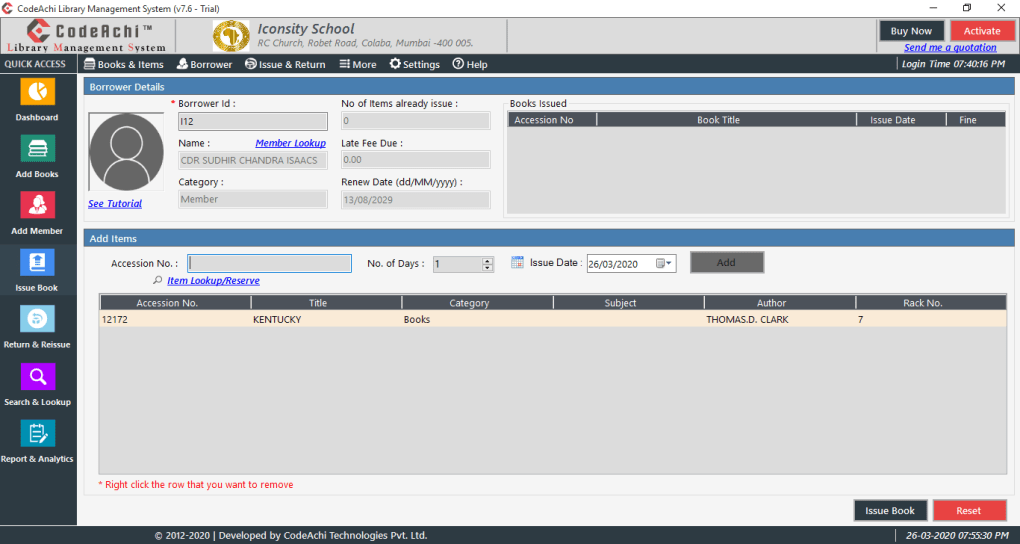
A Library Management System (LMS) is a software solution designed to manage books, digital resources, users, borrowing activities, cataloging, inventory tracking, and library operations efficiently. These systems are widely used in schools, colleges, universities, public libraries, research institutions, and private organizations.
📌 What is a Library Management System?
A Library Management System is a digital software platform that automates and organizes library-related operations.
Traditionally, libraries handled records manually using paper registers and physical indexing systems. Modern LMS platforms simplify these operations through computerized management systems.
The software is commonly used for:
- Book cataloging
- Borrowing management
- Member registration
- Inventory tracking
- Barcode management
- Fine calculation
- Digital library management
- Report generation
- User management
- Search functionality
One of the biggest strengths of a Library Management System is centralized organization.
Instead of manually tracking thousands of books and users, the system automates:
- Lending records
- Due dates
- Book availability
- Student/member information
- Library inventory
Library Management Systems are commonly used by:
- Schools
- Colleges
- Universities
- Public libraries
- Research centers
- Government institutions
- Private organizations
Depending on the type and scale, LMS platforms may support:
- Book catalog management
- ISBN management
- Barcode integration
- RFID support
- Member database management
- Borrow/return tracking
- Fine calculation
- Reservation systems
- E-book management
- Search systems
- Multi-branch support
- Cloud synchronization
- Reporting tools
- User permissions
- Attendance tracking
Some modern systems also support:
- Mobile applications
- Online public access catalogs (OPAC)
- Self-service kiosks
- QR code scanning
- Cloud backups
- Digital resource access
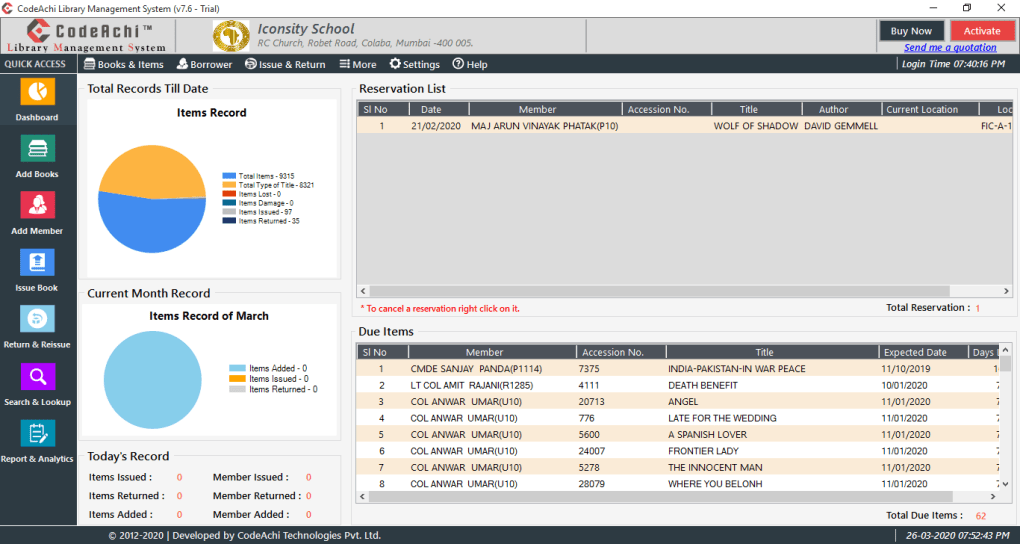
One major feature is circulation management.
The software tracks:
- Issued books
- Return dates
- Overdue items
- Fine calculations
- Book reservations
Another important feature is inventory control.
Libraries can monitor:
- Available books
- Lost books
- Damaged books
- Multiple copies
- Shelf organization
Search functionality is also critical.
Users may search books using:
- Title
- Author
- ISBN
- Category
- Publisher
- Keywords
Modern systems increasingly support digital libraries and e-learning environments.
Some platforms integrate with:
- PDF libraries
- Academic databases
- Student portals
- ERP systems
- Cloud storage services
The software may be available as:
- Desktop applications
- Web-based systems
- Cloud platforms
- Mobile applications
Popular Library Management solutions include:
- Koha
- Evergreen
- SLiMS
- Libsys
- NewGenLib
However, users should also understand several implementation challenges.
Large library systems may involve:
- Complex database migration
- Staff training
- Hardware integration
- Barcode/RFID setup
- Network infrastructure requirements
Security and backup systems are also important because libraries store:
- User records
- Borrowing history
- Inventory databases
- Institutional data
Poor system maintenance may lead to:
- Data loss
- Database corruption
- Unauthorized access
- Inventory inconsistencies
Overall, a Library Management System acts as a centralized digital platform designed to automate library operations, improve resource management, simplify cataloging, and enhance user access to educational materials.
💻 System Requirements (General)
Requirements vary depending on the software and scale.
Minimum Requirements
- Operating System:
Windows / Linux / macOS - Processor:
Dual-core processor - RAM:
Minimum 4GB RAM - Storage:
10GB+ available storage recommended - Database Support:
MySQL / PostgreSQL / SQL Server (depending on software) - Internet:
Required for cloud-based systems
Recommended Requirements
- Processor:
Intel Core i5 / Ryzen 5 or higher - RAM:
8GB–16GB RAM - Storage:
SSD recommended for faster database performance - Additional Hardware:
- Barcode scanners
- RFID readers
- Receipt printers
- Backup storage systems
🔄 Alternatives
Popular Library Management Systems include:
- Koha
- Evergreen
- SLiMS
- Libsys
- NewGenLib
❓ FAQ
Q1. What is a Library Management System mainly used for?
It is mainly used for automating library operations and managing books, users, and borrowing activities.
Q2. Can LMS software manage digital books?
Yes, many modern systems support e-books and digital resources.
Q3. What is barcode integration used for?
It helps quickly issue, return, and track books.
Q4. Is RFID supported in modern library systems?
Yes, many advanced systems support RFID technology.
Q5. Can cloud-based library systems work remotely?
Yes, cloud systems allow remote access through the internet.
Q6. Are Library Management Systems suitable for schools?
Yes, schools and colleges commonly use LMS software.
Q7. Why are backups important in library software?
Backups help prevent data loss and database corruption.
🔄 Best Alternatives
Features
- ✔️ Book catalog management
- ✔️ Member registration system
- ✔️ Borrow and return tracking
- ✔️ Fine calculation automation
- ✔️ Barcode integration
- ✔️ RFID compatibility
- ✔️ Inventory management
- ✔️ Search functionality
- ✔️ Report generation
- ✔️ Multi-user support
- ✔️ E-book management
- ✔️ Reservation system
- ✔️ Cloud synchronization
- ✔️ Role-based access control
- ✔️ Digital library integration
👍 Pros & 👎 Cons
Pros
- Automates library operations
- Reduces manual paperwork
- Improves inventory tracking
- Faster book search and circulation
- Simplifies student/member management
- Helps reduce lost records
- Supports digital learning systems
- Generates useful reports and analytics
Cons
- Initial setup may be complex
- Staff training may be required
- Hardware integration can increase costs
- Large databases require maintenance
- Security and backup systems are essential
- Smaller libraries may not need advanced features
- Internet dependency for cloud systems
- Migration from manual systems can be time-consuming
Expert Review
In my opinion, Library Management Systems became essential because modern libraries handle huge amounts of books, digital resources, and member records that are difficult to manage manually.
One of the biggest strengths is operational efficiency. Tasks that once required paper registers and manual searching can now be completed instantly through automated systems.
Search functionality alone dramatically improves user experience because students and readers can quickly locate books by title, author, category, or ISBN.
Inventory management is another major advantage. Libraries can monitor book availability, overdue items, and damaged inventory much more accurately.
Modern systems also support digital transformation through:
- E-books
- Online catalogs
- Remote access
- Cloud synchronization
However, successful implementation requires proper planning. Large institutions especially need reliable database management, staff training, backup systems, and security controls.
Smaller libraries may not require highly advanced enterprise systems, while universities and research institutions often need scalable multi-user solutions.
For educational institutions and modern libraries, a good Library Management System can significantly improve organization, accessibility, and operational efficiency.
How to Install
⚙️ Installation Guide (General Overview)
Step 1: Choose the LMS Software
Select a suitable library management platform based on your institution’s needs.
Step 2: Install the Application
Install the software on a local server or cloud environment.
Step 3: Configure the Database
Set up:
- Book databases
- Member records
- Categories
- User permissions
Step 4: Add Library Inventory
Import or manually add books and digital resources.
Step 5: Configure Barcode or RFID Systems
Set up scanning hardware if required.
Step 6: Create User Accounts
Add:
- Students
- Teachers
- Staff
- Administrators
Step 7: Configure Borrowing Rules
Set:
- Loan duration
- Fine structures
- Reservation limits
Step 8: Test the System
Verify circulation, search, and reporting functions.
Step 9: Train Staff
Provide training for librarians and administrators.
Step 10: Maintain Backups
Implement regular database and inventory backups.
Apps Specs
Licence
Trial
Latest Update
June 24, 2026
Platform
Windows
Downloads
1
Devlopers
Top Downloads


Related Topics
Disclaimer
This content is provided for educational and informational purposes only. We do not host, store, or distribute any software files on our servers. All trademarks, product names, and logos belong to their respective owners.
We strongly recommend downloading software only from official websites or trusted sources. We are not responsible for any damage, data loss, or issues that may occur from the use of third-party software.
Users should ensure they comply with all applicable laws and software licensing agreements in their country before downloading or using any software mentioned on this website.
You may also like






Alternatives to
Expore Apps