
- Utilities & Tools
- Keyboards
- MapKeyboard

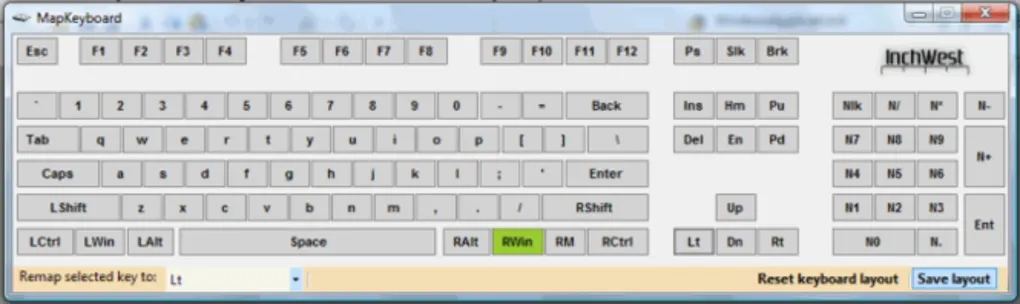
MapKeyboard is designed to provide an easy way for users to customize their keyboard functionality by changing how individual keys behave. Instead of relying on default keyboard layouts, users can assign new actions to existing keys according to their workflow or personal preference.
The software is especially useful in situations where:
- Certain keyboard keys stop working
- Users want faster access to shortcuts
- Gaming controls need customization
- Accessibility adjustments are required
- Specific keyboard layouts feel uncomfortable
Unlike advanced scripting tools, MapKeyboard focuses on simplicity and ease of use. Most remapping tasks can be completed through a graphical interface without coding.
Common remapping examples include:
- Changing Caps Lock into Ctrl
- Swapping Alt and Windows keys
- Disabling accidental key presses
- Assigning unused keys to frequently used functions
The software typically modifies Windows registry keyboard mappings, which means changes remain active after restarting the computer.
📌 What is MapKeyboard?
MapKeyboard is a lightweight Windows utility designed to remap or reassign keyboard keys to different functions. It allows users to change how specific keys behave without needing advanced programming knowledge or expensive hardware customization tools.
The software is mainly used to customize keyboard layouts, replace damaged keys, improve workflow efficiency, and create personalized keyboard controls for productivity or accessibility purposes.
🚀 Key Uses
- Remapping keyboard keys to different functions
- Replacing broken or non-working keyboard keys
- Customizing keyboard layouts for productivity
- Creating personalized shortcut workflows
- Swapping key positions (e.g., Ctrl and Caps Lock)
- Accessibility support for easier typing
- Gaming keyboard customization
- Adapting keyboards for different language layouts
💻 System Requirements (General)
Minimum Requirements
- Windows XP / Vista / 7 / 8 / 10 / 11
- 512MB–1GB RAM
- Basic processor
- Standard keyboard support
Recommended Requirements
- 2GB+ RAM
- Updated Windows system
- External keyboard compatibility support
- Administrator privileges for system-level changes
🔄 Alternatives
- SharpKeys
- Microsoft PowerToys Keyboard Manager
- KeyTweak
- AutoHotkey
- Karabiner-Elements (Mac alternative)
- Keyboard Layout Creator
❓ FAQ
Q1. What is MapKeyboard used for?
It is used to remap keyboard keys and customize keyboard behavior on Windows systems.
Q2. Can it disable specific keys?
Yes, users can disable unwanted keys such as Caps Lock.
Q3. Does it permanently change the keyboard?
It changes Windows keyboard mappings, but settings can usually be reverted.
Q4. Is it useful for broken keyboards?
Yes, many users remap damaged keys to unused ones.
Q5. Does it require internet access?
No, it works completely offline after installation.
Features
✔ Keyboard key remapping support
✔ Disable unwanted keys
✔ Simple graphical interface
✔ Lightweight system utility
✔ Fast key reassignment process
✔ Supports custom keyboard layouts
✔ No advanced coding required
✔ Persistent remapping after restart
✔ Useful accessibility customization
✔ Compatible with most Windows keyboards
✔ Low system resource usage
✔ Easy restoration of default mappings
👍 Pros & 👎 Cons
Pros
- Very lightweight and simple
- Easy key customization
- Useful for broken keyboards
- No programming knowledge needed
- Fast setup and configuration
- Helpful productivity enhancement tool
Cons
- Limited advanced automation features
- Requires restart/log out for some changes
- Mainly focused on Windows systems
- No complex macro support
Our Analysis
MapKeyboard is a very practical tool for users who want quick and simple keyboard customization without dealing with complex scripting systems.
Its biggest strengths are:
- Extremely lightweight design
- Beginner-friendly interface
- Fast keyboard remapping
- Useful accessibility support
The software becomes especially valuable when dealing with damaged keyboards or when users want a more efficient typing workflow.
Although it lacks advanced macro automation features found in professional keyboard scripting tools, it performs exceptionally well for simple remapping tasks and everyday keyboard customization.
Overall, it is a clean, reliable, and efficient keyboard remapping solution for Windows users who need simple customization and better workflow control.
⚙️ Installation Guide (General Overview)
Step 1: Download Software
Download MapKeyboard from a trusted source or official provider.
Step 2: Run Installer
Open the setup file and complete the installation process by following on-screen instructions.
Step 3: Launch Application
Open the software from desktop shortcut or start menu after installation is complete.
Step 4: Select Key to Remap
Inside the keyboard layout interface, click the key you want to modify or disable.
Step 5: Assign New Function
Choose the new key behavior or replacement key from the available list.
Step 6: Save Keyboard Layout
Apply the new mapping configuration and save changes.
Step 7: Restart or Log Out
Some key mapping changes may require restarting Windows or logging out for proper activation.
Step 8: Test New Key Behavior
After restart, verify that the remapped keys are functioning correctly inside normal applications.
About SoftwareDownloading Editorial Team
The SoftwareDownloading Editorial Team researches Windows software, compatibility information, features, alternatives, and software-related guides for SoftwareDownloading.in.
Our pages are prepared using available product information and relevant documentation. When an application has not been personally tested, we distinguish research-based analysis from hands-on testing. Learn more about our review process
Apps Specs
Developer
Inchwest
Licence
Free
Version
2.2
Platform
Windows
Download Clicks
7
Page Reviewed
September 26, 2026
Top Downloads





Related Topics
Disclaimer
This content is provided for educational and informational purposes only. We do not host, store, or distribute any software files on our servers. All trademarks, product names, and logos belong to their respective owners.
We strongly recommend downloading software only from official websites or trusted sources. We are not responsible for any damage, data loss, or issues that may occur from the use of third-party software.
Users should ensure they comply with all applicable laws and software licensing agreements in their country before downloading or using any software mentioned on this website.



This Post Has One Comment
Pingback: How to Remap Keyboard Keys on Windows 11: Practical Guide