- Development & IT
- Servers
- Jenkins

Jenkins is a powerful open-source automation server used for continuous integration (CI), continuous delivery (CD), software testing, deployment automation, and DevOps workflow management across software development environments.
📌 What is Jenkins?
Jenkins is one of the most popular open-source automation tools used in modern software development and DevOps environments. It helps developers automate repetitive development tasks such as code building, testing, deployment, packaging, and integration workflows.
In traditional software development, developers manually compile code, run tests, deploy applications, and monitor build processes. These manual operations can become slow, repetitive, and error-prone as projects grow larger. Jenkins solves this problem by automating the entire software delivery pipeline.
Jenkins is widely used for:
- Continuous Integration (CI)
- Continuous Delivery (CD)
- Automated software testing
- Application deployment automation
- Build management
- DevOps workflow orchestration
- Infrastructure automation
- Monitoring software pipelines
One of the biggest strengths of Jenkins is flexibility. The software supports thousands of plugins that extend functionality for programming languages, cloud services, testing frameworks, containers, source control systems, and deployment tools.
Jenkins integrates with many development technologies including:
- Git
- Docker
- Kubernetes
- Maven
- Gradle
- GitHub
- GitLab
The software works by creating automated workflows called pipelines. These pipelines define step-by-step actions such as:
- Pull source code from repositories
- Compile applications
- Run automated tests
- Generate reports
- Deploy applications to servers or cloud platforms
- Notify developers about build results
Jenkins supports distributed builds, allowing tasks to run across multiple machines for better performance and scalability.
Another major advantage is plugin support. Thousands of plugins allow Jenkins to integrate with:
- Cloud platforms
- Security systems
- Container technologies
- Monitoring tools
- Notification services
- CI/CD workflows
- Infrastructure management tools
The software is commonly used by:
- DevOps engineers
- Software developers
- QA teams
- Enterprise IT departments
- Cloud infrastructure teams
- Continuous deployment environments
Jenkins can run on Windows, Linux, macOS, Docker containers, and cloud environments.
Overall, Jenkins acts as a centralized automation platform for modern software development and deployment workflows.
💻 System Requirements (Detailed)
To run Jenkins smoothly, the following system requirements are recommended:
Minimum Requirements
- Operating System:
Windows / Linux / macOS - Processor:
Intel or AMD Dual-Core processor - RAM:
Minimum 2GB RAM - Storage Space:
At least 1GB free disk space - Java Requirement:
Java Development Kit (JDK) required - Network:
Internet or local network connection for repositories and integrations
Recommended Requirements
- Processor:
Intel Core i5 / Ryzen 5 or higher - RAM:
4GB–8GB RAM or more for larger pipelines - Storage:
SSD recommended for faster builds and caching - Additional Tools:
Frequently used with:- Docker
- Visual Studio Code
- Git
- Cloud Platforms:
Compatible with AWS, Azure, Google Cloud, and Kubernetes environments
Best Suitable For
Jenkins is ideal for:
- DevOps engineers
- Software developers
- Enterprise CI/CD environments
- Automated testing workflows
- Cloud deployment systems
- Agile development teams
- Infrastructure automation
- Continuous delivery pipelines
🔄 Alternatives
If you want similar CI/CD and automation platforms, you can try:
- GitLab CI/CD
- TeamCity
- Bamboo
- CircleCI
- Travis CI
❓ FAQ
Q1. What is Jenkins mainly used for?
It is used for automating software builds, testing, and deployment workflows.
Q2. Is Jenkins free?
Yes, Jenkins is open-source and free to use.
Q3. Does Jenkins support Docker and Kubernetes?
Yes, integration with Docker and Kubernetes is supported.
Q4. Can Jenkins automate testing?
Yes, automated software testing is one of its main functions.
Q5. Is programming knowledge required?
Basic scripting and DevOps knowledge are helpful for advanced pipelines.
Q6. Does Jenkins work on Windows and Linux?
Yes, it supports multiple operating systems.
Q7. Why is Jenkins popular in DevOps?
Because it provides flexible automation and strong CI/CD workflow support.
Features
- ✔️ Continuous Integration (CI) support
- ✔️ Continuous Delivery (CD) automation
- ✔️ Pipeline-based workflow management
- ✔️ Thousands of plugin integrations
- ✔️ Automated software testing
- ✔️ Build and deployment automation
- ✔️ Distributed build support
- ✔️ Integration with Git and GitHub
- ✔️ Docker and Kubernetes compatibility
- ✔️ Real-time build monitoring
- ✔️ Notification and reporting systems
- ✔️ Multi-platform support
- ✔️ Open-source and highly customizable
- ✔️ Scalable enterprise automation
- ✔️ DevOps workflow integration
👍 Pros & 👎 Cons
Pros
- Extremely powerful automation capabilities
- Large plugin ecosystem
- Excellent CI/CD pipeline support
- Open-source and widely adopted
- Strong DevOps integration features
- Works with many programming languages and tools
- Highly customizable workflows
- Large community support and documentation
Cons
- Initial setup can feel complex for beginners
- Plugin management may require maintenance
- Large installations may consume significant resources
- UI feels outdated compared to some modern alternatives
- Advanced pipelines require scripting knowledge
Our Analysis
In my opinion, Jenkins remains one of the most powerful and flexible automation servers available for software development and DevOps workflows. The biggest advantage is its enormous plugin ecosystem and ability to integrate with almost every major development tool and cloud platform.
Jenkins is especially valuable for teams that need full control over CI/CD pipelines, automated testing, deployment workflows, and infrastructure automation. Its scalability makes it suitable for both small development projects and large enterprise environments.
Although beginners may initially find Jenkins slightly complex because of plugin management and pipeline configuration, the long-term benefits are excellent for professional software development workflows.
The software’s flexibility, community support, and integration capabilities continue to make it one of the most trusted automation platforms in the DevOps industry.
If you need a powerful, customizable, and enterprise-ready automation solution for continuous integration and deployment, Jenkins is definitely one of the best choices available.
⚙️ Installation Guide (Step-by-Step)
Follow these steps to install Jenkins:
Step 1: Install Java
Download and install Java JDK because Jenkins requires Java to run.
Step 2: Download Jenkins
Download the latest Jenkins installer from the official website.
Step 3: Run the Installer
Open the setup file and allow administrator permissions if requested.
Step 4: Choose Installation Settings
Select:
- Installation directory
- Service options
- Port configuration
Step 5: Complete Installation
Finish the installation process and launch Jenkins.
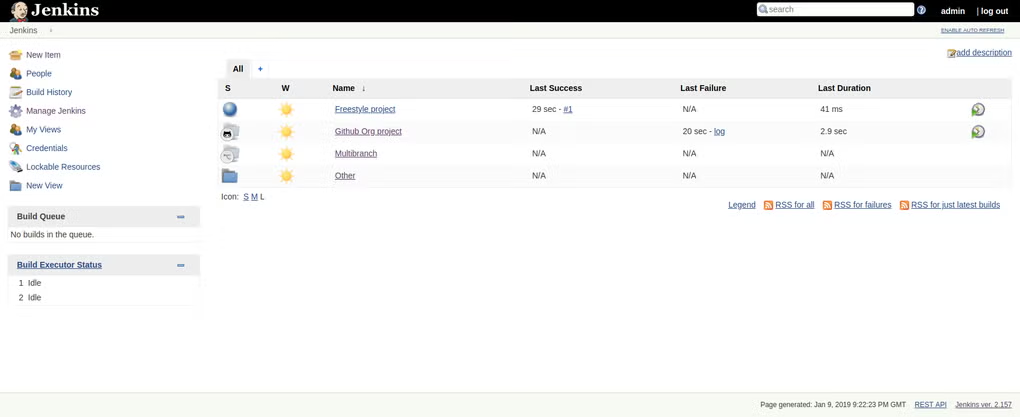
Step 6: Access Jenkins Dashboard
Open your browser and visit:
http://localhost:8080to access the Jenkins control panel.
Step 7: Unlock Jenkins
Use the administrator password generated during installation.
Step 8: Install Recommended Plugins
Allow Jenkins to install suggested plugins for CI/CD functionality.
Step 9: Create Administrator Account
Configure admin username and password.
Step 10: Create Your First Pipeline
Connect Git repositories and configure automated build workflows.
About SoftwareDownloading Editorial Team
The SoftwareDownloading Editorial Team researches Windows software, compatibility information, features, alternatives, and software-related guides for SoftwareDownloading.in.
Our pages are prepared using available product information and relevant documentation. When an application has not been personally tested, we distinguish research-based analysis from hands-on testing. Learn more about our review process
Apps Specs
Developer
Licence
Free
Version
V 2.176.2
Platform
Windows
Download Clicks
1
Page Reviewed
September 26, 2026
Top Downloads




Related Topics
Disclaimer
This content is provided for educational and informational purposes only. We do not host, store, or distribute any software files on our servers. All trademarks, product names, and logos belong to their respective owners.
We strongly recommend downloading software only from official websites or trusted sources. We are not responsible for any damage, data loss, or issues that may occur from the use of third-party software.
Users should ensure they comply with all applicable laws and software licensing agreements in their country before downloading or using any software mentioned on this website.