- Development & IT
- Servers
- ProVide

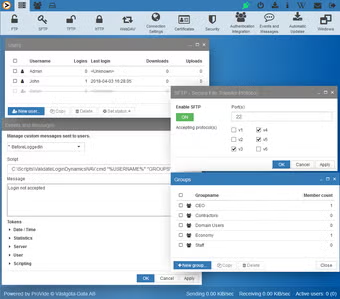
ProVide is a secure managed file transfer and communication server solution designed for businesses and organizations that require encrypted data exchange, automation, secure FTP services, and enterprise-level file transfer management.
📌 What is ProVide?
ProVide is a professional managed file transfer (MFT) and secure communication platform developed for organizations that need reliable, automated, and encrypted methods for transferring sensitive data between systems, users, partners, and servers.
Modern businesses regularly exchange important files such as financial documents, customer records, backups, reports, contracts, databases, and enterprise application data. Standard file transfer methods are often insufficient for handling these tasks securely and efficiently. ProVide addresses these challenges by providing centralized file transfer management with strong security controls and automation features.
The software is commonly used by:
- Enterprises and corporations
- Financial institutions
- Healthcare organizations
- Government departments
- IT infrastructure teams
- Managed service providers
- Data exchange environments
One of the biggest strengths of ProVide is security. The software focuses heavily on encrypted communication protocols and controlled data movement to help organizations protect sensitive information.
Depending on the version and deployment environment, ProVide may support:
- FTP and secure FTP services
- SFTP and SCP support
- HTTPS file transfers
- Automated transfer scheduling
- Secure partner communication
- Encryption and authentication systems
- Logging and auditing tools
- User permission management
- File synchronization
- Workflow automation
- Centralized transfer monitoring
The software is designed to help businesses automate repetitive file transfer operations while reducing manual administrative work.
ProVide may also include advanced features such as:
- Event-triggered transfers
- Real-time monitoring dashboards
- Backup and recovery workflows
- Compliance-oriented logging
- Multi-user access control
- Integration with enterprise applications
- High-volume data transfer handling
Another major advantage is reliability. Enterprise environments often require guaranteed delivery, transfer verification, and detailed activity reporting. ProVide helps administrators monitor transfer success, failures, and security events from centralized management tools.
The software can be deployed on business servers and integrated into larger IT infrastructures for secure data exchange operations.
Overall, ProVide acts as a professional enterprise file transfer and secure communication solution for organizations requiring reliable and automated data management.
💻 System Requirements (Detailed)
To run ProVide smoothly, the following system requirements are recommended:
Minimum Requirements
- Operating System:
Windows Server editions / Windows 10 / Windows 11 - Processor:
Intel or AMD Dual-Core processor - RAM:
Minimum 4GB RAM - Storage Space:
At least 5GB free disk space - Network:
Stable business internet or local network connection - Security:
Firewall and SSL certificate configuration recommended
Recommended Requirements
- Processor:
Intel Xeon / Ryzen 7 / Server-grade processor - RAM:
8GB–16GB RAM or more depending on transfer volume - Storage:
SSD recommended for logging, automation, and transfer performance - Network:
High-speed broadband or enterprise network infrastructure - Additional Tools:
Helpful utilities include:- WinSCP
- FileZilla
Best Suitable For
ProVide is ideal for:
- Enterprise file transfer management
- Secure business communications
- Automated backup workflows
- Compliance-oriented industries
- Financial data exchange
- Managed service providers
- Secure server environments
- Large-scale IT infrastructure operations
🔄 Alternatives
If you want similar managed file transfer and secure communication software, you can try:
- Serv-U Managed File Transfer Server
- MOVEit Transfer
- Cerberus FTP Server
- FileZilla Server
- Globalscape EFT
❓ FAQ
Q1. What is ProVide mainly used for?
It is used for secure enterprise file transfer and communication management.
Q2. Does ProVide support encrypted transfers?
Yes, secure encrypted transfer protocols are supported.
Q3. Can ProVide automate file transfers?
Yes, scheduling and workflow automation features are available.
Q4. Is ProVide suitable for businesses?
Yes, it is designed mainly for enterprise and organizational environments.
Q5. Does ProVide support FTP and SFTP?
Yes, multiple transfer protocols are supported.
Q6. Is technical knowledge required?
Yes, server and networking knowledge is recommended for advanced deployments.
Q7. Can ProVide handle large data transfers?
Yes, it is designed for enterprise-level data exchange operations.
Features
- ✔️ Secure managed file transfer functionality
- ✔️ FTP, SFTP, SCP, and HTTPS support
- ✔️ Automated transfer scheduling
- ✔️ Encrypted communication channels
- ✔️ User authentication and permissions
- ✔️ Workflow automation tools
- ✔️ Real-time transfer monitoring
- ✔️ Logging and auditing systems
- ✔️ Enterprise data exchange support
- ✔️ Backup and synchronization capabilities
- ✔️ Multi-user server management
- ✔️ Compliance-focused security features
- ✔️ Centralized administration interface
- ✔️ High-volume file transfer support
- ✔️ Reliable business communication infrastructure
👍 Pros & 👎 Cons
Pros
- Strong security and encryption support
- Reliable automated file transfers
- Good enterprise workflow management
- Centralized monitoring and logging tools
- Supports multiple secure transfer protocols
- Useful for compliance-focused environments
- Reduces manual transfer management work
- Suitable for large-scale business operations
Cons
- Advanced configuration may require technical expertise
- Enterprise deployments may require stronger hardware
- Licensing costs can be high for large organizations
- Smaller businesses may not need all advanced features
- Initial setup and integration can be time-consuming
Our Analysis
In my opinion, ProVide is a strong and professional managed file transfer solution for organizations that require secure, automated, and reliable data exchange systems. The software focuses heavily on security, centralized management, and workflow automation, which makes it especially useful in enterprise environments.
One of the biggest advantages is its support for multiple secure transfer protocols combined with detailed monitoring and auditing tools. Businesses handling sensitive data can benefit greatly from the encryption, automation, and compliance-oriented features.
The software is particularly valuable for companies that regularly exchange large amounts of files between departments, customers, servers, or external partners. Automated scheduling and centralized monitoring also help reduce manual administrative work.
Although beginners may find advanced configuration somewhat technical, ProVide offers excellent functionality for professional environments where security and reliability are critical.
If you need a secure enterprise-grade managed file transfer platform with automation and centralized control features, ProVide is definitely worth considering.
⚙️ Installation Guide (Step-by-Step)
Follow these steps to install ProVide:
Step 1: Download ProVide
Download the latest version from a trusted source.
Step 2: Run the Installer
Open the setup file and allow administrator permissions if requested.
Step 3: Accept License Agreement
Read and agree to the installation terms.
Step 4: Choose Installation Directory
Select the folder where ProVide should be installed.
Step 5: Configure Server Settings
Set up:
- Server ports
- Storage directories
- User accounts
- Authentication methods
Step 6: Configure Security Options
Enable:
- SSL/TLS encryption
- Firewall rules
- Secure transfer protocols
- Access permissions
Step 7: Create Transfer Workflows
Configure automated transfer tasks and schedules.
Step 8: Start ProVide Services
Launch file transfer and communication services.
Step 9: Test File Transfers
Verify secure upload and download functionality.
Step 10: Monitor Activity Logs
Use reporting and monitoring tools to track transfers and security events.
About SoftwareDownloading Editorial Team
The SoftwareDownloading Editorial Team researches Windows software, compatibility information, features, alternatives, and software-related guides for SoftwareDownloading.in.
Our pages are prepared using available product information and relevant documentation. When an application has not been personally tested, we distinguish research-based analysis from hands-on testing. Learn more about our review process
Apps Specs
Developer
Licence
Free
Version
V 14.5.11.23
Platform
Windows
Download Clicks
2
Page Reviewed
June 24, 2026
Top Downloads




Related Topics
Disclaimer
This content is provided for educational and informational purposes only. We do not host, store, or distribute any software files on our servers. All trademarks, product names, and logos belong to their respective owners.
We strongly recommend downloading software only from official websites or trusted sources. We are not responsible for any damage, data loss, or issues that may occur from the use of third-party software.
Users should ensure they comply with all applicable laws and software licensing agreements in their country before downloading or using any software mentioned on this website.