- Utilities & Tools
- Screen Capture
- Soft4Boost Screen Recorder
Soft4Boost Screen Recorder is a desktop screen recording application designed for capturing on-screen activities, tutorials, gameplay, video calls, and presentations on Windows systems.
The software helps users record:
- Desktop activity
- Application windows
- Gameplay sessions
- Video tutorials
- Webcam sessions
- Audio from microphone and system sound
It is commonly used by:
- Students
- Teachers
- Gamers
- YouTubers
- Technical support users
- Office professionals
because of its simple recording workflow and beginner-friendly interface.
📌 What is Soft4Boost Screen Recorder?
Soft4Boost Screen Recorder is a Windows screen recording utility designed to help users capture everything happening on their computer screens and save it as video files.
The software is commonly used for:
- Recording tutorials
- Capturing gameplay
- Saving video calls
- Demonstrating software
- Recording presentations
- Creating educational content
Depending on the version, users may record:
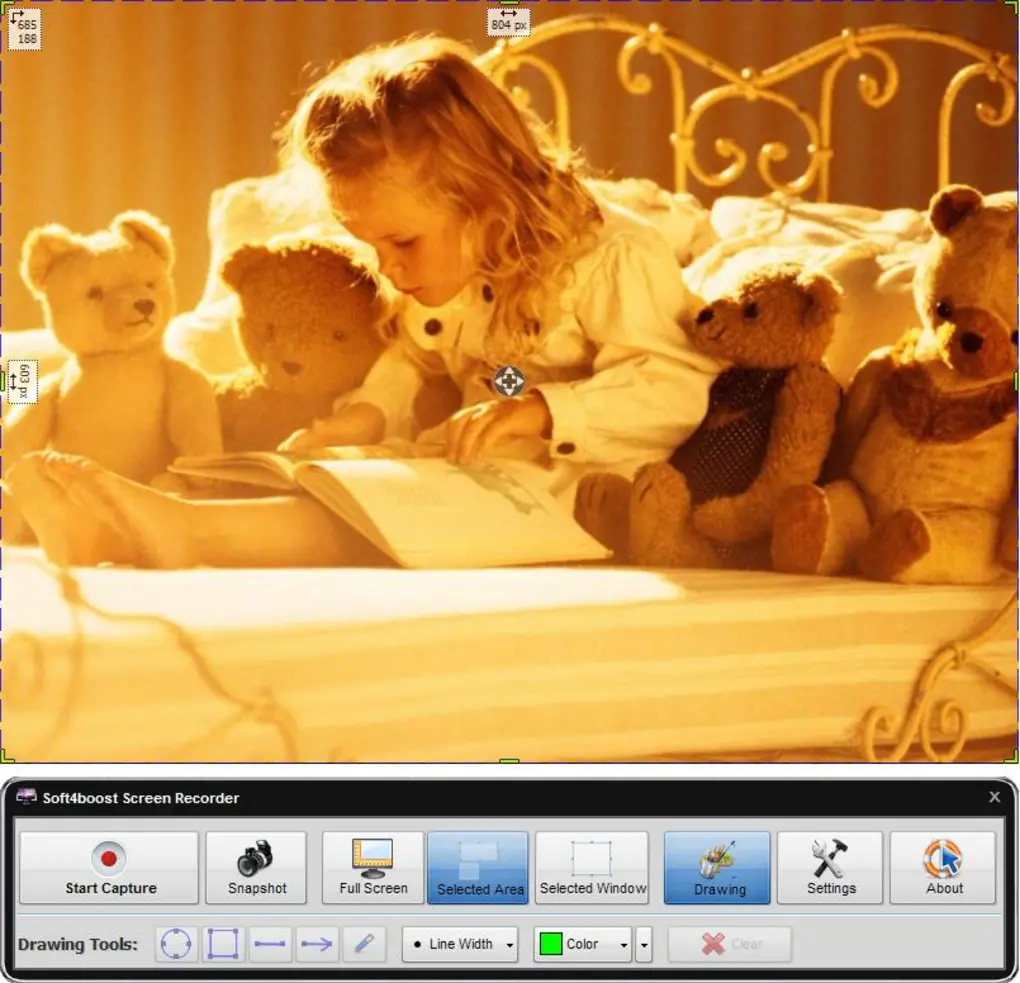
- Full screen
- Selected screen area
- Specific windows
- Webcam overlays
- Audio input/output
The application focuses on lightweight and accessible screen recording workflows.
🚀 Key Uses
🎮 Gameplay Recording
Used for recording gaming sessions and gameplay demonstrations.
🧑🏫 Tutorial Creation
Helps users create educational videos and software guides.
💼 Presentation Recording
Useful for capturing office presentations and demonstrations.
📹 Video Call Capture
Can record online meetings and webcam conversations.
🖥️ Desktop Activity Recording
Captures desktop operations for troubleshooting or training purposes.
- space
💻 System Requirements (General)
Minimum Requirements
- Operating System: Windows XP / Vista / 7 / 8 / 10 / 11
- RAM: 2GB minimum
- Storage: Free disk space for recordings
- Processor: Intel or AMD compatible CPU
Recommended Requirements
- RAM: 4GB or more
- Storage: SSD recommended for smoother recording
- GPU: Dedicated graphics recommended for gameplay recording
- Audio Devices: Microphone and speakers/headset
Supported Windows compatibility information appears in multiple software listings.
🔄 Alternatives
- OBS Studio
- Bandicam
- Action!
- Camtasia
- ShareX
- iTop Screen Recorder
Community discussions often recommend OBS Studio and ShareX as popular alternatives for users seeking free or open-source recording solutions.
❓ FAQ
Q1. What is Soft4Boost Screen Recorder mainly used for?
It is mainly used for screen recording, gameplay capture, tutorial creation, and desktop video recording.
Q2. Can it record audio?
Yes, microphone and system audio recording are commonly supported.
Q3. Does it support gameplay recording?
Yes, the software can record gaming sessions and DirectX applications.
Q4. Can it capture only a selected screen area?
Yes, users can record custom regions or specific windows.
Q5. Is it beginner-friendly?
Yes, the software is commonly described as simple and easy to use.
Q6. Is it free?
Trial or shareware versions are commonly available, though some versions may apply watermarks or feature limitations.
🔄 Best Alternatives
Features
✔️ Full-screen recording support
✔️ Selected area screen capture
✔️ Application window recording
✔️ Gameplay recording support
✔️ Webcam recording integration
✔️ Microphone audio capture
✔️ System sound recording
✔️ Screenshot capture functionality
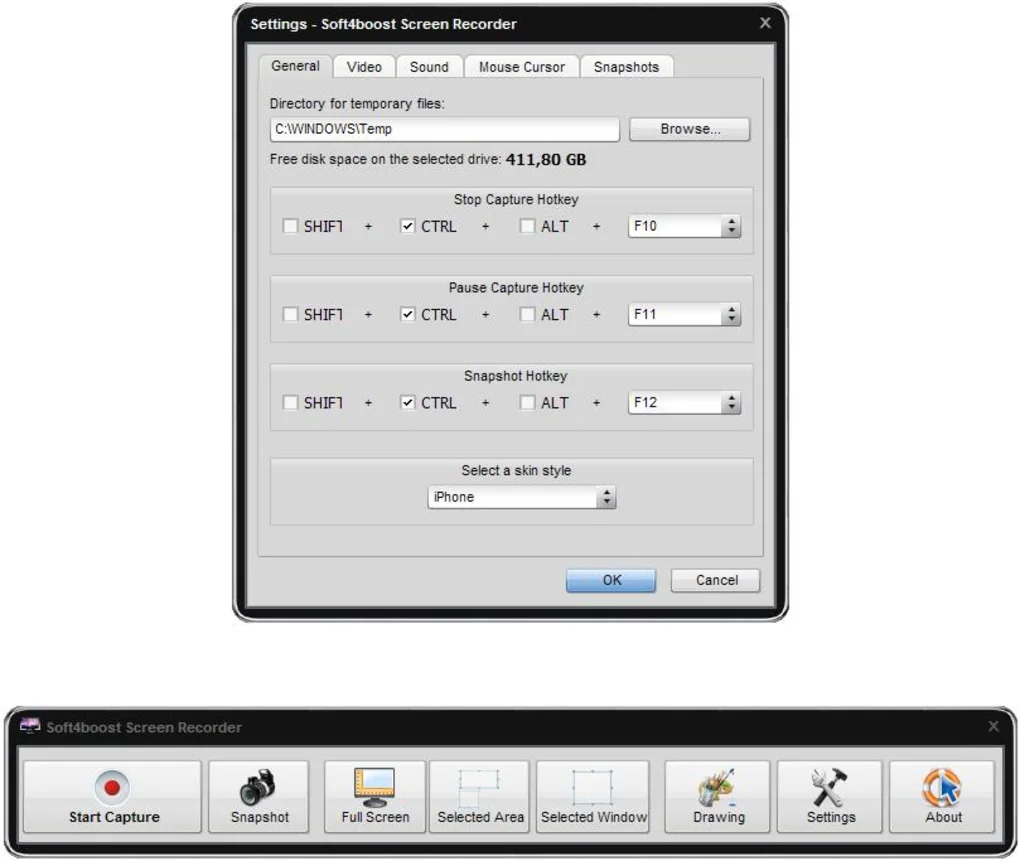
✔️ Hotkey support
✔️ Multiple output video formats
✔️ HD recording workflows
✔️ Beginner-friendly interface
✔️ Lightweight desktop utility
✔️ Basic annotation and highlighting tools
👍 Pros & 👎 Cons
Pros
- Simple and easy-to-use interface
- Supports screen and audio recording
- Useful for tutorials and gameplay capture
- Lightweight compared to some advanced recording suites
- Multiple screen capture modes available
- Hotkey support improves usability
Cons
- Advanced editing features are limited
- Free versions may include watermarks
- High-resolution recording may impact performance
- Some users reported audio recording issues in certain versions
- Large recordings may consume significant storage space
Expert Review
Soft4Boost Screen Recorder is a practical screen recording utility for users who want a straightforward solution for desktop capture and tutorial creation.
Its biggest strengths are:
- Simple interface
- Lightweight design
- Multiple recording modes
- Easy audio capture setup
This makes it useful for:
- Students
- Beginner YouTubers
- Teachers
- Office users
- Casual gameplay recording
The software focuses more on ease of use than professional-grade production workflows.
However, users needing advanced editing, streaming integrations, or enterprise-level recording features may prefer more powerful tools like OBS Studio or Camtasia.
Overall, Soft4Boost Screen Recorder is a capable beginner-friendly recording solution for everyday screen capture and tutorial workflows.
How to Install
⚙️ Installation Guide (General Overview)
Step 1: Download Software
Obtain Soft4Boost Screen Recorder from a trusted source.
Step 2: Install Application
Run installer and complete setup.
Step 3: Launch Program
Open the recording dashboard.
Step 4: Select Recording Mode
Choose:
- Full screen
- Window recording
- Custom area recording
Step 5: Configure Audio
Enable:
- Microphone recording
- System audio
- Webcam (optional)
Step 6: Start Recording
Begin capturing screen activity.
Step 7: Save Video
Export recorded files in supported formats.
Apps Specs
Licence
Trial
Latest Update
June 24, 2026
Platform
Windows
Downloads
3
Devlopers
Releted Searches
Top Downloads





Related Topics
Disclaimer
This content is provided for educational and informational purposes only. We do not host, store, or distribute any software files on our servers. All trademarks, product names, and logos belong to their respective owners.
We strongly recommend downloading software only from official websites or trusted sources. We are not responsible for any damage, data loss, or issues that may occur from the use of third-party software.
Users should ensure they comply with all applicable laws and software licensing agreements in their country before downloading or using any software mentioned on this website.
You may also like






Alternatives to




Expore Apps