- Education & Reference
- Books
- OpenAudible

OpenAudible is a powerful audiobook management software that allows users to download, organize, convert, and back up audiobooks from Audible into accessible formats.
📌 What is OpenAudible?
OpenAudible is a desktop application designed to help users manage their Audible audiobook library more effectively. It provides tools to download audiobooks, convert them into common audio formats, and organize them for easy access.
Normally, audiobooks purchased from Audible are protected with DRM (Digital Rights Management), which limits how and where they can be played. OpenAudible allows users to create personal backups and convert audiobooks into formats like MP3 or M4B for more flexible usage.
The software is especially useful for users who want to listen to audiobooks on different devices that may not support Audible’s official app. It also helps in organizing large audiobook collections by adding metadata, cover images, and proper file structure.
OpenAudible is popular among audiobook enthusiasts, learners, and professionals who consume audiobooks regularly. It ensures that your purchased content remains accessible even if you switch devices or platforms.
Overall, it acts as a bridge between Audible’s ecosystem and general media players, giving users more control over their audiobook files.
💻 System Requirements (Detailed)
To run OpenAudible efficiently, the following system requirements are recommended:
Minimum Requirements
- Operating System: Windows 7 / Windows 8 / Windows 10 / Windows 11 / macOS / Linux
- Processor: Intel Dual-Core or equivalent
- RAM: Minimum 2GB RAM
- Storage Space: 500MB free space (more for audiobooks)
- Internet: Required for syncing Audible library
Recommended Requirements
- Processor: Intel Core i5 or higher
- RAM: 4GB–8GB or more
- Storage: Large storage space for audiobook collections
- Internet: Stable connection for downloading large files
Since audiobooks are large files, having sufficient storage is important.
🔄 Alternatives
If you want similar audiobook tools, you can try:
- Libation
- AAX Audio Converter
- AudibleSync
- Smart AudioBook Player
❓ FAQ
Q1. What is OpenAudible mainly used for?
It is used for downloading, converting, and managing Audible audiobooks.
Q2. Can it convert Audible books to MP3?
Yes, it supports conversion to MP3 and M4B formats.
Q3. Is OpenAudible free?
It offers a free version, but full features require a paid license.
Q4. Is it legal to use?
It depends on how you use it and your local laws. It is mainly intended for personal backup.
Q5. Do I need an Audible account?
Yes, you need an Audible account to access your purchased audiobooks.
Features
- ✔️ Download audiobooks from Audible library
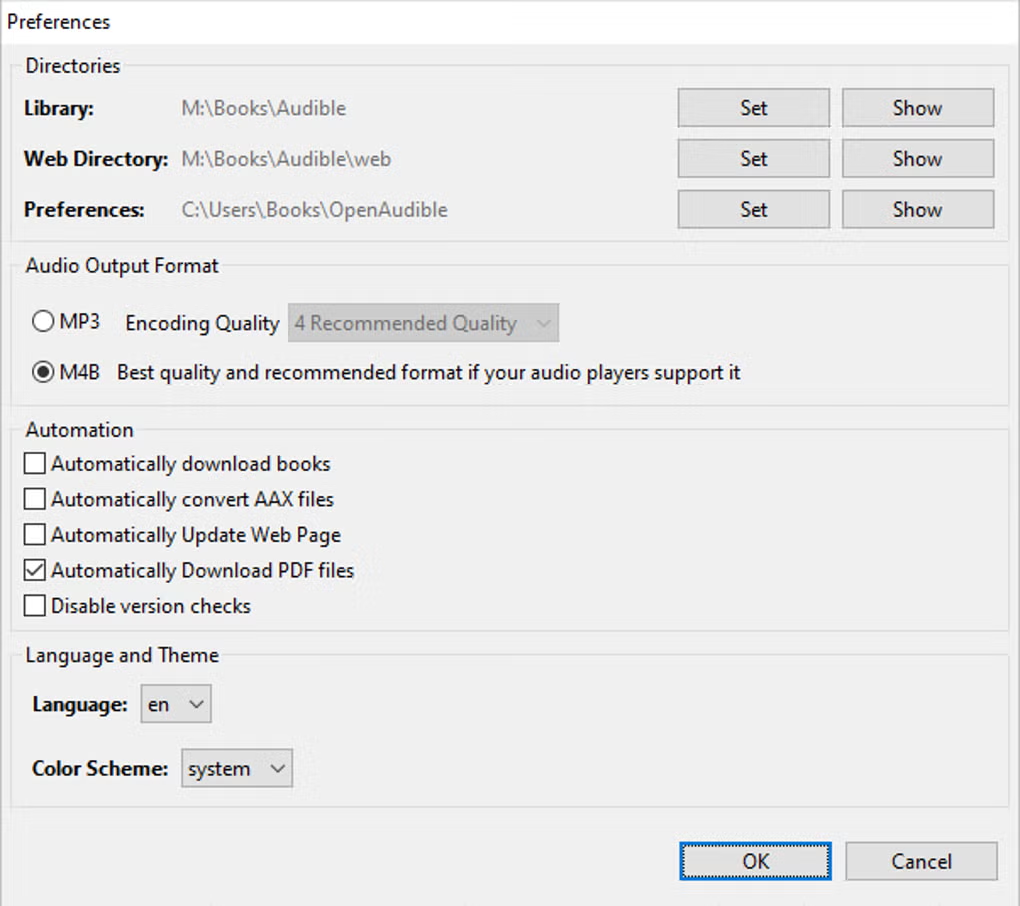
- ✔️ Convert audiobooks to MP3 and M4B formats
- ✔️ Backup and store audiobook collections
- ✔️ Organize files with metadata and cover art
- ✔️ Split audiobooks into chapters
- ✔️ Supports large audiobook libraries
- ✔️ Cross-platform compatibility
- ✔️ Easy-to-use interface
- ✔️ Offline listening support
- ✔️ Regular updates and improvements
👍 Pros & 👎 Cons
Pros
Pros:
- Gives full control over audiobook files
- Useful for backup and long-term storage
- Supports multiple audio formats
- Works across different devices
- Good for heavy audiobook users
Cons
Cons:
- Requires basic technical understanding
- Paid license for full features
- Conversion process can take time
- Depends on Audible account access
- Legal considerations vary by region
Our Analysis
In my opinion, OpenAudible is one of the best tools for users who want more flexibility with their audiobook collections. It removes many limitations of the Audible ecosystem and gives users control over their purchased content.
The ability to convert audiobooks into standard formats is extremely useful, especially for users who prefer different media players or devices. Its organization features also make it easier to manage large libraries.
However, users should be aware of legal considerations and use the software responsibly. Overall, for serious audiobook listeners, OpenAudible is a very powerful and valuable tool.
Follow these steps to install OpenAudible properly:
Step 1: Download the Software
Download the latest version of OpenAudible from a trusted and official source.
Step 2: Open the Installer
Run the setup file to begin installation.
Step 3: Accept License Agreement
Read and accept the terms and conditions.
Step 4: Choose Installation Folder
Select where you want to install the software.
Step 5: Complete Installation
Click Install and wait for the process to finish.
Step 6: Launch the Software
Open OpenAudible after installation.
Step 7: Connect Audible Account
Sign in to your Audible account to sync your library.
Step 8: Download and Convert Audiobooks
Select books and convert them into your preferred format.
About SoftwareDownloading Editorial Team
The SoftwareDownloading Editorial Team researches Windows software, compatibility information, features, alternatives, and software-related guides for SoftwareDownloading.in.
Our pages are prepared using available product information and relevant documentation. When an application has not been personally tested, we distinguish research-based analysis from hands-on testing. Learn more about our review process

Apps Specs
Developer
Licence
Free
Version
V 3.4.2
Platform
Windows
Download Clicks
1
Page Reviewed
September 26, 2026
Top Downloads





Related Topics
Disclaimer
This content is provided for educational and informational purposes only. We do not host, store, or distribute any software files on our servers. All trademarks, product names, and logos belong to their respective owners.
We strongly recommend downloading software only from official websites or trusted sources. We are not responsible for any damage, data loss, or issues that may occur from the use of third-party software.
Users should ensure they comply with all applicable laws and software licensing agreements in their country before downloading or using any software mentioned on this website.