
- Utilities & Tools
- Keyboards
- Mousetroke Download for Windows

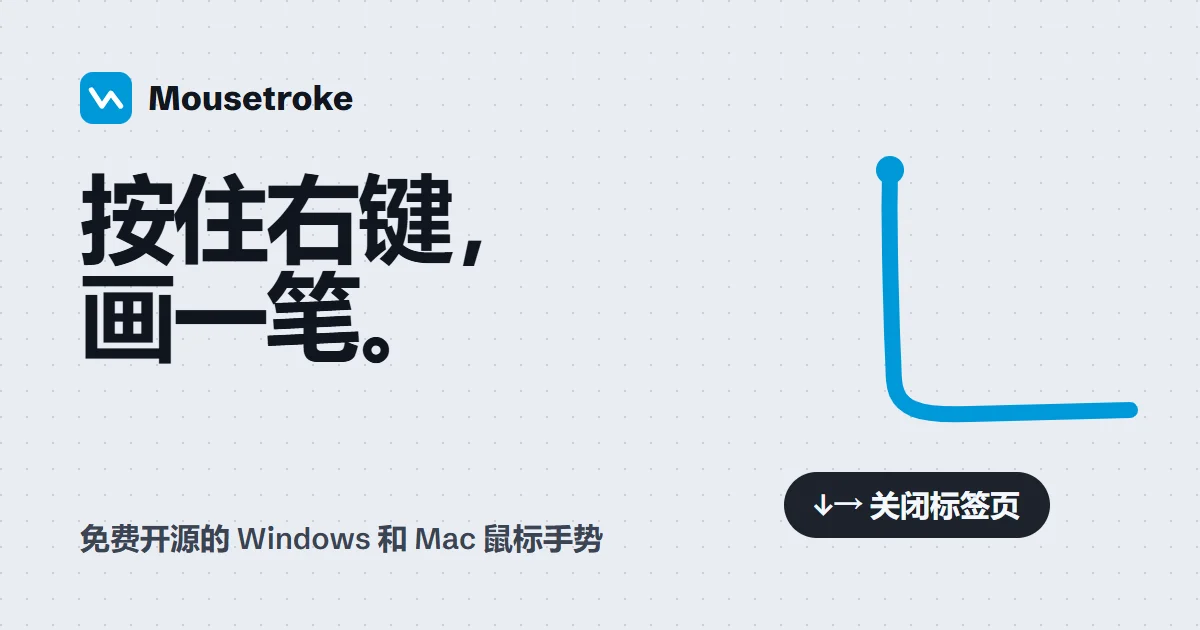
Mousetroke is a free, open-source mouse gesture utility for Windows 10 and Windows 11 that allows users to perform everyday actions by holding the right mouse button and drawing simple gestures. It supports approximately 50 built-in customizable gestures, hot corners, screen-edge actions, application-specific rules, and Lua scripting for advanced customization. Designed as a lightweight portable application using Rust and Tauri, Mousetroke helps users navigate browsers, manage windows, and execute shortcuts without repeatedly using keyboard combinations or menus. The software is distributed under the MIT License and is available through its official GitHub Releases page.
X-Mouse Button Control PortableMousetroke Download (0.2.1) – Free Mouse Gestures
Mousetroke System Requirements
Before downloading Mousetroke, make sure your computer meets the following system requirements.
| Operating System | Windows 10 (Version 1809 or later), Windows 11 |
|---|---|
| Architecture | 64-bit (x64) |
| Processor | 64-bit compatible processor |
| RAM | Minimum RAM not officially specified |
| Storage | Approximately 13 MB for the portable executable |
| Required Software | Microsoft Edge WebView2 for the settings interface |
| Installation | Portable EXE (no traditional installation required) |
| Internet Connection | Required for downloading the application |
Note: Mousetroke is designed for 64-bit Windows systems. The developer has not specified official minimum RAM or processor performance requirements.
Mousetroke is a free and open-source mouse gesture application designed to make everyday Windows navigation faster and more convenient. Instead of relying entirely on keyboard shortcuts, toolbar buttons, or application menus, users can perform common actions by holding the right mouse button and drawing a gesture.
Developed by eiaao, Mousetroke provides customizable mouse gestures, hot corners, screen-edge actions, application-specific rules, and Lua scripting support. The application is built using Rust and Tauri and is distributed under the MIT open-source license.
Mousetroke supports 64-bit Windows 10 version 1809 or later and Windows 11. The developer also provides a separate macOS beta, although the Windows version is the primary focus of this listing.
How Mousetroke Works
Mousetroke uses mouse movements as shortcuts for common computer tasks.
To perform a gesture, users hold the right mouse button and move the pointer in a particular direction or pattern. The application recognizes the movement and executes the corresponding action.
For example, mouse gestures can be configured to navigate backward in a web browser, close a tab, minimize a window, or perform other frequently used commands.
A normal right-click continues to open the context menu when no gesture is performed, helping preserve familiar Windows mouse behavior.
Customizable Mouse Gestures
Mousetroke includes approximately 50 built-in editable gestures, according to the developer’s submission.
These gestures provide starting points for everyday navigation and window-management tasks. Users can customize gesture assignments to match their preferences and workflows.
This flexibility can be useful for people who frequently switch between applications, navigate websites, or perform repetitive desktop operations.
Hot Corners and Screen-Edge Actions
In addition to mouse gestures, Mousetroke supports hot corners and screen-edge interactions.
These features allow users to associate actions with particular areas of the screen. Moving the pointer to a configured corner or edge can provide another way to access commonly used functions.
Hot corners and edge actions can complement traditional mouse gestures, giving users multiple options for controlling their desktop.
Application-Specific Gesture Rules
Mousetroke supports per-application rules, allowing gesture behavior to be customized for different programs.
For example, users may want one set of shortcuts for a web browser and different commands for another application.
Application-specific rules make it possible to adapt mouse gestures to different workflows without relying on a single universal configuration.
Lua Scripting for Advanced Customization
For users who want additional control, Mousetroke provides Lua scripting support.
Lua scripts can extend the available customization options and help users create more specialized actions.
This capability makes the software relevant to both casual users who prefer built-in gestures and advanced users who want to develop customized workflows.
Portable and Lightweight Design
Mousetroke is distributed as a portable Windows executable through the project’s official GitHub Releases page.
The developer describes the application as lightweight, with an executable size of approximately 13 MB and a reported memory footprint of approximately 19 MB.
Actual memory consumption may vary depending on the system, configuration, and active features.
Because the software is built with Rust and Tauri, its implementation differs from some traditional Windows automation utilities.
Free and Open-Source Software
Mousetroke is released under the MIT License.
The project’s source code is available on GitHub, where users and developers can inspect the repository, review releases, and follow ongoing development.
The official GitHub Releases page is the distribution source confirmed by the developer.
Windows Compatibility and macOS Beta
The stable Windows release supports Windows 10 version 1809 or later and Windows 11 on 64-bit systems.
A separate macOS beta is also available through the project’s GitHub Releases page. The macOS version should be treated as beta software rather than equivalent to the stable Windows release.
Final Overview
Mousetroke offers an alternative way to control Windows through mouse gestures, hot corners, screen-edge actions, and customizable shortcuts.
Its combination of built-in gestures, application-specific rules, Lua scripting, and open-source licensing makes it a useful option for users interested in desktop productivity and mouse-based navigation.
Users looking for a free mouse gesture utility for Windows can download Mousetroke from the developer’s official GitHub Releases page.
Developer: eiaao
Latest Stable Windows Version: 0.2.1
Release Date: October 20, 2026
License: MIT Open Source
Official Website: https://mousetroke.pages.dev/
Official Download: https://github.com/eiaao/mousetroke/releases/latest
Features
- 50+ Customizable Mouse Gestures: Perform browsing, editing, and window-management actions with configurable mouse movements.
- Right-Click Gesture Control: Hold the right mouse button and draw a gesture to execute an assigned command.
- Normal Right-Click Support: Open standard context menus without activating gestures.
- Hot Corners: Trigger actions by moving the cursor into configured screen corners.
- Screen-Edge Controls: Control functions such as volume and brightness using supported edge interactions.
- Application-Specific Rules: Assign different gestures to different programs or disable gestures for selected applications.
- Eight Action Types: Send keystrokes, control windows, open applications, open URLs, execute commands, control media, display menus, and run Lua scripts.
- Lua Scripting: Create advanced gesture-based workflows using custom scripts.
- Fullscreen Detection: Automatically pause gesture recognition during fullscreen games, videos, and presentations.
- Manual Pause Shortcut: Temporarily disable or resume gestures using Win + Esc.
- Portable Application: Run Mousetroke directly from a standalone executable without a traditional installer.
- Lightweight Operation: Developer-reported resident memory usage of approximately 19 MB.
- Multilingual Interface: Supports 10 interface languages.
- Open-Source Licensing: Distributed under the MIT License, including permission for commercial use.
- Configuration Import and Export: Save and restore customized gesture settings.
👍 Pros & 👎 Cons
Pros
- Completely free and open source
- Approximately 50 customizable gestures
- Portable application without traditional installation
- Hot corners and screen-edge controls
- Application-specific gesture configuration
- Lua scripting for advanced automation
- Low developer-reported memory usage
- Supports Windows 10 and Windows 11
- Preserves standard right-click behavior
- Configuration import and export
- No advertisements or account requirement
Cons
- Windows version requires a 64-bit system
- Windows 7 and Windows 8 are unsupported
- Executable is not currently code-signed
- Windows SmartScreen may display a warning
- Advanced customization requires some learning
- Lua scripting may be difficult for beginners
- Gesture conflicts may require per-app exclusions
- Settings interface depends on Microsoft Edge WebView2
- macOS version is currently in beta
Our Analysis
Mousetroke offers a flexible approach to Windows navigation by converting mouse movements into customizable shortcuts. Its combination of approximately 50 built-in gestures, hot corners, screen-edge interactions, and application-specific rules makes it relevant to users who frequently navigate browsers, manage windows, or repeat common desktop actions.
One of the application’s strengths is its customization system. Users can modify existing gestures, record new ones, and assign actions such as keyboard shortcuts, window commands, application launches, and Lua scripts. This provides more flexibility than utilities limited to a small collection of predefined gestures.
The portable distribution model is another advantage. Mousetroke does not require a conventional installation process, and the developer reports a relatively small executable size and low resident memory usage.
The application also includes practical compatibility features. Normal right-click behavior remains available, fullscreen activities can temporarily suspend gesture recognition, and per-application rules help avoid interference with software that depends on mouse dragging.
However, users should be aware that the Windows executable is not currently code-signed. This may trigger a Windows SmartScreen warning, so downloads should come from the official GitHub Releases page and should be checked against the developer’s published SHA-256 checksum.
Mousetroke’s Lua scripting and advanced configuration options may require additional learning for beginners. The settings interface also depends on Microsoft Edge WebView2.
Our Assessment: Mousetroke is a promising free and open-source mouse gesture utility for Windows users seeking customizable shortcuts and desktop productivity features. Its portable design, flexible gesture system, and application-specific controls make it worth considering as an alternative to traditional mouse navigation tools.
This editorial assessment is based on official documentation and developer-provided information, not independent performance or security testing.
How to Download and Run Mousetroke on Windows
- Visit the official Mousetroke website or GitHub Releases page.
- Open the latest stable Windows release.
- Download the
mousetroke.exeportable executable. - Download
SHA256SUMS.txtfrom the same release and compare the executable’s SHA-256 checksum with the published value. - Move the executable to a convenient folder where you want to keep the application.
- Double-click
mousetroke.exeto launch it. - Follow the introductory guide when the application opens for the first time.
- Find the Mousetroke icon in the Windows system tray.
- Left-click the tray icon to open the settings interface.
- Configure your preferred mouse gestures, hot corners, and application-specific rules.
- Hold the right mouse button and draw a gesture to perform an assigned action.
Important: The developer states that the Windows executable is not currently code-signed. Windows SmartScreen may therefore display a warning. Confirm the download source and verify the file checksum before deciding whether to run it.
How to Remove Mousetroke
- Disable the Start with Windows option if enabled.
- Exit Mousetroke from its system tray menu.
- Delete the
mousetroke.exefile. - To remove saved preferences, delete the
%APPDATA%\mousetrokefolder.
Removing the configuration folder will also delete saved gesture settings.
About SoftwareDownloading Editorial Team
The SoftwareDownloading Editorial Team researches Windows software, compatibility information, features, alternatives, and software-related guides for SoftwareDownloading.in.
Our pages are prepared using available product information and relevant documentation. When an application has not been personally tested, we distinguish research-based analysis from hands-on testing. Learn more about our review process
Apps Specs
Developer
Licence
Free
Version
0.2.1
Platform
Windows
Download Clicks
2
Page Reviewed
October 22, 2026
Top Downloads




Related Topics
Disclaimer
Disclaimer
This page is provided for informational purposes. Software availability, licensing, compatibility and download sources may change over time. Download links on SoftwareDownloading.in may direct users to an official developer website, another external source, or a file made available through our download system where appropriate.
SoftwareDownloading.in does not claim ownership of third-party software, trademarks, product names or logos. Users should review the applicable licence terms, system compatibility and download source before installing or using any software. See our Disclaimer for more information.
