- Utilities & Tools
- Screen Capture
- Soft4Boost TV Recorder
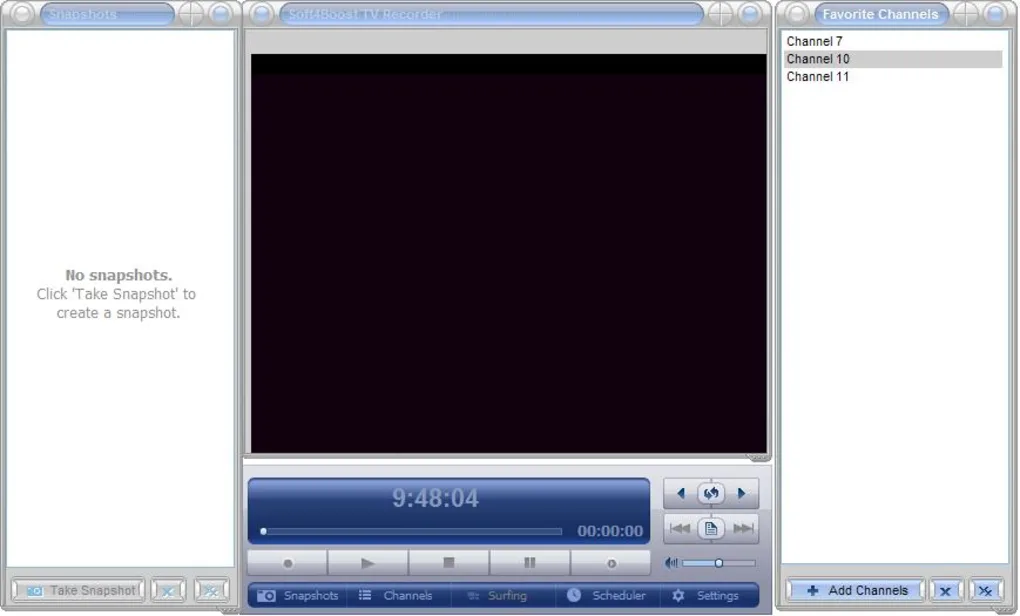
Soft4Boost TV Recorder is a multimedia recording application designed for watching, scheduling, and recording television broadcasts directly on Windows computers using compatible TV tuner hardware.
The software allows users to:
- Watch live TV
- Record television programs
- Schedule recordings
- Capture video streams
- Manage recorded broadcasts
It is commonly used by:
- Home entertainment users
- TV recording enthusiasts
- Multimedia users
- Personal media archive users
- Educational users
because it helps transform a computer into a digital television recording system.
📌 What is Soft4Boost TV Recorder?
Soft4Boost TV Recorder is a Windows-based television recording utility that works with supported TV tuner devices to capture and save television broadcasts.
The software is commonly used for:
- Watching live television
- Recording TV programs
- Scheduling future recordings
- Creating personal TV archives
- Managing broadcast content
Depending on hardware compatibility and region support, the software may work with:
- Analog TV signals
- Digital TV broadcasts
- DVB-compatible tuner devices
The application focuses on home multimedia and TV recording workflows.
🚀 Key Uses
📺 Live TV Watching
Used for viewing television broadcasts directly on a PC.
⏺️ TV Program Recording
Allows users to save television content for later viewing.
🗓️ Scheduled Recording
Useful for automatically recording broadcasts at specific times.
💾 Media Archiving
Helps create personal collections of recorded TV programs.
🖥️ Home Entertainment
Turns computers into multimedia television systems.
💻 System Requirements (General)
Minimum Requirements
- Operating System: Windows XP / Vista / 7 / 8 / 10 / 11
- RAM: 2GB minimum
- Storage: Free space required for recorded videos
- Processor: Intel or AMD compatible CPU
- Additional Hardware: Supported TV tuner card or USB TV tuner
Recommended Requirements
- RAM: 4GB or more
- Storage: Large HDD or SSD recommended for recordings
- Processor: Multi-core CPU
- TV Hardware: Digital TV tuner with stable signal reception
🔄 Alternatives
- NextPVR
- Kodi with TV tuner plugins
- MediaPortal
- Windows Media Center
- DVB Dream
- ProgDVB
❓ FAQ
Q1. What is Soft4Boost TV Recorder mainly used for?
It is mainly used for watching and recording television broadcasts on a computer.
Q2. Does it require TV tuner hardware?
Yes, compatible TV tuner hardware is generally required.
Q3. Can it schedule recordings?
Yes, scheduled recording functionality is commonly supported.
Q4. Can users watch live TV?
Yes, live television playback is supported.
Q5. Does it support digital TV broadcasts?
Support depends on tuner hardware and regional broadcast compatibility.
Q6. Is internet required?
Internet is not usually required for local TV broadcasts, but some guide features may require connectivity.
Features
✔️ Live TV viewing support
✔️ Television broadcast recording
✔️ Scheduled recording functionality
✔️ TV tuner hardware compatibility
✔️ Full-screen TV playback
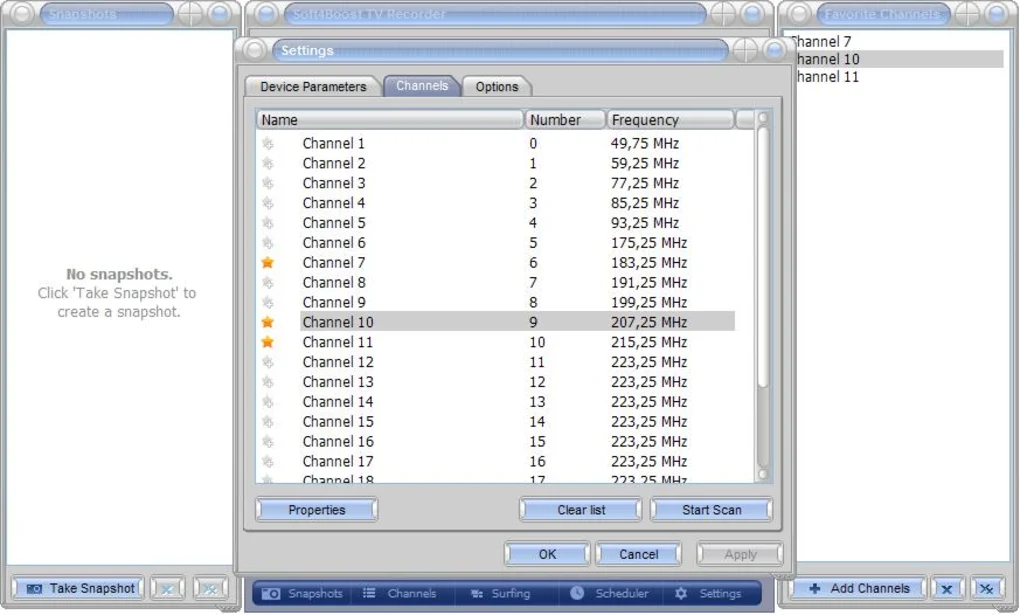
✔️ Channel scanning support
✔️ Screenshot capture functionality
✔️ Video recording in multiple formats
✔️ Time-shift viewing support
✔️ Audio recording support
✔️ Electronic program guide support (in some environments)
✔️ Simple media management workflows
✔️ Beginner-friendly interface
✔️ Personal TV archive creation
👍 Pros & 👎 Cons
Pros
- Supports live TV playback
- Scheduled recording improves convenience
- Useful for personal media archives
- Beginner-friendly interface
- Multiple recording options available
- Integrates with TV tuner hardware
Cons
- Requires compatible TV tuner device
- Broadcast compatibility may vary by region
- Modern streaming platforms may reduce usefulness
- Large recordings can consume significant storage space
- Signal quality depends on tuner hardware and reception
Our Analysis
Soft4Boost TV Recorder is a practical multimedia utility for users who still rely on television tuner hardware for watching and recording broadcasts on PCs.
Its biggest strengths are:
- Live TV playback
- Scheduled recording support
- Personal TV archive creation
- Simple interface
This makes it useful for:
- Home entertainment users
- TV enthusiasts
- Multimedia archiving workflows
The software can effectively transform a compatible Windows PC into a personal television recording system.
However, modern streaming services and online platforms have reduced reliance on traditional TV recording software in many environments.
Overall, Soft4Boost TV Recorder remains a useful solution for television capture and broadcast recording workflows when paired with compatible tuner hardware.
⚙️ Installation Guide (General Overview)
Step 1: Install TV Tuner Hardware
Connect compatible:
- USB TV tuner
- PCI TV card
- Digital TV receiver
Step 2: Install Drivers
Install tuner device drivers.
Step 3: Install Software
Download and install Soft4Boost TV Recorder.
Step 4: Launch Application
Open the TV recording dashboard.
Step 5: Scan Channels
Search for available television broadcasts.
Step 6: Watch or Record TV
Choose:
- Live TV playback
- Manual recording
- Scheduled recording
Step 7: Save Recordings
Store recorded TV content on local storage.
About SoftwareDownloading Editorial Team
The SoftwareDownloading Editorial Team researches Windows software, compatibility information, features, alternatives, and software-related guides for SoftwareDownloading.in.
Our pages are prepared using available product information and relevant documentation. When an application has not been personally tested, we distinguish research-based analysis from hands-on testing. Learn more about our review process
Apps Specs
Developer
Licence
Trial
Version
5.7.3.243
Platform
Windows
Download Clicks
1
Page Reviewed
September 26, 2026
Top Downloads




Related Topics
Disclaimer
This content is provided for educational and informational purposes only. We do not host, store, or distribute any software files on our servers. All trademarks, product names, and logos belong to their respective owners.
We strongly recommend downloading software only from official websites or trusted sources. We are not responsible for any damage, data loss, or issues that may occur from the use of third-party software.
Users should ensure they comply with all applicable laws and software licensing agreements in their country before downloading or using any software mentioned on this website.