- Utilities & Tools
- Keyboards
- Auto Clicker Typer

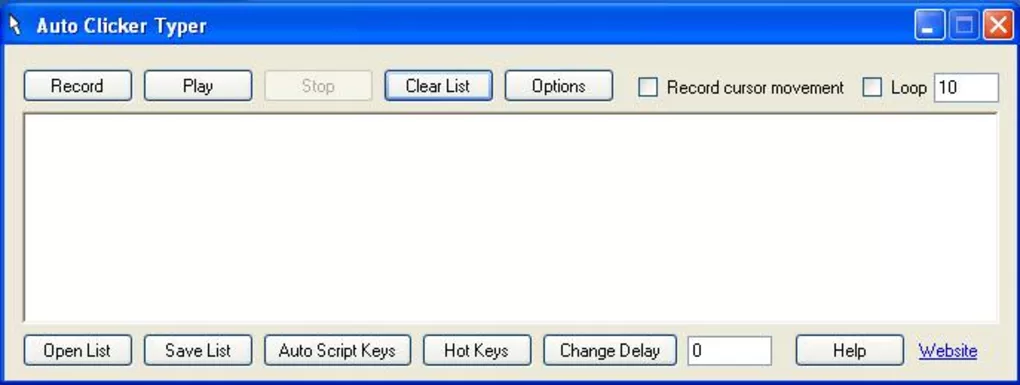
Auto Clicker Typer is designed to automate repetitive computer interactions by simulating mouse clicks and keyboard typing actions according to user-defined settings.
Instead of manually repeating the same actions multiple times, users can configure the software to perform:
- Automatic mouse clicks
- Keyboard typing sequences
- Timed text input
- Repetitive commands
- Scheduled automation workflows
The software is commonly used for:
- Office productivity tasks
- Data entry operations
- Automated software testing
- Idle gaming actions
- Form submission workflows
- Repetitive desktop interaction
Depending on the version, users may configure:
- Click intervals
- Typing speed
- Screen targeting positions
- Shortcut activation keys
- Repeat loops
- Delay timing settings
- Macro-like automation sequences
One of the biggest advantages of automation utilities like this is time-saving because repetitive actions can be executed automatically without continuous user interaction.
The software can also reduce repetitive strain caused by constant clicking or typing during long workflows.
Some users additionally use automation tools for application testing and workflow simulation in development environments.
However, users should always respect software and platform policies because automation tools may not be allowed in some online services or competitive gaming environments.
📌 What is Auto Clicker Typer?
Auto Clicker Typer is an automation utility designed to automate repetitive mouse clicks and keyboard typing actions on Windows systems. It combines auto-clicking functionality with automated text input, allowing users to create repetitive workflows without manual interaction.
The software is commonly used for productivity automation, repetitive office tasks, gaming assistance, software testing, form filling, and automated interaction with applications.
🚀 Key Uses
- Automating repetitive mouse clicks
- Automatic keyboard typing workflows
- Repetitive data entry automation
- Gaming input assistance
- Software testing and simulation
- Form filling automation
- Productivity workflow optimization
- Scheduled text input operations
- Accessibility assistance for repetitive tasks
- Reducing manual keyboard and mouse workload
💻 System Requirements (General)
Minimum Requirements
- Windows XP / 7 / 8 / 10 / 11
- 1GB RAM
- Standard keyboard and mouse support
- Basic processor
Recommended Requirements
- 2GB+ RAM
- Multi-core processor
- Updated Windows environment
- Stable USB or wireless input device drivers
🔄 Alternatives
- AutoHotkey
- OP Auto Clicker
- TinyTask
- GS Auto Clicker
- Pulover’s Macro Creator
- FastKeys
- Macro Recorder
❓ FAQ
Q1. What is Auto Clicker Typer used for?
It is used to automate repetitive mouse clicking and keyboard typing tasks.
Q2. Can it automate text input?
Yes, it can simulate automatic typing and keyboard input.
Q3. Is it useful for repetitive office tasks?
Yes, it is commonly used for repetitive workflows and form filling.
Q4. Can click speed and typing speed be customized?
Yes, users can usually adjust timing intervals and automation speed.
Q5. Does it work offline?
Yes, it works completely offline after installation.
Features
✔ Automatic mouse clicking support
✔ Automated keyboard typing functionality
✔ Adjustable click and typing speed
✔ Hotkey activation controls
✔ Repetitive workflow automation
✔ Custom text input support
✔ Screen position targeting
✔ Timed automation operations
✔ Lightweight background operation
✔ Simple user interface
✔ Macro-style task execution
✔ Productivity workflow enhancement
✔ Accessibility support for repetitive tasks
✔ Low system resource usage
👍 Pros & 👎 Cons
Pros
- Saves time during repetitive tasks
- Combines clicking and typing automation
- Lightweight and easy to use
- Useful for productivity workflows
- Adjustable automation settings
- Reduces repetitive manual workload
Cons
- Advanced automation may require configuration learning
- Some applications may block automation tools
- Misuse can violate software policies
- Limited compared to full scripting platforms
Our Analysis
Auto Clicker Typer is a practical automation utility for users who frequently perform repetitive mouse and keyboard tasks.
Its strongest advantages are:
- Combined clicking and typing automation
- Lightweight system usage
- Flexible timing controls
- Easy repetitive workflow management
The software becomes especially useful for repetitive office work, form filling, software testing, and productivity automation scenarios.
While it may not replace advanced scripting environments for complex automation projects, it provides an accessible and beginner-friendly solution for simple repetitive tasks.
Overall, it is a useful automation tool for improving workflow efficiency, reducing repetitive workload, and automating routine mouse and keyboard interactions on Windows systems.
⚙️ Installation Guide (General Overview)
Step 1: Download Software
Download Auto Clicker Typer from a trusted source or official provider.
Step 2: Run Installer
Open the downloaded setup file and follow the on-screen installation instructions.
Step 3: Select Installation Preferences
Choose installation location and optional shortcut creation settings if needed.
Step 4: Complete Installation
Finish setup and launch the software after installation is complete.
Step 5: Configure Mouse Automation
Set:
- Click type
- Mouse button selection
- Click interval timing
- Screen target location
Step 6: Configure Typing Automation
Enter custom text or keyboard commands to automate typing workflows.
Step 7: Assign Hotkeys
Choose keyboard shortcuts to quickly start or stop automation tasks.
Step 8: Test Automation Workflow
Run automation in a safe environment and verify correct click and typing behavior.
Step 9: Fine-Tune Settings
Adjust timing, delays, repeat counts, and input behavior for smoother operation.
About SoftwareDownloading Editorial Team
The SoftwareDownloading Editorial Team researches Windows software, compatibility information, features, alternatives, and software-related guides for SoftwareDownloading.in.
Our pages are prepared using available product information and relevant documentation. When an application has not been personally tested, we distinguish research-based analysis from hands-on testing. Learn more about our review process
Apps Specs
Developer
Licence
Free
Version
1.0
Platform
Windows
Download Clicks
3
Page Reviewed
September 27, 2026
Top Downloads





Related Topics
Disclaimer
This content is provided for educational and informational purposes only. We do not host, store, or distribute any software files on our servers. All trademarks, product names, and logos belong to their respective owners.
We strongly recommend downloading software only from official websites or trusted sources. We are not responsible for any damage, data loss, or issues that may occur from the use of third-party software.
Users should ensure they comply with all applicable laws and software licensing agreements in their country before downloading or using any software mentioned on this website.