- Development & IT
- Servers
- Webserver Stress Tool
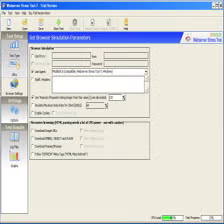
Webserver Stress Tool is a network and server testing application designed to simulate heavy traffic loads on websites and web servers in order to measure performance, stability, speed, and reliability under high-demand conditions.
📌 What is Webserver Stress Tool?
Webserver Stress Tool is a web performance testing utility used to simulate multiple users accessing a website or web application simultaneously. The software helps developers, administrators, and hosting professionals analyze how a web server behaves under heavy traffic loads and stressful conditions.
Modern websites often experience sudden increases in visitors, especially during promotions, product launches, online events, or viral traffic spikes. If a server cannot handle large numbers of requests efficiently, websites may slow down, crash, or become unavailable. Webserver Stress Tool helps identify such weaknesses before real-world traffic problems occur.
The software works by generating virtual users or simulated HTTP requests that repeatedly access webpages, APIs, databases, and web applications. Administrators can then monitor response times, server errors, bandwidth usage, CPU consumption, and overall performance metrics.
One of the biggest advantages of Webserver Stress Tool is performance analysis. By simulating realistic traffic patterns, developers can optimize server configurations, improve application performance, and identify bottlenecks in infrastructure.
The software is commonly used for:
- Website load testing
- Web application performance testing
- API stress testing
- Hosting infrastructure analysis
- Database performance evaluation
- Server scalability testing
- Network response analysis
Depending on the version, Webserver Stress Tool may support multi-threaded testing, HTTPS requests, custom request headers, authentication testing, proxy support, logging tools, and detailed reporting features.
It is especially useful for system administrators, DevOps engineers, QA testers, web hosting providers, and developers managing high-traffic websites.
Overall, Webserver Stress Tool acts as a professional server benchmarking and stress testing solution for evaluating website reliability and scalability.
💻 System Requirements (Detailed)
To run Webserver Stress Tool smoothly, the following system requirements are recommended:
Minimum Requirements
- Operating System:
Windows 7 / Windows 8 / Windows 10 / Windows 11 - Processor:
Intel or AMD Dual-Core processor - RAM:
Minimum 2GB RAM - Storage Space:
At least 500MB free disk space - Network:
Stable internet or local network connection required - Display:
Standard monitor resolution
Recommended Requirements
- Processor:
Intel Core i5 / Ryzen 5 or higher - RAM:
4GB–8GB RAM or more - Storage:
SSD recommended for logging and report generation - Internet Speed:
High-speed broadband connection for large-scale testing - Additional Tools:
Monitoring tools such as:- Wireshark
- Apache JMeter
Recommended For
Webserver Stress Tool is ideal for:
- Web developers
- Hosting providers
- System administrators
- DevOps engineers
- QA testers
- API developers
- Website optimization specialists
- Server performance analysts
🔄 Alternatives
If you want similar server testing and load testing tools, you can try:
- Apache JMeter
- LoadRunner
- k6
- Locust
- Gatling
❓ FAQ
Q1. What is Webserver Stress Tool mainly used for?
It is used for testing website and server performance under heavy traffic conditions.
Q2. Can it simulate multiple users?
Yes, it can generate large numbers of virtual users and requests.
Q3. Is Webserver Stress Tool suitable for API testing?
Yes, it can test APIs and server endpoints.
Q4. Does stress testing affect server performance?
Yes, high-load simulations can temporarily increase server resource usage.
Q5. Is technical knowledge required?
Basic knowledge helps, especially for advanced testing configurations.
Q6. Can beginners use Webserver Stress Tool?
Yes, but understanding web servers and performance metrics is recommended.
Q7. Is it safe to test any website?
You should only test servers and websites you own or have permission to analyze.
🔄 Best Alternatives
Features
- ✔️ Website load and stress testing
- ✔️ Simulates multiple virtual users
- ✔️ HTTP and HTTPS request support
- ✔️ Server response monitoring
- ✔️ Multi-threaded performance testing
- ✔️ Web application benchmarking
- ✔️ Real-time traffic simulation
- ✔️ Detailed reporting and analysis tools
- ✔️ API and database testing support
- ✔️ Network performance evaluation
- ✔️ Custom request configuration
- ✔️ Helps identify server bottlenecks
- ✔️ Suitable for web hosting analysis
- ✔️ Performance optimization assistance
- ✔️ Lightweight and efficient testing environment
👍 Pros & 👎 Cons
Pros
- Helps identify server performance limits
- Useful for website optimization
- Simulates realistic traffic conditions
- Supports stress and load testing workflows
- Valuable for hosting and DevOps environments
- Helps improve website stability
- Good for testing APIs and applications
- Detailed reporting improves troubleshooting
Cons
- Requires technical knowledge for advanced testing
- Heavy testing can temporarily overload weak servers
- Incorrect configurations may produce inaccurate results
- Some advanced enterprise features may require paid versions
- Not intended for unauthorized testing of third-party servers
Expert Review
In my opinion, Webserver Stress Tool is a very useful solution for developers and administrators who need to evaluate website stability and server performance before handling real-world traffic loads. The ability to simulate multiple users and monitor performance metrics helps identify weaknesses that may otherwise remain hidden until a live traffic spike occurs.
The software is especially valuable for hosting companies, DevOps teams, and developers working on high-traffic web applications or APIs. Proper load testing can significantly improve website reliability and user experience.
Although beginners may initially find some advanced configuration options technical, the software provides strong value for performance optimization and infrastructure analysis. If you manage websites or online services and want to ensure server stability under pressure, Webserver Stress Tool is definitely worth using.
How to Install
⚙️ Installation Guide (Step-by-Step)
Follow these steps to install Webserver Stress Tool:
Step 1: Download the Software
Download Webserver Stress Tool from a trusted source.
Step 2: Run the Installer
Open the setup file and allow administrator permissions if requested.
Step 3: Accept License Agreement
Read and agree to the installation terms.
Step 4: Choose Installation Location
Select the directory where the software should be installed.
Step 5: Complete Installation
Click Install and wait for the setup process to finish.
Step 6: Launch Webserver Stress Tool
Open the software after installation completes.
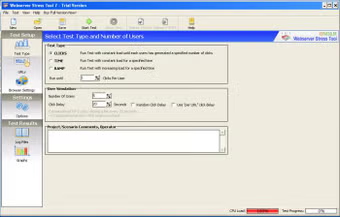
Step 7: Configure Target Server
Enter:
- Website URL
- API endpoint
- Request type
- Number of virtual users
- Stress level configuration
Step 8: Start Stress Testing
Run the simulation and monitor:
- Response time
- Errors
- CPU usage
- Server stability
- Traffic handling performance
Step 9: Analyze Reports
Review generated reports and optimize server performance accordingly.
Apps Specs
Licence
Trial
Latest Update
June 24, 2026
Platform
Windows
Downloads
Devlopers
Top Downloads




Related Topics
Disclaimer
This content is provided for educational and informational purposes only. We do not host, store, or distribute any software files on our servers. All trademarks, product names, and logos belong to their respective owners.
We strongly recommend downloading software only from official websites or trusted sources. We are not responsible for any damage, data loss, or issues that may occur from the use of third-party software.
Users should ensure they comply with all applicable laws and software licensing agreements in their country before downloading or using any software mentioned on this website.
You may also like





Alternatives to



Expore Apps