- Education & Reference
- Catalogs
- GymMaster
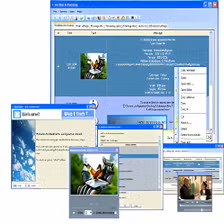
GymMaster is a professional gym management software designed to help fitness centers, gyms, and health clubs manage memberships, billing, attendance, scheduling, and daily operations efficiently.
📌 What is GymMaster?
GymMaster is a complete fitness business management solution created for gym owners, personal trainers, fitness studios, and health clubs. It helps automate daily operations such as member registration, billing, access control, staff scheduling, and class bookings.
Running a gym involves much more than training members. Managing memberships manually can create problems like payment delays, attendance confusion, missed renewals, and scheduling errors. GymMaster solves these issues by centralizing all operations into one organized system.
The software allows gym owners to track member information, manage subscriptions, monitor attendance, and even handle door access control in some setups. This improves efficiency, reduces paperwork, and creates a more professional experience for both staff and members.
GymMaster is especially useful for medium to large fitness centers where handling large numbers of clients manually becomes difficult. It also helps improve revenue tracking and customer retention by automating reminders and renewals.
Because of its business-focused features, GymMaster is not just software—it acts like a full operational assistant for modern fitness businesses.
💻 System Requirements (Detailed)
To run GymMaster efficiently, the following system requirements are recommended:
Minimum Requirements
- Operating System: Windows 7 / Windows 8 / Windows 10 / Windows 11
- Processor: Intel Core i3 or equivalent
- RAM: Minimum 4GB RAM
- Storage Space: 500MB free disk space
- Display: 1366×768 resolution or higher
- Internet Connection: Required for cloud features and updates
Recommended Requirements
- Processor: Intel Core i5 or higher
- RAM: 8GB or more
- Storage: SSD recommended for faster performance
- Additional Hardware: Barcode scanner, access control devices, printers (optional)
For larger gyms with multiple users, stronger hardware is recommended for smoother operation.
🔄 Alternatives
If you want similar gym management software, you can also try:
- Mindbody
- Zen Planner
- Glofox
- Trainerize
These tools also provide strong business management features for fitness centers.
❓ FAQ
Q1. What is GymMaster mainly used for?
It is used for managing memberships, billing, attendance, scheduling, and gym operations.
Q2. Is GymMaster suitable for small gyms?
Yes, but smaller gyms may not need all advanced features.
Q3. Can it track payments and renewals?
Yes, billing and automatic renewal reminders are major features.
Q4. Does it support staff management?
Yes, staff scheduling and employee management tools are included.
Q5. Is GymMaster cloud-based?
Some versions support both cloud and local installation.
Features
- ✔️ Membership management system
- ✔️ Billing and payment tracking
- ✔️ Attendance and check-in monitoring
- ✔️ Class and appointment scheduling
- ✔️ Staff management tools
- ✔️ Member profile management
- ✔️ Access control integration
- ✔️ Automated renewal reminders
- ✔️ Reports and business analytics
- ✔️ Cloud and local usage options
👍 Pros & 👎 Cons
Pros
Pros:
- Complete gym management solution
- Saves time by automating daily tasks
- Improves billing and membership tracking
- Professional experience for members
- Useful analytics and reporting system
Cons
Cons:
- Can be expensive for small gyms
- Requires setup and staff training
- Some advanced features may be unnecessary for small studios
- Internet may be needed for some cloud features
Our Analysis
In my opinion, GymMaster is one of the most complete gym management solutions available for fitness businesses. It handles almost every major task—from memberships to billing and attendance—making daily operations much smoother.
Its automation features save significant time and reduce common manual errors. While it may feel too advanced for very small gyms, it becomes extremely valuable for growing fitness centers that want a professional system.
If your gym is expanding and manual management is becoming difficult, GymMaster is definitely a strong investment for long-term business efficiency.
Follow these steps to install GymMaster properly:
Step 1: Download the Software
Download the latest version of GymMaster from a trusted and secure source.
Step 2: Open the Installer
Double-click the downloaded setup file to begin installation.
Step 3: Accept License Agreement
Read and accept the terms and conditions to continue.
Step 4: Choose Installation Folder
Select the location where the software will be installed.
Step 5: Complete Installation
Click Install and wait for the process to finish.
Step 6: Launch GymMaster
Open the software after installation is complete.
Step 7: Configure Business Settings
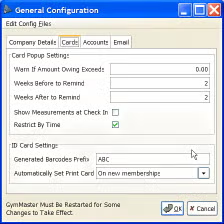
Add gym details, membership plans, staff accounts, and payment settings.
Step 8: Start Managing Members
Register members and begin using the system for daily operations.
About SoftwareDownloading Editorial Team
The SoftwareDownloading Editorial Team researches Windows software, compatibility information, features, alternatives, and software-related guides for SoftwareDownloading.in.
Our pages are prepared using available product information and relevant documentation. When an application has not been personally tested, we distinguish research-based analysis from hands-on testing. Learn more about our review process
Apps Specs
Developer
Licence
Free
Version
V 4.0.5
Platform
Windows
Download Clicks
1
Page Reviewed
September 26, 2026
Top Downloads



Related Topics
Disclaimer
This content is provided for educational and informational purposes only. We do not host, store, or distribute any software files on our servers. All trademarks, product names, and logos belong to their respective owners.
We strongly recommend downloading software only from official websites or trusted sources. We are not responsible for any damage, data loss, or issues that may occur from the use of third-party software.
Users should ensure they comply with all applicable laws and software licensing agreements in their country before downloading or using any software mentioned on this website.