- Browser
- Add-ons & Tools
- Perplexity AI

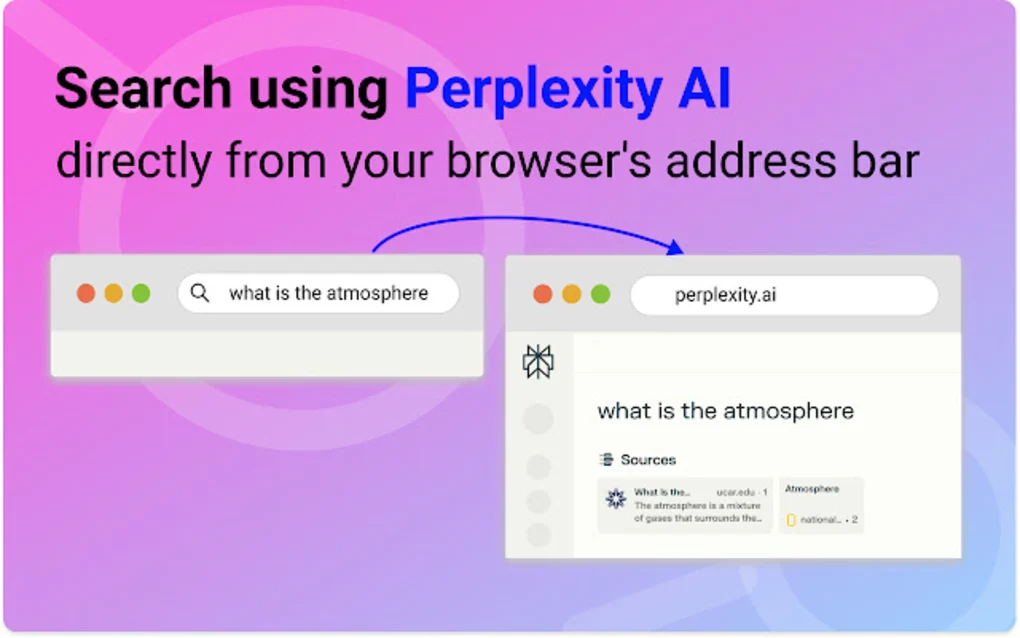
Perplexity AI is an AI-powered search and answer engine that combines conversational artificial intelligence with real-time web search to provide direct answers, citations, summaries, research assistance, and productivity-focused information retrieval.
📌 What is Perplexity AI?
Perplexity AI is an artificial intelligence search platform designed to combine the functionality of traditional search engines with large language model (LLM) conversational capabilities.
Instead of only showing lists of websites like traditional search engines, Perplexity AI attempts to generate direct conversational answers while also citing information sources from across the web.
The platform is commonly used for:
- AI-powered search
- Research assistance
- Information summarization
- Conversational question answering
- Academic research
- Productivity workflows
- Technical explanations
- Real-time web-assisted AI responses
- Learning and education
One of the biggest strengths of Perplexity AI is citation-supported AI responses.
The platform is commonly used by:
- Students
- Researchers
- Professionals
- Developers
- Writers
- Journalists
- Office users
- AI enthusiasts
- Productivity-focused users
Depending on the subscription tier and AI model availability, Perplexity AI may support:
- Conversational AI search
- Real-time web search integration
- Source citations
- AI-generated summaries
- Research assistance
- Multi-turn conversations
- File uploads
- PDF analysis
- Code assistance
- AI writing help
- Follow-up questioning
- Academic-style research workflows
- Voice interaction
- Mobile synchronization
- AI model selection
Unlike traditional search engines that mainly provide ranked web pages, Perplexity AI attempts to:
- Understand user intent
- Search the web
- Summarize information
- Provide conversational explanations
- Include references and citations
The platform may use multiple large language models depending on subscription level and feature availability.
Perplexity AI is often compared with:
- OpenAI
- Anthropic
- Microsoft
The platform may support advanced features such as:
- Pro Search
- Deep research workflows
- AI copilots
- File-based analysis
- AI-assisted browsing
- Custom AI interactions
Users may ask questions related to:
- Science
- Technology
- Programming
- History
- Current events
- Finance
- Education
- Productivity
- General knowledge
Perplexity AI is available through:
- Web browsers
- Mobile applications
- Desktop environments (depending on platform support)
Some versions and plans may support integrations with premium AI models.
One major advantage is speed. Users often receive summarized answers faster than manually opening many websites.
Another advantage is transparency through citations, which helps users verify information sources more easily.
However, AI-generated responses may still occasionally contain:
- Hallucinations
- Incomplete context
- Outdated information
- Misinterpretations
- Incorrect summaries
Therefore, users should verify important or sensitive information independently.
Privacy and data handling are also important considerations when using AI search systems, especially when uploading files or sensitive information.
Overall, Perplexity AI acts as an AI-powered conversational search and research platform designed to combine web search, citations, and large language models into a more interactive information retrieval experience.
💻 System Requirements (Detailed)
Since Perplexity AI is primarily cloud-based, system requirements are relatively lightweight.
Minimum Requirements
- Operating System:
Windows / macOS / Linux / Android / iOS - Browser Support:
Modern browser with JavaScript enabled - RAM:
Minimum 2GB–4GB RAM recommended - Internet:
Stable internet connection required
Recommended Requirements
- Processor:
Modern multi-core processor - RAM:
8GB RAM or more for multitasking workflows - Browser:
Updated Chromium-based browser or Firefox - Additional Tools:
Frequently compared with:- OpenAI
- Anthropic
🔄 Alternatives
If you want similar AI search or conversational AI platforms, you can try:
- OpenAI
- Anthropic
- Microsoft
- You.com
❓ FAQ
Q1. What is Perplexity AI mainly used for?
It is mainly used for AI-powered search, research assistance, and conversational information retrieval.
Q2. Does Perplexity AI provide citations?
Yes, one of its major features is citation-supported AI answers.
Q3. Can Perplexity AI search the web in real time?
Yes, many responses use web-assisted search and live information retrieval.
Q4. Is Perplexity AI free?
A free version is available, while advanced features may require paid plans.
Q5. Can users upload documents to Perplexity AI?
Yes, some versions support document and PDF analysis.
Q6. Is Perplexity AI useful for students and researchers?
Yes, it is widely used for research, learning, summarization, and productivity workflows.
Q7. Can Perplexity AI make mistakes?
Yes, like other AI systems, it may occasionally generate incorrect or incomplete information.
🔄 Best Alternatives
Features
- ✔️ AI-powered conversational search
- ✔️ Real-time web-assisted answers
- ✔️ Citation-supported responses
- ✔️ Multi-turn conversations
- ✔️ AI-generated summaries
- ✔️ Research assistance tools
- ✔️ PDF and file analysis
- ✔️ Code assistance support
- ✔️ Follow-up questioning
- ✔️ Mobile app support
- ✔️ Voice interaction support
- ✔️ AI productivity workflows
- ✔️ Multiple AI model support
- ✔️ Fast information retrieval
- ✔️ Web-based accessibility
👍 Pros & 👎 Cons
Pros
- Fast AI-powered answers
- Source citations improve transparency
- Excellent for research workflows
- Conversational interaction is easy to use
- Useful for summarization and learning
- Multi-step questioning support
- Good productivity tool for students and professionals
- Real-time web integration improves freshness
Cons
- AI responses may still contain inaccuracies
- Important facts should still be verified manually
- Some advanced features require paid plans
- Citation quality can vary
- Privacy concerns may exist for sensitive uploads
- AI summaries may oversimplify complex topics
Expert Review
In my opinion, Perplexity AI is one of the most interesting developments in AI-powered search because it combines conversational AI with web citations in a way that feels much more interactive than traditional search engines.
One of the biggest strengths is speed and convenience. Instead of manually opening many websites, users can quickly receive summarized explanations with linked references.
The citation-based approach also helps improve trust and transparency compared to AI systems that provide answers without showing information sources.
For students, researchers, writers, and productivity-focused users, Perplexity AI can save a large amount of time during research workflows.
Another major advantage is conversational follow-up capability. Users can continue asking questions naturally instead of rewriting new search queries repeatedly.
However, users should still understand that AI systems are not perfect. AI-generated summaries may occasionally contain inaccuracies, misunderstandings, or oversimplified explanations.
For important topics such as medicine, law, finance, academic publishing, or business decisions, independent verification remains essential.
Overall, Perplexity AI represents a strong example of how AI-enhanced search engines may shape the future of information discovery and productivity-oriented internet usage.
How to Install
⚙️ Getting Started Guide (Step-by-Step)
Follow these steps to use Perplexity AI:
Step 1: Open the Platform
Visit the official website or install the mobile application.
Step 2: Create an Account
Sign up using email or supported login providers.
Step 3: Access the Search Interface
Open the conversational search area.
Step 4: Ask a Question
Enter questions naturally using conversational language.
Step 5: Review AI Answers and Citations
Check:
- AI summaries
- Linked sources
- Citations
- Follow-up suggestions
Step 6: Continue the Conversation
Ask follow-up questions for deeper explanations.
Step 7: Use Research Features
Explore:
- File uploads
- Research summaries
- Topic exploration
- Technical explanations
Step 8: Compare Sources
Verify AI responses using the cited references.
Step 9: Customize the Workflow
Depending on the plan, configure AI models and advanced tools.
Step 10: Use Responsibly
Double-check critical information, especially for:
- Medical topics
- Legal topics
- Financial decisions
- Academic citations
Apps Specs
Licence
Free
Latest Update
June 24, 2026
Platform
Windows
Downloads
10
Devlopers
Top Downloads





Disclaimer
This content is provided for educational and informational purposes only. We do not host, store, or distribute any software files on our servers. All trademarks, product names, and logos belong to their respective owners.
We strongly recommend downloading software only from official websites or trusted sources. We are not responsible for any damage, data loss, or issues that may occur from the use of third-party software.
Users should ensure they comply with all applicable laws and software licensing agreements in their country before downloading or using any software mentioned on this website.
You may also like






Alternatives to



Expore Apps