- Development & IT
- Programming Languages
- 3D GameStudio

3D GameStudio is a game development engine and integrated development environment (IDE) designed for creating 2D and 3D video games using scripting, level editors, asset management tools, and game programming systems.
📌 What is 3D GameStudio?
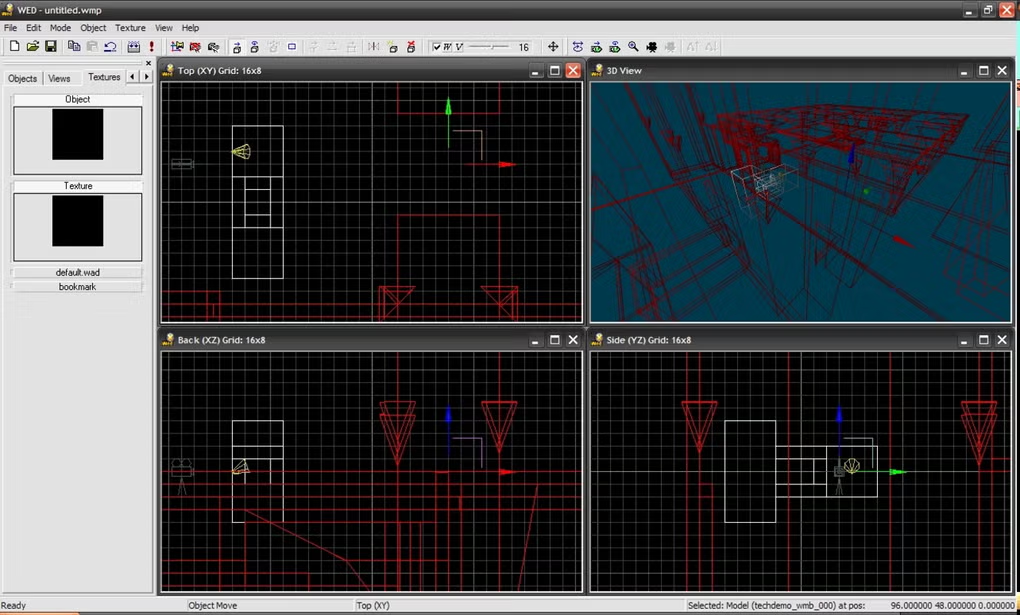
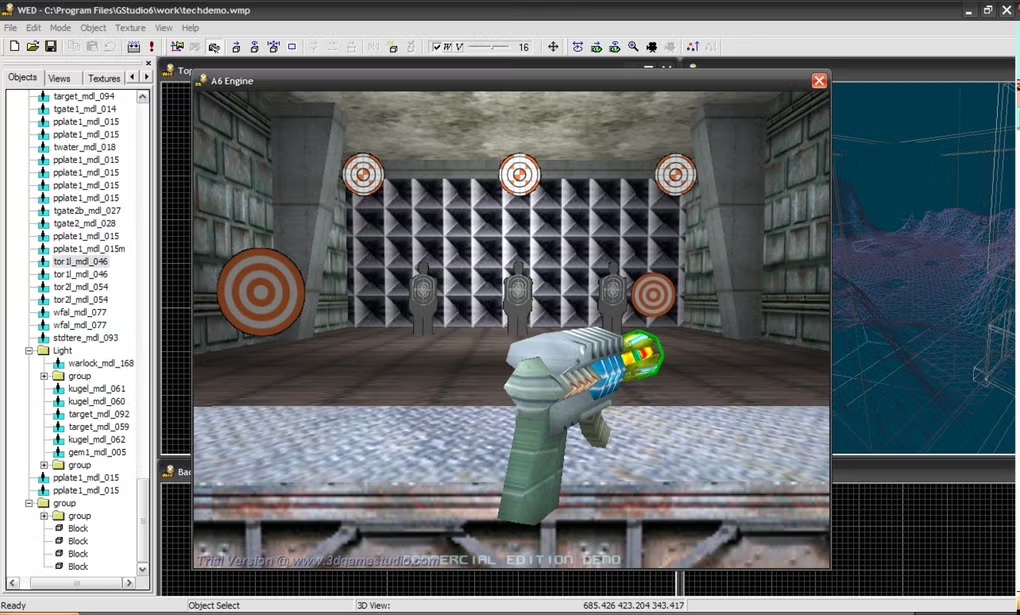
3D GameStudio is a game development platform designed for creating interactive 2D and 3D games for Windows-based systems. The software combines a game engine, scripting environment, level editor, and development tools into a single integrated platform for game creators.
Game engines simplify game development by providing reusable systems for rendering graphics, managing physics, handling audio, processing user input, and running gameplay logic.
3D GameStudio is commonly used for:
- 3D game development
- 2D game creation
- Level design
- Game scripting
- Physics-based gameplay
- Educational game projects
- Indie game development
- Real-time rendering projects
- Interactive simulations
One of the biggest strengths of 3D GameStudio is its integrated workflow, allowing users to manage coding, level editing, and asset handling inside one environment.
The software is commonly used by:
- Indie game developers
- Students learning game development
- Hobbyist programmers
- Small game studios
- Educational institutions
- Prototype developers
- Simulation creators
Depending on the version and engine features, 3D GameStudio may support:
- Real-time 3D rendering
- Terrain and world editing
- Physics engine integration
- AI scripting systems
- Particle effects
- Collision detection
- Character animation systems
- Sound and music support
- Shader programming
- Multiplayer networking support
- Asset importing tools
- Lighting and shadow systems
- HUD and UI development
- Game scripting languages
The software often includes integrated tools such as:
- Level editors
- Script editors
- Model viewers
- Asset managers
- Terrain generators
- Physics configuration tools
Programming and scripting are important components of the engine. Depending on the version, users may create gameplay systems using scripting languages and engine APIs.
The engine may support:
- Character controllers
- NPC AI systems
- Vehicle simulations
- First-person and third-person gameplay
- Real-time interaction systems
Another major advantage is rapid prototyping. Developers can quickly test gameplay mechanics, scenes, and interactive environments without building every engine system from scratch.
3D GameStudio may also support importing external assets such as:
- 3D models
- Textures
- Audio files
- Animations
- Terrain data
The platform is especially useful for learning older-generation game engine workflows and understanding traditional game development pipelines.
Overall, 3D GameStudio acts as a complete game development environment for designing, scripting, testing, and publishing interactive 2D and 3D games.
💻 System Requirements (Detailed)
To run 3D GameStudio smoothly, the following system requirements are recommended:
Minimum Requirements
- Operating System:
Windows XP / Windows 7 / Windows 8 / Windows 10 - Processor:
Intel or AMD compatible processor - RAM:
Minimum 2GB RAM - Graphics:
DirectX-compatible graphics card - Storage Space:
Around 2GB free disk space - Audio:
DirectX-compatible sound device
Recommended Requirements
- Processor:
Intel Core i5 / Ryzen 5 or higher - RAM:
4GB–8GB RAM or more - Graphics:
Dedicated GPU recommended for smoother rendering - Storage:
SSD recommended for faster asset loading and project handling - Additional Tools:
Frequently compared with:- Unity
- Unreal Engine
- Godot
Best Suitable For
3D GameStudio is ideal for:
- Indie game development
- Educational game programming
- 3D simulations
- Prototype development
- Hobby game creation
- Learning game engine concepts
- Small-scale interactive projects
🔄 Alternatives
If you want similar game development platforms, you can try:
- Unity
- Unreal Engine
- Godot
- CryEngine
- GameMaker
❓ FAQ
Q1. What is 3D GameStudio mainly used for?
It is used for developing 2D and 3D video games.
Q2. Does 3D GameStudio support scripting?
Yes, scripting tools are used for gameplay logic and AI systems.
Q3. Can beginners use 3D GameStudio?
Yes, it is often used for learning game development basics.
Q4. Does it include a level editor?
Yes, integrated level editing tools are included.
Q5. Is multiplayer support available?
Some versions may support multiplayer networking functionality.
Q6. Can external assets be imported?
Yes, models, textures, sounds, and animations may be imported.
Q7. Is 3D GameStudio still useful today?
It can still be useful for educational purposes, retro projects, and understanding classic game development workflows.
🔄 Best Alternatives
Features
- ✔️ 2D and 3D game development support
- ✔️ Integrated game engine and IDE
- ✔️ Real-time rendering system
- ✔️ Terrain and level editing tools
- ✔️ Physics engine integration
- ✔️ AI scripting functionality
- ✔️ Particle effects and shaders
- ✔️ Character animation support
- ✔️ Sound and music integration
- ✔️ Collision detection systems
- ✔️ Multiplayer networking capabilities
- ✔️ Asset importing and management
- ✔️ HUD and UI creation tools
- ✔️ Rapid game prototyping support
- ✔️ Suitable for indie and educational projects
👍 Pros & 👎 Cons
Pros
- All-in-one game development environment
- Useful for learning game engine workflows
- Supports both 2D and 3D projects
- Integrated level editor simplifies development
- Rapid prototyping capabilities improve productivity
- Physics and AI systems support interactive gameplay
- Suitable for educational and indie projects
- Asset importing increases flexibility
Cons
- Older engine architecture compared to modern engines
- Limited modern graphical capabilities
- Smaller community compared to major engines
- Advanced game development requires programming knowledge
- Modern platform support may be limited
Expert Review
In my opinion, 3D GameStudio is an interesting and historically important game development platform that helped many developers learn the fundamentals of 3D game creation and engine-based development workflows. Before modern engines became dominant, tools like 3D GameStudio provided accessible ways for indie developers and hobbyists to build interactive games.
One of the biggest advantages is the integrated environment. Having level editing, scripting, rendering, and asset management inside a single platform simplifies the development process for smaller projects and educational learning.
The engine is especially useful for understanding traditional game development concepts such as scene management, collision systems, scripting logic, terrain editing, and gameplay programming.
Although modern engines like Unity and Unreal Engine now provide more advanced graphics, cross-platform support, and larger ecosystems, 3D GameStudio still has value for retro development workflows, experimentation, and educational purposes.
The software may feel outdated compared to current-generation game engines, but it remains a useful learning tool for understanding classic game engine architecture and interactive game design.
If you want to explore traditional 3D game development workflows or experiment with smaller indie game projects, 3D GameStudio is definitely worth trying.
How to Install
⚙️ Installation Guide (Step-by-Step)
Follow these steps to install 3D GameStudio:
Step 1: Download the Software
Download the installation package from the official or trusted source.
Step 2: Run the Installer
Launch the setup file and allow administrator permissions if required.
Step 3: Accept License Agreement
Read and agree to the installation terms.
Step 4: Choose Installation Directory
Select where the engine and tools should be installed.
Step 5: Complete Installation
Finish the setup process and launch the software.
Step 6: Configure Development Environment
Set up:
- Rendering options
- Input controls
- Project folders
- Asset libraries
Step 7: Create a New Game Project
Start a 2D or 3D project.
Step 8: Build Levels and Gameplay
Use level editors, scripting tools, and assets to create gameplay systems.
Step 9: Test the Game
Run the project inside the engine testing environment.
Step 10: Export or Publish the Game
Compile and distribute the final game build.
Apps Specs
Licence
Paid
Latest Update
June 24, 2026
Platform
Windows
Downloads
2
Devlopers
Top Downloads





Related Topics
Disclaimer
This content is provided for educational and informational purposes only. We do not host, store, or distribute any software files on our servers. All trademarks, product names, and logos belong to their respective owners.
We strongly recommend downloading software only from official websites or trusted sources. We are not responsible for any damage, data loss, or issues that may occur from the use of third-party software.
Users should ensure they comply with all applicable laws and software licensing agreements in their country before downloading or using any software mentioned on this website.
You may also like






Alternatives to



Expore Apps