- Browser
- Add-ons & Tools
- TeaserFast

TeaserFast is a browser-based advertising and micro-earning platform that allows users to earn small amounts of money by viewing teaser ads, pop-up advertisements, websites, and YouTube videos through a browser extension. The platform also provides advertising services for businesses wanting traffic, impressions, and promotional exposure.
📌 What is TeaserFast?
TeaserFast is a Russian advertising and reward platform that combines browser advertising with microtask-style earning opportunities.
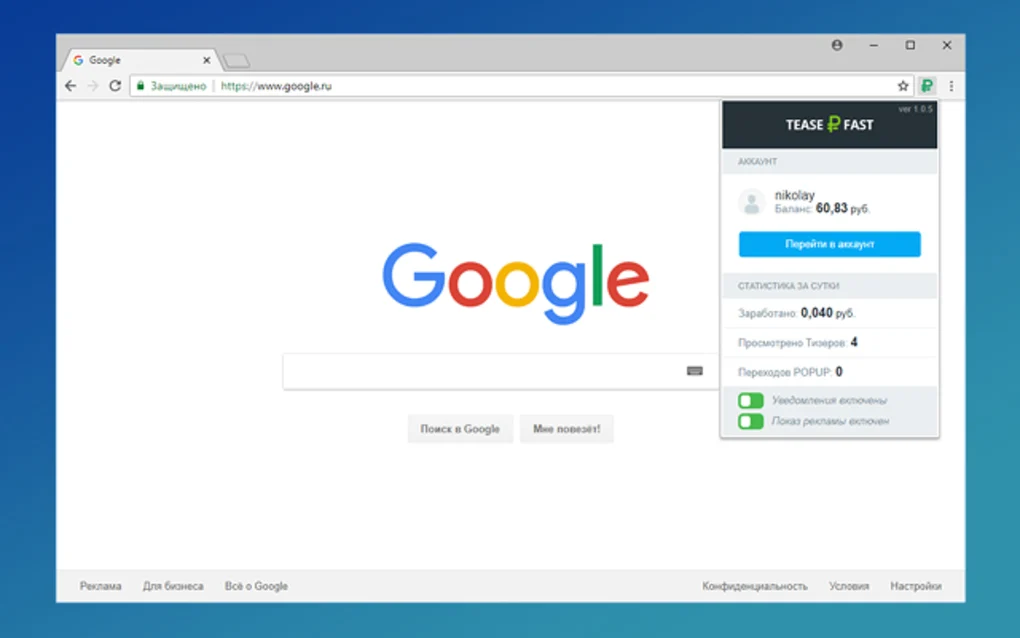
The platform mainly works through a browser extension that displays advertisements while users browse the internet. Users receive small payments for viewing ads, visiting websites, watching videos, and completing promotional tasks.
TeaserFast is commonly used for:
- Passive browser earning
- Paid advertisement viewing
- Traffic generation
- Website promotion
- YouTube view boosting
- Referral marketing
- Browser-based microtasks
- Online advertising campaigns
One of the biggest reasons for the platform’s popularity is simplicity.
Users generally:
- Register an account
- Install the browser extension
- Continue normal browsing
- Receive advertisements automatically
- Earn small rewards for interactions
The platform is commonly used by:
- Passive earning users
- Microtask workers
- Affiliate marketers
- Advertisers
- Traffic buyers
- Referral marketers
- Users searching for online side income
According to the official TeaserFast earning page, the extension displays:
- Teaser ads
- Site visit offers
- YouTube viewing tasks
The platform may support:
- Teaser advertisements
- Popup advertisements
- Paid website visits
- Video viewing tasks
- Referral systems
- Advertising campaigns
- Browser notifications
- Automatic ad display
- Captcha verification
- Payment withdrawals
- Multi-browser support
- Traffic targeting tools
One major feature is browser-based passive advertising.
The extension may show advertisements in the lower-right corner of the screen while users browse normally. Compensation varies depending on advertisement type and viewing duration.
Another earning method includes watching YouTube videos or completing promotional tasks.
The platform also includes a multi-level referral system.
Several reviews mention:
- 5 referral levels
- Percentage commissions from referrals
- Additional advertiser referral commissions
For advertisers, TeaserFast acts as a traffic generation platform.
Businesses may purchase:
- Advertisement impressions
- Website visits
- Video views
- Promotional exposure
The official advertising page claims support for:
- Audience targeting
- Campaign statistics
- Ad configuration
- Traffic analytics
According to the Chrome Web Store listing, the extension has tens of thousands of users and supports Chrome-based browsers.
Supported browsers may include:
- Google Chrome
- Mozilla Firefox
- Opera
- Yandex Browser
Payment methods mentioned across reviews include:
- Payeer
- WebMoney
Some sources claim:
- Low minimum withdrawal thresholds
- Instant payment processing
- Daily withdrawal limits
However, users should clearly understand several important concerns.
The browser extension reportedly accesses:
- User activity
- Browser interactions
- Advertising behavior
Some independent reviews also warn about:
- Privacy concerns
- Activity tracking
- Aggressive advertising
- Potentially misleading ads
Because earnings come from advertising exposure, users effectively exchange browsing attention and behavioral data for small financial rewards.
Additionally, earnings are generally very low compared to traditional employment or freelancing opportunities.
Overall, TeaserFast acts as a browser advertising and micro-earning platform designed for passive ad-viewing rewards, traffic generation, and online advertising campaigns.
💻 System Requirements (Detailed)
Minimum Requirements
- Operating System:
Windows / macOS / Linux - Supported Browsers:
Google Chrome
Mozilla Firefox
Opera
Yandex Browser - Internet:
Required for ad synchronization and earnings - RAM:
Minimum 2GB RAM - Storage:
Very low storage usage
Recommended Requirements
- RAM:
4GB or more - Browser:
Updated Chromium-based browser recommended - Additional Tools:
Frequently used with:- Payeer wallet
- WebMoney wallet
- Browser translation tools for Russian interface users
🔄 Alternatives
If you want similar browser earning or advertising platforms, you can try:
- Surfearner
- VipIP
- TimeBucks
- Scarlet Clicks
- PaidVerts
Some reviews directly compare TeaserFast with Surfearner and VipIP platforms.
❓ FAQ
Q1. What is TeaserFast mainly used for?
It is mainly used for earning small rewards by viewing advertisements through a browser extension.
Q2. Does TeaserFast require installing a browser extension?
Yes, the platform primarily works through a browser extension.
Q3. Can advertisers use TeaserFast?
Yes, businesses can purchase advertisement traffic and promotional campaigns.
Q4. Which browsers support TeaserFast?
Chrome, Firefox, Opera, and some Chromium-based browsers are supported.
Q5. Does TeaserFast pay real money?
Reviews and platform information claim payouts through systems like Payeer and WebMoney.
Q6. Are the earnings high?
No, earnings are generally very small and considered micro-income.
Q7. Are there privacy concerns?
Yes, the extension may collect user activity and browsing-related information.
Features
- ✔️ Browser extension earning system
- ✔️ Paid teaser advertisement viewing
- ✔️ Popup advertisement rewards
- ✔️ Website visit tasks
- ✔️ YouTube video viewing tasks
- ✔️ Referral commission system
- ✔️ Browser notification ads
- ✔️ Passive earning model
- ✔️ Advertising campaign platform
- ✔️ Audience targeting tools
- ✔️ Real-time campaign statistics
- ✔️ Multi-browser compatibility
- ✔️ Low minimum withdrawal system
- ✔️ Traffic generation functionality
- ✔️ Advertiser dashboard support
👍 Pros & 👎 Cons
Pros
- Simple passive earning concept
- Easy registration and setup
- Low withdrawal threshold
- Browser extension works automatically
- Multiple earning methods available
- Referral system included
- Supports advertisers and users
- Compatible with several browsers
Cons
- Earnings are usually extremely small
- Privacy concerns may exist
- Browser activity tracking involved
- Popup ads may become annoying
- Some ads may appear misleading
- Requires browser extension permissions
- Income potential is limited
- Some users may dislike constant advertisements
Our Analysis
In my opinion, TeaserFast became popular because it offers an extremely simple “passive earning” model that requires very little effort from users.
The idea is attractive:
- Install a browser extension
- Continue normal browsing
- Receive small payments automatically
For users wanting tiny amounts of side income without active work, this type of system feels easy and accessible.
Another strong point is the low withdrawal threshold. Several reviews mention that users can reach their first payout relatively quickly because the minimum withdrawal amount is very small.
However, the most important reality is that earnings are extremely limited. Even active users generally earn only small micro-payments rather than meaningful income.
Privacy is another major concern. Browser advertising extensions often track browsing behavior, ad interactions, and user activity to optimize advertising systems. Users should carefully consider whether the tradeoff is worthwhile for the small earnings involved.
Some independent reviews also warn that certain advertisements may feel intrusive or misleading.
For users who simply want experimental passive micro-earning and understand the privacy tradeoffs, TeaserFast can function as a lightweight browser reward platform. However, it should not be viewed as a serious long-term income source.
⚙️ Installation Guide (Step-by-Step)
Step 1: Create an Account
Register on the TeaserFast website.
Step 2: Verify Email
Confirm your registration email if required.
Step 3: Install the Browser Extension
Add the TeaserFast extension to your browser.
Step 4: Enable the Extension
Activate the extension inside the browser toolbar.
Step 5: Continue Browsing Normally
The extension will automatically display teaser ads while browsing.
Step 6: Watch Ads or Visit Sites
Complete:
- Advertisement views
- Website visits
- Video viewing tasks
to receive rewards.
Step 7: Solve Captchas When Required
Some anti-bot verification steps may appear periodically.
Step 8: Configure Payment Details
Add supported payment wallet information.
Step 9: Withdraw Earnings
Request payouts after reaching the minimum withdrawal limit.
Step 10: Monitor Privacy & Permissions
Review extension permissions and browsing impact regularly.
About SoftwareDownloading Editorial Team
The SoftwareDownloading Editorial Team researches Windows software, compatibility information, features, alternatives, and software-related guides for SoftwareDownloading.in.
Our pages are prepared using available product information and relevant documentation. When an application has not been personally tested, we distinguish research-based analysis from hands-on testing. Learn more about our review process
Apps Specs
Developer
Licence
Free
Version
1.2.1
Platform
Windows
Download Clicks
5
Page Reviewed
September 26, 2026
Top Downloads





Disclaimer
This content is provided for educational and informational purposes only. We do not host, store, or distribute any software files on our servers. All trademarks, product names, and logos belong to their respective owners.
We strongly recommend downloading software only from official websites or trusted sources. We are not responsible for any damage, data loss, or issues that may occur from the use of third-party software.
Users should ensure they comply with all applicable laws and software licensing agreements in their country before downloading or using any software mentioned on this website.