- Development & IT
- Servers
- Abyss Web Server

Abyss Web Server is a lightweight yet powerful web server software designed for hosting websites, web applications, and HTTP services on Windows, Linux, and macOS systems. It provides secure, flexible, and efficient website hosting capabilities suitable for both beginners and advanced users.
📌 What is Abyss Web Server?
Abyss Web Server is a compact and feature-rich web server application developed to provide secure and efficient website hosting for individuals, developers, businesses, and administrators. The software supports HTTP and HTTPS protocols and allows users to host websites directly from their own systems without requiring large enterprise server infrastructure.
Web servers are responsible for delivering webpages and web content to browsers through internet protocols. Abyss Web Server performs this role while focusing on simplicity, lightweight performance, security, and customization flexibility.
Unlike very large enterprise web servers that may require complicated configurations, Abyss Web Server provides a more user-friendly environment while still including advanced hosting capabilities.
The software is commonly used for:
- Personal website hosting
- Small business websites
- Local development environments
- Internal company servers
- Educational web projects
- Lightweight application hosting
- Testing and staging servers
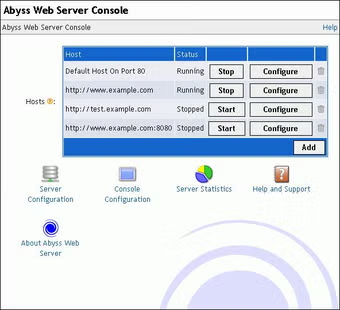
One of the biggest strengths of Abyss Web Server is its balance between simplicity and advanced functionality. Beginners can quickly host websites using the graphical management interface, while advanced users can configure security rules, virtual hosts, SSL certificates, authentication systems, and custom server settings.
Depending on the edition and version, Abyss Web Server may support:
- HTTP and HTTPS hosting
- SSL/TLS encryption
- CGI scripting
- PHP support
- Virtual hosts
- Password protection
- Access control systems
- URL rewriting
- Logging and monitoring tools
- Custom MIME types
- IPv6 support
- Remote administration
The software is known for low system resource usage, making it suitable for low-end computers and lightweight hosting environments.
Abyss Web Server is also appreciated for its security-focused design and straightforward administration tools.
Overall, Abyss Web Server acts as a reliable, lightweight, and flexible web hosting solution for users who want efficient server functionality without excessive complexity.
💻 System Requirements (Detailed)
To run Abyss Web Server smoothly, the following system requirements are recommended:
Minimum Requirements
- Operating System:
Windows XP / Windows 7 / Windows 8 / Windows 10 / Windows 11
Linux distributions and macOS versions may also be supported - Processor:
Intel Pentium or compatible processor - RAM:
Minimum 512MB RAM - Storage Space:
Around 100MB free disk space - Network:
Internet or local network connection required for hosting - Display:
Standard monitor resolution
Recommended Requirements
- Processor:
Intel Core i3 / Ryzen 3 or higher - RAM:
2GB–4GB RAM or more - Storage:
SSD recommended for faster file serving and logging - Network:
Stable broadband connection for public hosting - Additional Tools:
Recommended development utilities include:- Visual Studio Code
- FileZilla
Best Suitable For
Abyss Web Server is ideal for:
- Personal website hosting
- Educational projects
- Small business websites
- Local development environments
- Lightweight hosting servers
- Internal office portals
- Web application testing
- Developers learning web server management
🔄 Alternatives
If you want similar web server software, you can try:
- Apache HTTP Server
- Nginx
- LiteSpeed Web Server
- HFS
- Baby Web Server
❓ FAQ
Q1. What is Abyss Web Server mainly used for?
It is used for hosting websites and web applications.
Q2. Does Abyss Web Server support HTTPS?
Yes, SSL/TLS support is available for secure hosting.
Q3. Can beginners use Abyss Web Server?
Yes, it includes user-friendly administration tools.
Q4. Is PHP supported?
Yes, PHP support is available depending on configuration.
Q5. Can Abyss Web Server run on Linux?
Yes, multiple operating systems are supported.Q6. Is Abyss Web Server lightweight?
Yes, it is designed for low resource usage.
Q7. Is it suitable for large enterprise hosting?
It is better suited for lightweight to medium hosting environments.
🔄 Best Alternatives
Features
- ✔️ HTTP and HTTPS web hosting
- ✔️ SSL/TLS security support
- ✔️ Lightweight server architecture
- ✔️ Virtual host management
- ✔️ CGI and PHP support
- ✔️ Remote server administration
- ✔️ Password-protected directories
- ✔️ URL rewriting functionality
- ✔️ Detailed server logging tools
- ✔️ IPv6 compatibility
- ✔️ Multi-platform support
- ✔️ Custom MIME type configuration
- ✔️ Beginner-friendly administration interface
- ✔️ Low memory and CPU usage
- ✔️ Suitable for personal and business hosting
👍 Pros & 👎 Cons
Pros
- Lightweight and fast performance
- Easy for beginners to configure
- Good security and SSL support
- Works on multiple operating systems
- Low system resource consumption
- Supports virtual hosts and PHP
- Suitable for local and online hosting
- Simple graphical administration tools
Cons
- Smaller community compared to Apache or Nginx
- Some advanced enterprise features may be limited
- Large-scale traffic handling may require stronger servers
- Certain modules available in Apache may not exist here
- Advanced configurations may still require technical knowledge
Expert Review
In my opinion, Abyss Web Server is an excellent choice for users who want a lightweight but capable web server that balances simplicity and advanced hosting functionality. The software is especially useful for personal websites, small businesses, localhost environments, and educational projects.
One of the strongest advantages is its low resource usage combined with strong security support. The graphical administration interface also makes server management easier for beginners compared to some command-line-focused web servers.
Although it may not replace enterprise-grade server environments for extremely high-traffic applications, Abyss Web Server performs very well for small-to-medium hosting needs and development environments. Its multi-platform support and lightweight architecture make it a flexible and practical hosting solution.
If you need a simple, efficient, and secure web server for lightweight hosting or local development, Abyss Web Server is definitely worth considering.
How to Install
⚙️ Installation Guide (Step-by-Step)
Follow these steps to install Abyss Web Server:
Step 1: Download Abyss Web Server
Download the latest version from a trusted source.
Step 2: Run the Installer
Open the setup file and allow administrator permissions if requested.
Step 3: Accept License Agreement
Read and agree to the installation terms.
Step 4: Choose Installation Directory
Select the folder where the software will be installed.
Step 5: Configure Server Settings
Choose:
- HTTP port
- HTTPS options
- Server directories
- Host settings
Step 6: Complete Installation
Click Install and wait for the setup process to finish.
Step 7: Launch Abyss Web Server
Open the server management interface.
Step 8: Add Website Files
Place HTML, PHP, or web application files into the server directory.
Step 9: Start the Web Server
Enable hosting services from the control panel.
Step 10: Test Website Access
Open your browser and visit:
http://localhostto verify server functionality.
Apps Specs
Licence
Free
Latest Update
June 24, 2026
Platform
Windows
Downloads
1
Devlopers
Top Downloads



Related Topics
Disclaimer
This content is provided for educational and informational purposes only. We do not host, store, or distribute any software files on our servers. All trademarks, product names, and logos belong to their respective owners.
We strongly recommend downloading software only from official websites or trusted sources. We are not responsible for any damage, data loss, or issues that may occur from the use of third-party software.
Users should ensure they comply with all applicable laws and software licensing agreements in their country before downloading or using any software mentioned on this website.
You may also like






Alternatives to



Expore Apps