- Utilities & Tools
- Data Recovery
- Aomei Backupper Pro
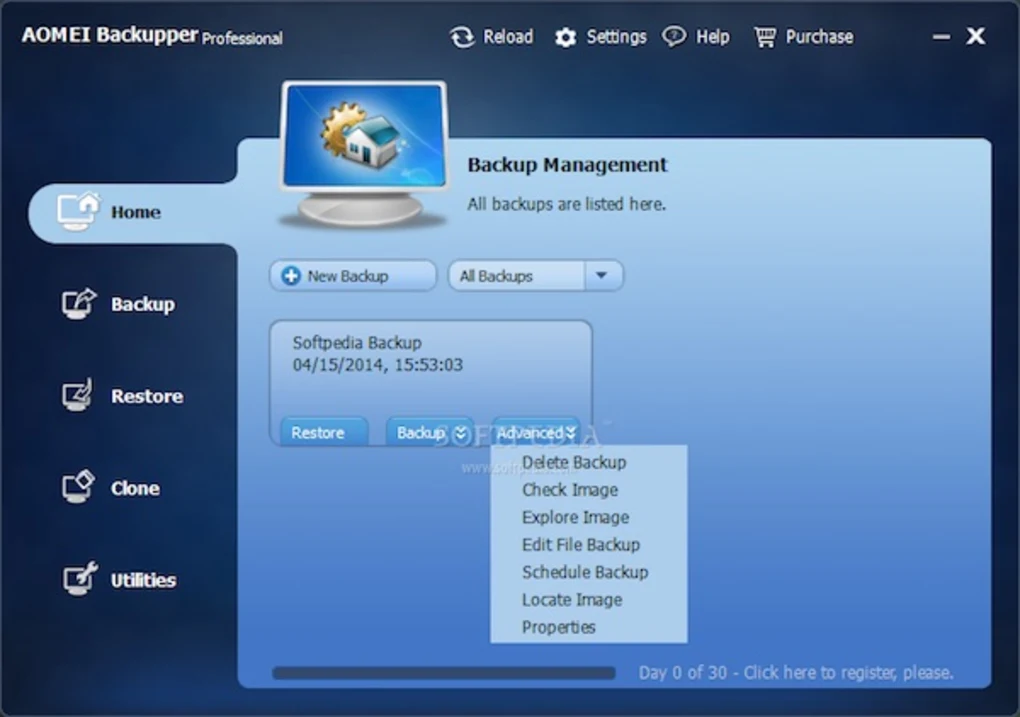
AOMEI Backupper Pro is a Windows backup, disk imaging, cloning, synchronization, and disaster recovery solution developed for protecting operating systems, files, applications, and storage devices.
The software is commonly used for system backups, disk cloning, SSD migration, scheduled backups, and recovery workflows in home, office, and business environments.
📌 What is AOMEI Backupper Pro?
AOMEI Backupper Pro is a backup and recovery application designed to help users protect digital data and restore systems after hardware failure, corruption, accidental deletion, or operating system problems.
The software is commonly used for:
- Full system backup
- Disk imaging
- File backup
- SSD migration
- Drive cloning
- Disaster recovery
- Scheduled backups
- Partition backup
One of the biggest strengths of the software is complete backup automation.
Users can create backup plans that run automatically without manual intervention.
The software is commonly used by:
- Home users
- Office users
- IT administrators
- Small businesses
- Technicians
- Power users
Depending on the version and configuration, AOMEI Backupper Pro may support:
- System image backups
- Incremental backups
- Differential backups
- Disk cloning
- SSD migration
- Partition cloning
- File synchronization
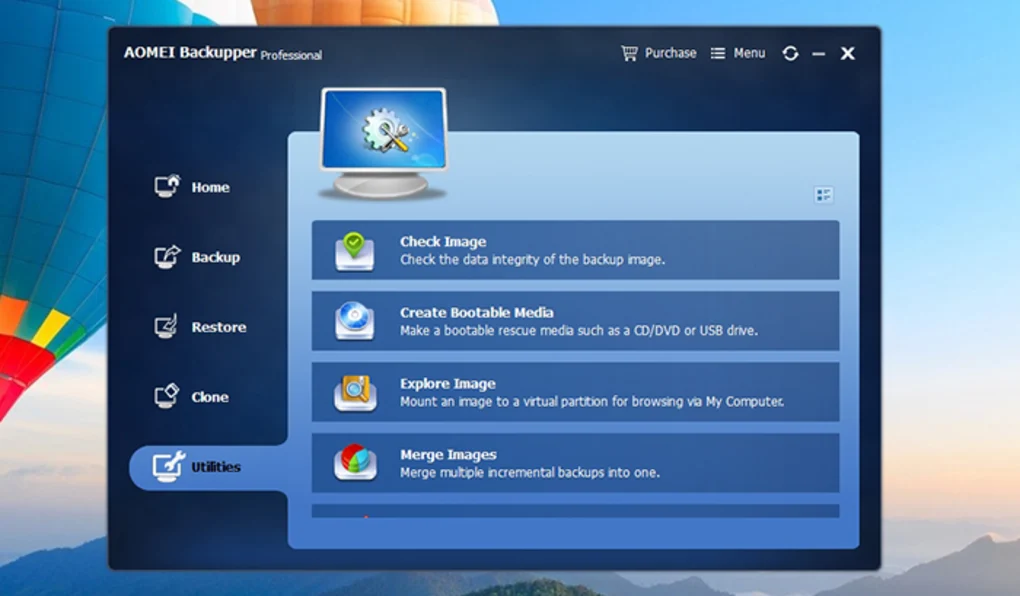
- Bootable rescue media
- Universal restore
- Backup scheduling
- Compression support
- Encryption support
- Cloud backup integration
- NAS backup support
- Dynamic disk support
- GPT/UEFI compatibility
One major feature category is system backup.
Users can create full backups of:
- Windows operating systems
- Installed applications
- System settings
- Drivers
- Boot partitions
This allows restoration after:
- Windows corruption
- Malware attacks
- Failed updates
- Hardware replacement
- Disk failure
Another major feature is disk cloning.
Users often migrate from:
- HDD to SSD
- Old SSD to larger SSD
- Smaller drives to larger storage devices
The software may help duplicate entire storage devices while preserving:
- Bootability
- Partitions
- Operating systems
- Installed software
Incremental and differential backup support is another important capability.
Instead of repeatedly copying all data, the software may only save changed files after the initial backup.
This improves:
- Storage efficiency
- Backup speed
- Automation performance
AOMEI Backupper Pro also commonly includes bootable rescue environments.
These recovery systems may help restore backups even when Windows no longer starts correctly.
The software generally supports:
- Windows 7
- Windows 10
- Windows 11
- UEFI systems
- GPT disks
- NTFS/FAT file systems
Storage destinations may include:
- Internal drives
- External HDDs
- SSDs
- NAS devices
- USB drives
- Network shares
Another useful feature is file synchronization.
Users can synchronize folders between:
- PCs
- Backup drives
- NAS systems
- External storage devices
However, users should understand several important considerations.
Backups are only useful if they are:
- Verified properly
- Stored safely
- Updated regularly
Users should periodically test restore procedures to ensure backups are functional.
Another important factor is ransomware protection.
If backups remain connected to infected systems, ransomware may also encrypt backup files.
Many users therefore maintain:
- Offline backups
- Multiple backup copies
- External backup rotation systems
Large system images may also require substantial storage space.
Backup performance depends on:
- Drive speed
- Compression settings
- File quantity
- System workload
Another important limitation is that cloning operations may become complicated when dealing with:
- BitLocker encryption
- Corrupted partitions
- Dynamic disks
- Mixed boot modes
Users should also obtain backup software only from trusted sources.
Overall, AOMEI Backupper Pro acts as a comprehensive Windows backup and disaster recovery platform designed to protect systems, storage devices, and user data from loss or hardware failure.
💻 System Requirements (General)
Minimum Requirements
- Operating System:
Windows 7 / Windows 10 / Windows 11 - Processor:
Intel or AMD compatible processor - RAM:
Minimum 2GB–4GB RAM - Storage:
Free space for backup images - File Systems:
NTFS / FAT32 / exFAT support
Recommended Requirements
- RAM:
8GB RAM or more - Storage:
SSD recommended for faster backup operations - Additional Hardware:
- External HDDs
- NAS storage
- USB backup drives
- Secondary SSDs
🔄 Alternatives
Users commonly compare AOMEI Backupper Pro with:
- Macrium Reflect
- EaseUS Todo Backup
- Acronis True Image
- Clonezilla
- Veeam Agent
❓ FAQ
Q1. What is AOMEI Backupper Pro mainly used for?
It is mainly used for Windows backups, disk imaging, cloning, and disaster recovery.
Q2. Can it clone HDDs to SSDs?
Yes, SSD migration and disk cloning are common features.
Q3. What are incremental backups?
Incremental backups only save changed data after the initial backup.
Q4. Can backups restore Windows after failure?
Yes, system image restoration is one of its main functions.
Q5. Why is rescue media important?
Bootable rescue media allows recovery when Windows cannot start.
Q6. Does backup software protect against ransomware automatically?
Not completely. Offline or isolated backups are still important.
Q7. Can backup images become corrupted?
Yes, users should periodically verify backup integrity.
🔄 Best Alternatives
Features
- ✔️ Full system backup
- ✔️ Disk imaging support
- ✔️ Incremental and differential backups
- ✔️ SSD and HDD cloning
- ✔️ Bootable rescue media
- ✔️ Partition backup and restore
- ✔️ Automatic scheduled backups
- ✔️ File synchronization
- ✔️ Universal restore support
- ✔️ Backup compression
- ✔️ Backup encryption
- ✔️ NAS and network backup support
- ✔️ GPT/UEFI compatibility
- ✔️ Windows disaster recovery tools
- ✔️ Beginner-friendly interface
👍 Pros & 👎 Cons
Pros
- Easy backup automation
- Useful disaster recovery features
- Supports SSD migration
- Incremental backups save storage space
- Helpful for Windows restoration
- Beginner-friendly interface
- Supports network and NAS backups
- Bootable recovery media improves flexibility
Cons
- Large backups require significant storage
- Restore testing is still necessary
- Advanced configurations may be complex
- Cloning encrypted disks can be complicated
- Backup speed depends on hardware performance
- Some enterprise features may require higher editions
- Poor backup planning can reduce recovery effectiveness
Expert Review
In my opinion, AOMEI Backupper Pro is valuable because reliable backup systems are one of the most important parts of computer maintenance, yet many users ignore backups until data loss occurs.
One of the biggest strengths is versatility. The software combines:
- System imaging
- Cloning
- Scheduling
- Synchronization
- Disaster recovery
into a relatively user-friendly interface.
The SSD migration and cloning tools are especially useful because many users upgrade from traditional HDDs to SSDs and want to preserve existing Windows installations.
Incremental and differential backups are also important advantages because they reduce storage usage and improve automation efficiency.
The rescue media feature significantly improves recovery flexibility because users can restore systems even after complete boot failure.
However, backup software is only effective when users maintain proper backup habits. Many people create a single backup and never update or test it again.
Another critical point is ransomware safety. Backups connected permanently to the system may also become encrypted during attacks.
For home users, small businesses, technicians, and Windows power users seeking automated backup and recovery functionality, AOMEI Backupper Pro can be a strong and practical data protection solution.
How to Install
⚙️ Installation Guide (General Overview)
Step 1: Download the Software
Obtain the installer from a trusted source.
Step 2: Install the Application
Complete the Windows installation process.
Step 3: Launch AOMEI Backupper Pro
Open the backup management interface.
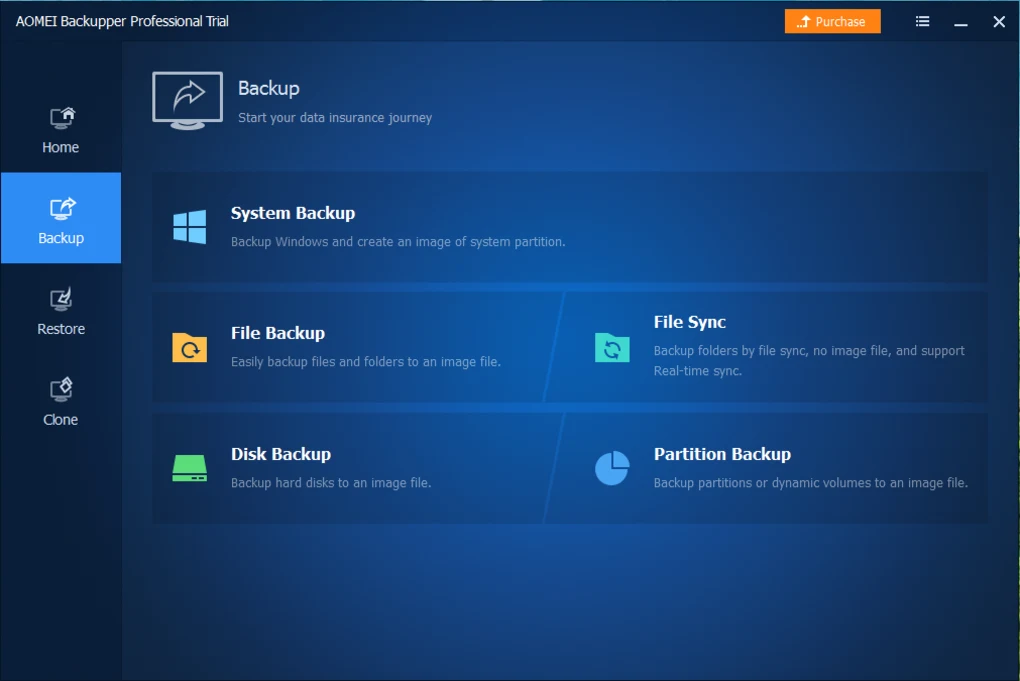
Step 4: Select Backup Type
Choose:
- System backup
- Disk backup
- File backup
- Partition backup
Step 5: Choose Destination Storage
Select backup storage such as:
- External drive
- NAS
- Secondary SSD
- Network share
Step 6: Configure Backup Settings
Adjust:
- Scheduling
- Compression
- Encryption
- Incremental backup options
Step 7: Start the Backup Process
Create the initial backup image.
Step 8: Create Rescue Media
Generate bootable recovery USB or ISO media.
Step 9: Test Backup Recovery
Verify restore functionality periodically.
Step 10: Maintain Regular Backup Schedules
Keep backups updated consistently.
Apps Specs
Licence
Trial
Latest Update
June 24, 2026
Platform
Windows
Downloads
Devlopers
Releted Searches
Top Downloads




Related Topics
Disclaimer
This content is provided for educational and informational purposes only. We do not host, store, or distribute any software files on our servers. All trademarks, product names, and logos belong to their respective owners.
We strongly recommend downloading software only from official websites or trusted sources. We are not responsible for any damage, data loss, or issues that may occur from the use of third-party software.
Users should ensure they comply with all applicable laws and software licensing agreements in their country before downloading or using any software mentioned on this website.
You may also like






Alternatives to

Expore Apps