- Utilities & Tools
- Printer & Fax
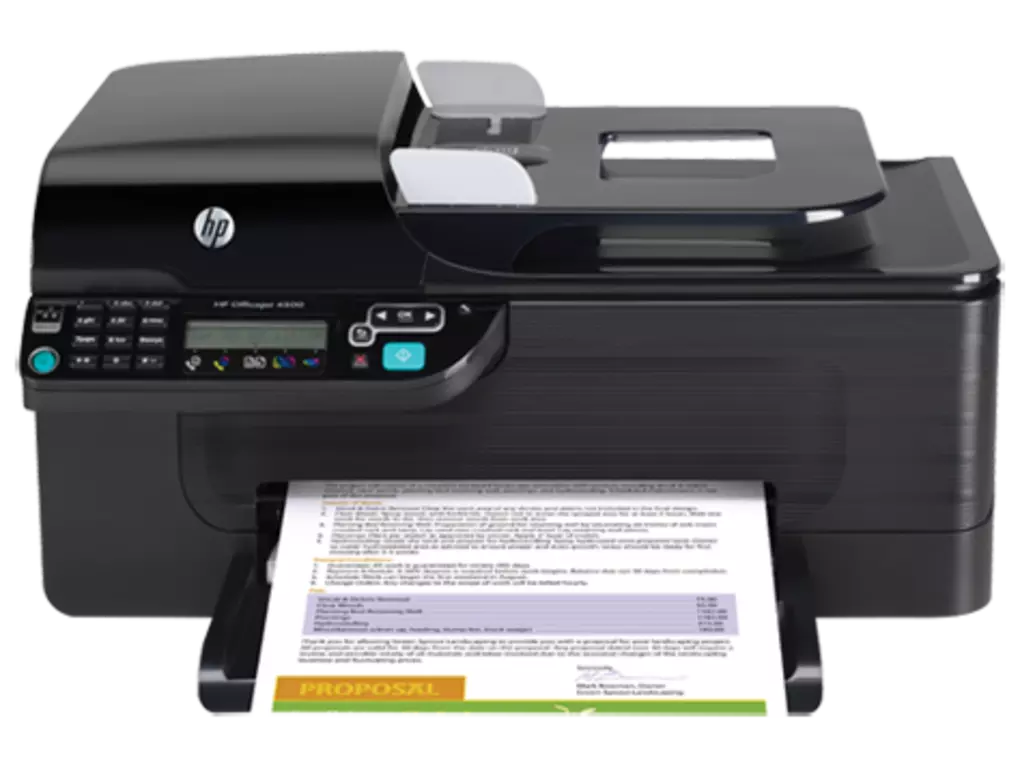
- HP Officejet 4500 All in One Printer driver

HP Officejet 4500 All-in-One Printer Driver is designed to provide communication between the HP Officejet 4500 printer and the Windows operating system.
The driver acts as a bridge that allows the computer to:
- Detect the printer
- Send print commands
- Configure printer settings
- Access scanning features
- Manage copy and fax functions
- Monitor printer status
The HP Officejet 4500 series is commonly used in:
- Home offices
- Small businesses
- Educational environments
- Personal productivity workflows
Depending on the version, the driver package may include:
- Printing drivers
- Scanner drivers
- Fax support tools
- HP device utilities
- Ink monitoring tools
- Printer management software
One major advantage of installing the official HP driver is full feature compatibility because generic drivers may not support advanced scanning or multifunction operations.
Users may also gain access to:
- Print quality adjustments
- Paper handling controls
- Ink management features
- Scanning configuration options
- Wireless printer setup tools
The driver package helps maintain stable communication between the operating system and the printer hardware for reliable daily operation.
📌 What is HP Officejet 4500 All-in-One Printer Driver?
HP Officejet 4500 All-in-One Printer Driver is the official driver package required for enabling communication between the HP Officejet 4500 All-in-One printer and a Windows computer. The driver allows the operating system to properly recognize and operate the printer’s printing, scanning, copying, and faxing functions.
Without the correct driver installed, the printer may not function correctly or some features may remain unavailable.
The software is mainly used for printer setup, device communication, print management, scanning operations, and maintaining stable multifunction printer performance on compatible Windows systems.
🚀 Key Uses
- Installing HP Officejet 4500 printer on Windows
- Enabling printing and scanning functionality
- Supporting copy and fax operations
- Managing printer communication with the system
- Configuring printer preferences and print quality
- Troubleshooting printer detection issues
- Supporting home and office document workflows
- Managing wireless or USB printer connectivity
- Improving printer compatibility and stability
- Maintaining multifunction printer performance
💻 System Requirements (General)
Minimum Requirements
- Windows XP / 7 / 8 / 10 / 11
- 1GB–2GB RAM
- HP Officejet 4500 printer
- USB or network connection support
- Basic processor
Recommended Requirements
- 4GB+ RAM
- Updated Windows environment
- Stable internet connection for updates
- Latest HP driver version
- Updated printer firmware
- Sufficient storage space for full driver package installation
🔄 Alternatives
- HP Smart
- Windows Built-in Printer Drivers
- HP Universal Print Driver
- HP Easy Start
- Generic printer setup utilities
❓ FAQ
Q1. What is HP Officejet 4500 All-in-One Printer Driver used for?
It is used to connect and operate the HP Officejet 4500 multifunction printer on Windows systems.
Q2. Is the driver necessary for scanning and printing?
Yes, the correct driver is generally required for full printer functionality including scanning and printing.
Q3. Does it support wireless connectivity?
Some models support wireless or network printing depending on the hardware version.
Q4. Can it fix printer detection issues?
Yes, reinstalling or updating the driver often resolves communication problems.
Q5. Does it work offline?
Yes, printing and scanning can usually function offline after setup is complete.
🔄 Best Alternatives
Features
✔ Printing functionality support
✔ Scanner driver integration
✔ Copy and fax operation support
✔ USB and network connectivity support
✔ Printer detection and setup tools
✔ Print quality management options
✔ Ink monitoring functionality
✔ Multifunction printer compatibility
✔ Home and office printing workflows
✔ Printer troubleshooting support
✔ Stable Windows integration
✔ Printer preference customization
✔ Device communication management
✔ Lightweight printer control utilities
👍 Pros & 👎 Cons
Pros
- Enables full printer functionality
- Supports printing, scanning, and copying
- Improves printer compatibility and stability
- Useful for home and office environments
- Helps resolve printer communication issues
- Supports multifunction workflows
Cons
- Mainly useful for HP Officejet 4500 series printers
- Older printer models may require compatibility adjustments
- Full driver packages can be larger in size
- Some advanced features depend on specific printer models
Expert Review
HP Officejet 4500 All-in-One Printer Driver is an essential software package for users who rely on the HP Officejet 4500 multifunction printer for everyday document management tasks.
Its strongest advantages are:
- Stable multifunction printer support
- Reliable scanning and printing integration
- Easy printer setup process
- Useful home and office workflow support
The driver package performs well for users who need dependable printing, scanning, copying, and faxing functionality in a single device.
Although the Officejet 4500 is an older printer series, it remains useful for many home and small office environments because of its multifunction capabilities and practical document handling features.
Overall, it is a reliable driver solution for enabling complete HP Officejet 4500 printer functionality and stable Windows device communication.
How to Install
⚙️ Installation Guide (General Overview)
Step 1: Download Driver
Download HP Officejet 4500 All-in-One Printer Driver from the official HP website or a trusted software provider.
Step 2: Prepare Printer
Ensure the HP Officejet 4500 printer is powered on and ready for installation.
Step 3: Run Setup File
Open the downloaded installer and begin the installation process.
Step 4: Accept License Agreement
Agree to installation terms and continue setup.
Step 5: Install Driver Components
Allow the setup wizard to install:
- Printer drivers
- Scanner drivers
- HP utilities
- Communication components
Step 6: Connect Printer
Connect the printer through:
- USB cable
- Wireless network
- Local network connection
depending on supported hardware configuration.
Step 7: Detect Printer Automatically
Allow the installer to identify and configure the connected printer.
Step 8: Complete Installation
Finish setup and restart the computer if required.
Step 9: Test Printer Functions
Verify:
- Printing
- Scanning
- Copy functionality
- Device communication
Step 10: Configure Preferences
Adjust:
- Print quality
- Paper settings
- Scan resolution
- Network options
- Default printing preferences
Apps Specs
Licence
Free
Latest Update
June 24, 2026
Platform
Windows
Downloads
2
Devlopers
Top Downloads


Related Topics
Disclaimer
This content is provided for educational and informational purposes only. We do not host, store, or distribute any software files on our servers. All trademarks, product names, and logos belong to their respective owners.
We strongly recommend downloading software only from official websites or trusted sources. We are not responsible for any damage, data loss, or issues that may occur from the use of third-party software.
Users should ensure they comply with all applicable laws and software licensing agreements in their country before downloading or using any software mentioned on this website.
You may also like






Alternatives to
Expore Apps