- Utilities & Tools
- Keyboards
- Avro Keyboard

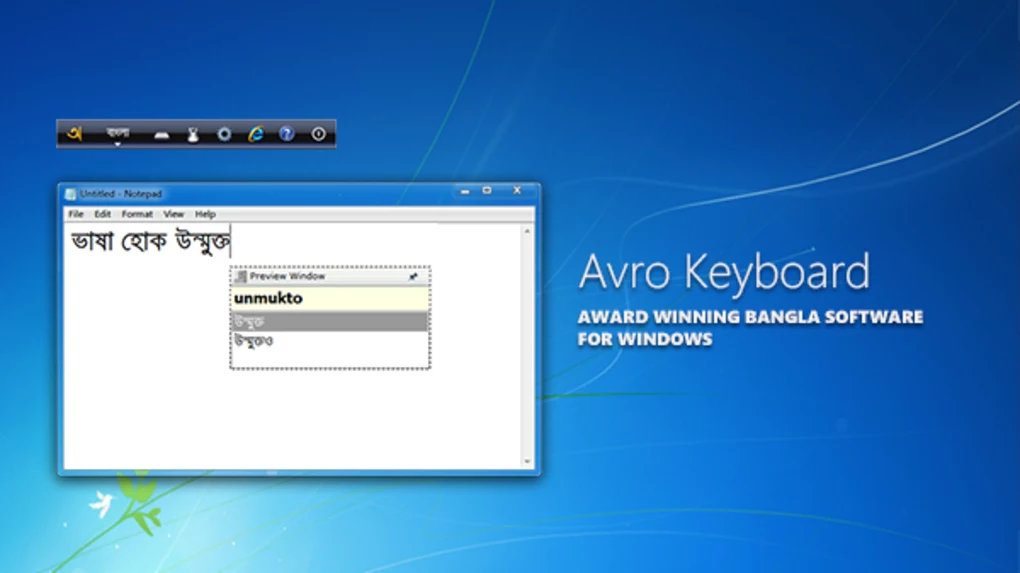
Avro Keyboard is designed to simplify Bangla typing on computers by converting English phonetic input into Bengali characters. Instead of memorizing complex keyboard layouts, users can type Bangla words using English pronunciation patterns.
For example, users can type Bangla words using Latin characters, and the software automatically converts them into proper Bengali script in real time.
The software is commonly used for:
- Writing Bengali articles and blogs
- Academic assignments and notes
- Social media communication
- Online messaging and chatting
- Professional office work in Bangla
One of the biggest strengths of Avro Keyboard is phonetic typing support because it allows even non-technical users to type Bengali quickly without learning complicated layouts.
The software usually supports:
- Unicode Bangla typing
- Multiple keyboard layouts
- Automatic spelling suggestions
- Keyboard shortcuts
- Language switching tools
- Custom dictionary support
It integrates smoothly with most Windows applications including browsers, word processors, email clients, and chat applications.
📌 What is Avro Keyboard?
Avro Keyboard is a popular Bangla typing software designed to help users write Bengali (Bangla) text easily on Windows computers using standard English keyboards. It provides phonetic typing support, multiple keyboard layouts, Unicode compatibility, and language conversion tools for smooth Bengali text input.
The software is widely used by Bangla-speaking users for typing documents, chatting online, creating content, academic work, and professional communication in the Bengali language.
🚀 Key Uses
- Typing Bangla text using English keyboard
- Bengali Unicode text input
- Writing Bangla documents and articles
- Online chatting and messaging in Bangla
- Bangla website content creation
- Academic and educational typing
- Social media posting in Bengali language
- Email and office communication in Bangla
🔄 Alternatives
- Bijoy Bayanno
- Google Input Tools (Bangla)
- Ridmik Keyboard
- Probhat Keyboard
- Microsoft Indic Language Input Tool
- Easy Bangla Typing
❓ FAQ
Q1. What is Avro Keyboard used for?
It is used for typing Bangla (Bengali) text using an English keyboard.
Q2. Does it support Unicode?
Yes, it fully supports Unicode Bangla typing.
Q3. Is it free to use?
Yes, Avro Keyboard is generally available as free software.
Q4. Can beginners use it easily?
Yes, phonetic typing makes Bangla typing easier for beginners.
Q5. Does it work offline?
Yes, it works completely offline after installation.
Features
✔ Bangla phonetic typing support
✔ Unicode Bengali text compatibility
✔ Multiple keyboard layout support
✔ Real-time character conversion
✔ Automatic word suggestions
✔ Custom dictionary support
✔ Easy language switching
✔ Lightweight background operation
✔ Works with most Windows applications
✔ Keyboard shortcut support
✔ Fast and accurate Bangla typing
✔ Beginner-friendly interface
👍 Pros & 👎 Cons
Pros
- Easy Bangla typing using English keyboard
- Excellent Unicode support
- Lightweight and fast performance
- Beginner-friendly phonetic input
- Useful for education and office work
- Works across most Windows applications
Cons
- Mainly useful for Bangla language users
- Some advanced layouts may require learning
- Interface design feels basic
- Occasional spelling prediction limitations
Our Analysis
Avro Keyboard is one of the most practical and user-friendly Bangla typing solutions available for Windows users.
Its biggest strengths are:
- Easy phonetic typing
- Smooth Unicode compatibility
- Lightweight performance
- Beginner-friendly workflow
The software makes Bangla typing accessible even for users who do not know traditional Bengali keyboard layouts.
It performs very well in daily communication, educational work, content creation, and office productivity environments. The phonetic engine is especially useful because it significantly reduces the learning curve for Bengali typing.
Overall, it is a highly reliable and efficient Bangla typing software for personal, academic, and professional communication on Windows systems.
⚙️ Installation Guide (General Overview)
Step 1: Download Software
Download Avro Keyboard from a trusted source or official provider.
Step 2: Run Setup File
Open the installer and begin the installation process. Follow the on-screen setup instructions carefully.
Step 3: Choose Installation Options
Select installation directory and additional options such as desktop shortcut creation if needed.
Step 4: Complete Installation
Finish the setup process and allow the software to integrate with Windows keyboard settings.
Step 5: Launch Avro Keyboard
Open the application from desktop shortcut or system tray.
Step 6: Select Typing Mode
Choose preferred typing method such as:
- Phonetic typing
- Traditional keyboard layout
- Unicode mode
Step 7: Configure Language Preferences
Adjust keyboard settings, shortcuts, and language preferences according to your workflow.
Step 8: Start Typing in Bangla
Open any application like Word, browser, or messaging software and begin typing Bengali text using the selected input method.
About SoftwareDownloading Editorial Team
The SoftwareDownloading Editorial Team researches Windows software, compatibility information, features, alternatives, and software-related guides for SoftwareDownloading.in.
Our pages are prepared using available product information and relevant documentation. When an application has not been personally tested, we distinguish research-based analysis from hands-on testing. Learn more about our review process
Apps Specs
Developer
Licence
Free
Version
5.6.0
Platform
Windows
Download Clicks
0
Page Reviewed
September 27, 2026
Top Downloads





Related Topics
Disclaimer
This content is provided for educational and informational purposes only. We do not host, store, or distribute any software files on our servers. All trademarks, product names, and logos belong to their respective owners.
We strongly recommend downloading software only from official websites or trusted sources. We are not responsible for any damage, data loss, or issues that may occur from the use of third-party software.
Users should ensure they comply with all applicable laws and software licensing agreements in their country before downloading or using any software mentioned on this website.