- Utilities & Tools
- File Managers
- Windows File Recovery

Windows File Recovery is a command-line data recovery utility developed by Microsoft for recovering deleted files from Windows storage devices such as hard drives, SSDs, USB drives, and memory cards.
The software is primarily designed for recovering accidentally deleted files from NTFS, FAT, exFAT, and ReFS storage systems on Windows computers.
📌 What is Windows File Recovery?
Windows File Recovery is an official Windows recovery utility designed to help users recover deleted or lost files from storage devices.
The software is commonly used for:
- Deleted file recovery
- USB recovery
- SD card recovery
- HDD recovery
- SSD recovery
- Photo restoration
- Document recovery
- File system recovery
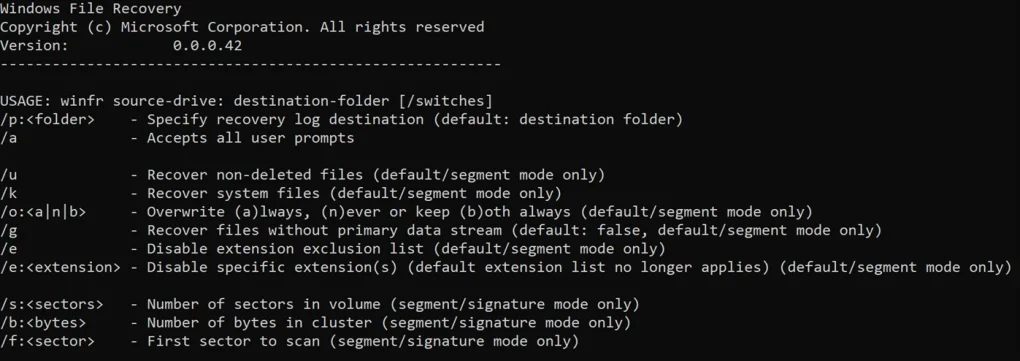
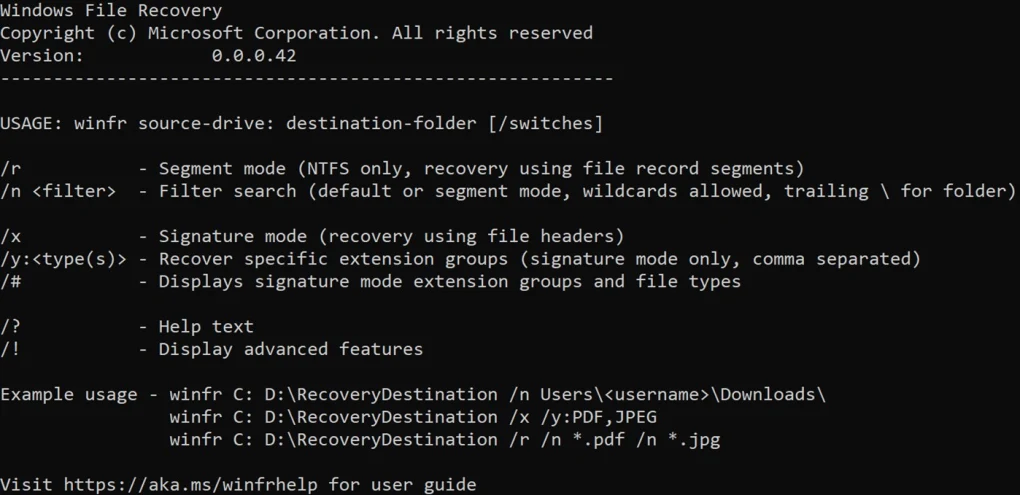
Unlike many graphical recovery tools, Windows File Recovery primarily operates through a command-line interface.
The software is commonly used by:
- Windows users
- IT technicians
- Office users
- Students
- System administrators
- Advanced PC users
Depending on the recovery mode and file system, the utility may support:
- Regular recovery mode
- Extensive recovery mode
- Signature recovery
- NTFS recovery
- FAT/exFAT recovery
- ReFS recovery
- File filtering
- Folder targeting
- Specific extension recovery
- Deep scanning workflows
The software may recover file types including:
- Photos
- Videos
- Documents
- ZIP archives
- PDFs
- Audio files
- Project files
One major feature category is NTFS recovery mode.
This mode is commonly used when files were recently deleted from standard Windows drives.
Another important feature is Extensive mode.
Extensive mode may help recover files after:
- Disk corruption
- Formatting
- Partition issues
- Severe file system damage
The software may also support signature-based recovery for file types such as:
- JPG
- PNG
- MP4
- ZIP
Windows File Recovery generally works on:
- Windows 10
- Windows 11
and supports storage devices including:
- Internal HDDs
- SSDs
- USB flash drives
- SD cards
- External hard drives
One important advantage is that the utility is developed directly by Microsoft, making it a trusted official Windows recovery tool.
Another major benefit is lightweight operation because the software is relatively small and focused primarily on recovery tasks.
However, users should understand several important limitations.
Recovery success is never guaranteed.
Once deleted data becomes overwritten by new information, recovery may become impossible.
SSD recovery may also be heavily limited because of:
- TRIM functionality
- Garbage collection systems
which can permanently erase deleted data blocks quickly.
Another important limitation is usability.
Because Windows File Recovery is command-line based, beginners may find it more difficult than graphical recovery tools.
Users often need to understand:
- Command syntax
- File paths
- Recovery modes
- Drive selection
The software also cannot fully repair severe physical hardware failures such as:
- Damaged SSD controllers
- Mechanically failed HDDs
- Broken NAND chips
- Severe platter damage
Such situations usually require professional recovery laboratories.
Another important consideration is recovery destination management.
Recovered files should always be saved to a different drive than the damaged or source drive to avoid overwriting recoverable sectors.
Users should also minimize further use of affected drives after accidental deletion because continued activity reduces recovery success rates.
Overall, Windows File Recovery acts as an official Windows command-line recovery utility designed to restore deleted files and assist users with logical data recovery scenarios on supported storage devices.
💻 System Requirements (General)
Minimum Requirements
- Operating System:
Windows 10 version 2004 or later / Windows 11 - Processor:
Intel or AMD compatible processor - RAM:
Minimum 2GB–4GB RAM - Storage:
Additional storage for recovered files - Supported File Systems:
NTFS / FAT / exFAT / ReFS
Recommended Requirements
- RAM:
8GB RAM or more - Storage:
SSD recommended for faster scan performance - Additional Recommendations:
- External recovery destination drive
- Minimal drive activity after deletion
- Administrator privileges
🔄 Alternatives
Users commonly compare Windows File Recovery with:
- Recuva
- Disk Drill
- EaseUS Data Recovery Wizard
- R-Studio
- MiniTool Power Data Recovery
❓ FAQ
Q1. What is Windows File Recovery mainly used for?
It is mainly used for recovering deleted files from Windows storage devices.
Q2. Is Windows File Recovery free?
Yes, it is an official free utility from Microsoft.
Q3. Does it have a graphical interface?
No, it primarily uses command-line operations.
Q4. Can it recover files from USB drives?
Yes, USB recovery is supported.
Q5. Does SSD recovery have limitations?
Yes, SSD TRIM can permanently erase deleted data quickly.
Q6. Should recovered files be saved to the same drive?
No, recovered data should be saved to a different drive.
Q7. Can it recover physically damaged drives?
No, severe physical damage usually requires professional recovery labs.
🔄 Best Alternatives
Features
- ✔️ Official Microsoft recovery utility
- ✔️ Deleted file recovery
- ✔️ NTFS recovery support
- ✔️ FAT/exFAT recovery
- ✔️ USB and SD card recovery
- ✔️ HDD and SSD compatibility
- ✔️ Extensive deep scan modes
- ✔️ Signature-based recovery
- ✔️ File extension filtering
- ✔️ Command-line operation
- ✔️ Lightweight installation
- ✔️ Windows 10 and 11 compatibility
- ✔️ External drive support
- ✔️ Advanced recovery modes
- ✔️ Free official recovery solution
👍 Pros & 👎 Cons
Pros
- Official Microsoft utility
- Free to use
- Lightweight installation
- Supports multiple file systems
- Useful for accidental deletion recovery
- Advanced recovery modes available
- Good for technical users
- Supports external storage devices
Cons
- Command-line interface may confuse beginners
- Recovery success is not guaranteed
- SSD TRIM limits recovery effectiveness
- Overwritten files may become unrecoverable
- No advanced graphical interface
- Physical hardware failures require professionals
- Complex syntax for advanced operations
Expert Review
In my opinion, Windows File Recovery is valuable because it gives Windows users an official, trustworthy recovery utility directly from Microsoft without requiring third-party recovery software.
One of the biggest strengths is simplicity of purpose. The utility focuses specifically on file recovery rather than including excessive additional tools or advertisements.
The support for multiple file systems and advanced recovery modes also makes it surprisingly capable for a free built-in ecosystem tool.
Another advantage is signature-based recovery, which can help locate file types even after serious file system corruption.
However, the command-line interface is likely the biggest barrier for casual users.
Many people prefer graphical recovery interfaces because command syntax can feel intimidating.
Another important limitation is that modern SSDs significantly reduce recovery success because of TRIM and secure storage management behavior.
Users should also understand that no recovery software can guarantee complete restoration after overwriting occurs.
For technically comfortable Windows users needing an official lightweight recovery utility for accidental deletions and logical file recovery situations, Windows File Recovery can be a practical and trustworthy solution.
How to Install
⚙️ Installation Guide (General Overview)
Step 1: Install from Microsoft Store
Download Windows File Recovery from official Microsoft sources.
Step 2: Launch Command Prompt or Windows Terminal
Run the recovery utility with administrative privileges.
Step 3: Select Source and Destination Drives
Choose:
- Source drive containing deleted files
- Separate destination drive for recovery
Step 4: Choose Recovery Mode
Examples include:
- Regular mode
- Extensive mode
- Signature mode
Step 5: Apply File Filters if Needed
Specify:
- File extensions
- Folder locations
- Search targets
Step 6: Start Recovery Scan
Allow the utility to analyze the storage device.
Step 7: Review Recovery Results
Recovered files are stored in recovery folders.
Step 8: Verify File Integrity
Check whether recovered files open correctly.
Step 9: Backup Important Data
Create backups after successful recovery.
Step 10: Maintain Preventive Backup Strategies
Regular backups reduce future recovery risks.
Apps Specs
Licence
Free
Latest Update
June 24, 2026
Platform
Windows
Downloads
2
Devlopers
Top Downloads





Related Topics
Disclaimer
This content is provided for educational and informational purposes only. We do not host, store, or distribute any software files on our servers. All trademarks, product names, and logos belong to their respective owners.
We strongly recommend downloading software only from official websites or trusted sources. We are not responsible for any damage, data loss, or issues that may occur from the use of third-party software.
Users should ensure they comply with all applicable laws and software licensing agreements in their country before downloading or using any software mentioned on this website.
You may also like






Alternatives to




Expore Apps