- Utilities & Tools
- Screen Capture
- ScreenToGIF

ScreenToGIF is designed to simplify animated screen capture and lightweight visual content creation workflows.
Unlike traditional screen recorders that focus mainly on video export, ScreenToGIF emphasizes:
- GIF animation creation
- Frame-by-frame editing
- Lightweight visual demonstrations
- Compact sharing workflows
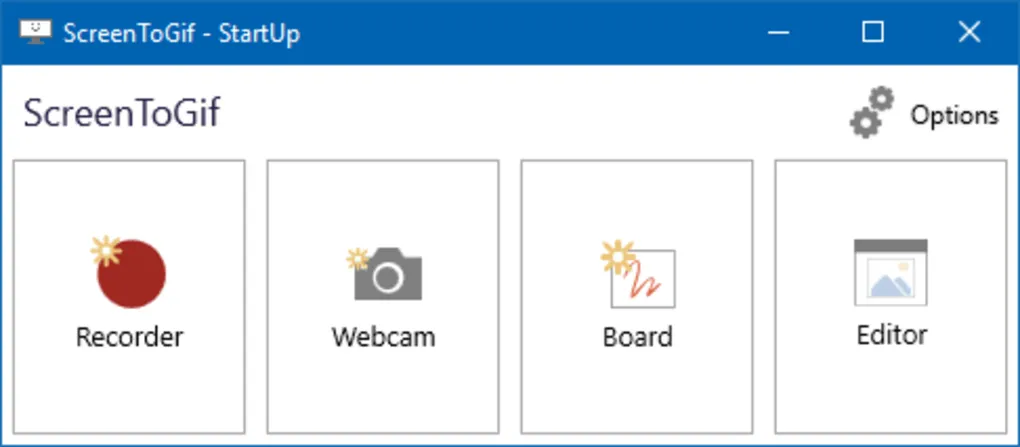
The software may support:
- Screen recording
- Webcam recording
- Drawing board capture
- Frame editing
- Export customization
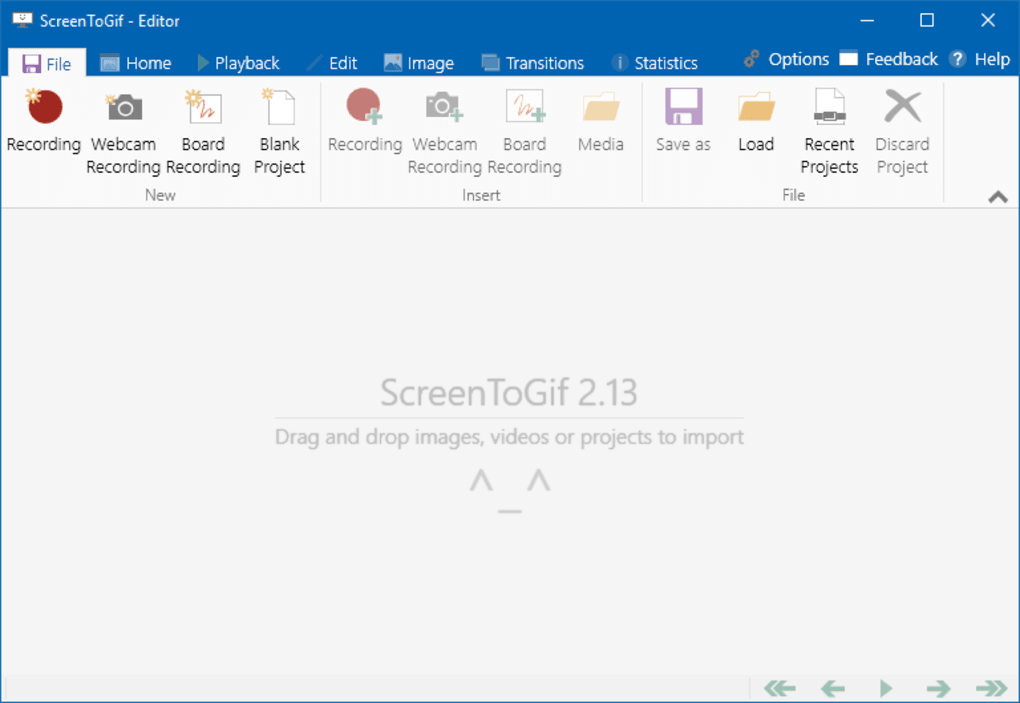
One major feature category is frame editing.
Users may:
- Remove unnecessary frames
- Add captions
- Insert transitions
- Apply image effects
- Resize animations
before exporting projects.
Another important advantage is portability because some versions can run without full installation.
The software is also popular among developers and support teams because GIFs can visually explain:
- Software bugs
- Interface workflows
- Error reproduction steps
- User interaction processes
in a lightweight and shareable format.
📌 What is ScreenToGIF?
ScreenToGIF is a lightweight screen recording and GIF creation utility designed for capturing desktop activity and converting recordings into animated GIFs, videos, or image sequences on Windows systems.
The software is commonly used for:
- Animated GIF creation
- Tutorial recording
- UI demonstrations
- Bug reporting
- Workflow visualization
- Educational content creation
Users can record:
- Selected screen regions
- Webcam feeds
- Whiteboard drawings
- Application workflows
One of the biggest strengths of the software is its built-in frame editor, which allows users to:
- Edit individual frames
- Remove unwanted frames
- Add text and captions
- Apply transitions
- Insert drawings and annotations
without requiring separate editing software.
It is commonly used by:
- Developers
- Bloggers
- Teachers
- Students
- Technical support users
- Content creators
because of its lightweight workflow and advanced GIF editing support.
🚀 Key Uses
🎞️ Animated GIF Creation
Used for recording and exporting desktop activity as GIF animations.
🧑🏫 Tutorial Creation
Helps users create quick visual learning guides.
🛠️ Bug Reporting
Useful for visually demonstrating software issues and UI behavior.
💻 Development Workflows
Developers may use it for showing interface functionality and animations.
📱 Social Sharing
Supports lightweight visual sharing for forums, websites, and messaging platforms.
💻 System Requirements (General)
Minimum Requirements
- Operating System: Windows 7 / 8 / 10 / 11
- RAM: 2GB minimum
- Storage: Free space for recordings and exported GIFs
- Processor: Intel or AMD compatible CPU
Recommended Requirements
- RAM: 4GB or more
- Storage: SSD recommended for smoother editing workflows
- Display: HD display recommended
- Additional Recommendations:
- Updated graphics drivers
- Sufficient free storage for large projects
- Stable desktop performance
🔄 Alternatives
- ShareX
- GifCam
- LICEcap
- OBS Studio
- Free Screen To GIF Recorder
- Recordit
❓ FAQ
Q1. What is ScreenToGIF mainly used for?
It is mainly used for recording desktop activity and creating animated GIFs.
Q2. Can it export video files?
Yes, some versions support exporting recordings as video formats in addition to GIFs.
Q3. Does it include editing tools?
Yes, the software includes a built-in frame editor and annotation tools.
Q4. Is it suitable for tutorials?
Yes, many users create tutorials, bug reports, and instructional animations with it.
Q5. Can it record webcams?
Yes, webcam recording support is commonly available.
Q6. Is ScreenToGIF beginner-friendly?
Yes, although advanced editing features may require some learning for new users.
Features
✔️ Screen-to-GIF recording support
✔️ Webcam recording functionality
✔️ Built-in frame editor
✔️ Frame-by-frame editing tools
✔️ Text and caption support
✔️ Drawing and annotation tools
✔️ Video export support
✔️ GIF optimization workflows
✔️ Lightweight utility design
✔️ Portable version support
✔️ Custom recording region selection
✔️ Transition and effect support
✔️ Tutorial creation workflows
✔️ Beginner-friendly interface
👍 Pros & 👎 Cons
Pros
- Powerful GIF editing capabilities
- Lightweight and portable
- Excellent for tutorials and bug reports
- Built-in frame editor reduces dependency on external editors
- Easy sharing workflows
- Supports webcam and drawing capture
Cons
- Large GIFs can consume significant storage space
- Advanced editing may require learning time
- Long recordings may create oversized files
- High frame rate GIFs may impact performance
- Professional video production features are limited compared to full video editors
Our Analysis
ScreenToGIF is one of the most capable lightweight GIF creation utilities available for Windows users.
Its biggest strengths are:
- Advanced frame editing
- Lightweight workflow
- Excellent GIF export support
- Built-in annotation tools
This makes it especially useful for:
- Developers
- Teachers
- Bloggers
- Technical support teams
- Tutorial creators
The software provides far more editing flexibility than many basic GIF recorders while remaining relatively lightweight.
However, users should understand that long or high-resolution GIF recordings may become very large and consume substantial system resources.
Overall, ScreenToGIF is an excellent solution for animated tutorials, workflow demonstrations, UI presentations, and lightweight visual communication workflows.
⚙️ Installation Guide (General Overview)
Step 1: Download Software
Obtain ScreenToGIF from a trusted source.
Step 2: Install or Launch Portable Version
Run installer or portable executable.
Step 3: Open Recording Interface
Launch the capture window.
Step 4: Select Recording Area
Choose the portion of the screen to capture.
Step 5: Start Recording
Capture desktop activity, tutorials, or application workflows.
Step 6: Stop Recording
Open recorded frames in editor.
Step 7: Edit Frames
Optionally:
- Remove frames
- Add captions
- Insert drawings
- Apply effects
Step 8: Export Project
Save as:
- GIF
- Video
- Image sequence
About SoftwareDownloading Editorial Team
The SoftwareDownloading Editorial Team researches Windows software, compatibility information, features, alternatives, and software-related guides for SoftwareDownloading.in.
Our pages are prepared using available product information and relevant documentation. When an application has not been personally tested, we distinguish research-based analysis from hands-on testing. Learn more about our review process
Apps Specs
Developer
Licence
Free
Version
2.39
Platform
Windows
Download Clicks
4
Page Reviewed
September 26, 2026
Top Downloads

Related Topics
Disclaimer
This content is provided for educational and informational purposes only. We do not host, store, or distribute any software files on our servers. All trademarks, product names, and logos belong to their respective owners.
We strongly recommend downloading software only from official websites or trusted sources. We are not responsible for any damage, data loss, or issues that may occur from the use of third-party software.
Users should ensure they comply with all applicable laws and software licensing agreements in their country before downloading or using any software mentioned on this website.