- Browser
- Web Browser
- BlockSite
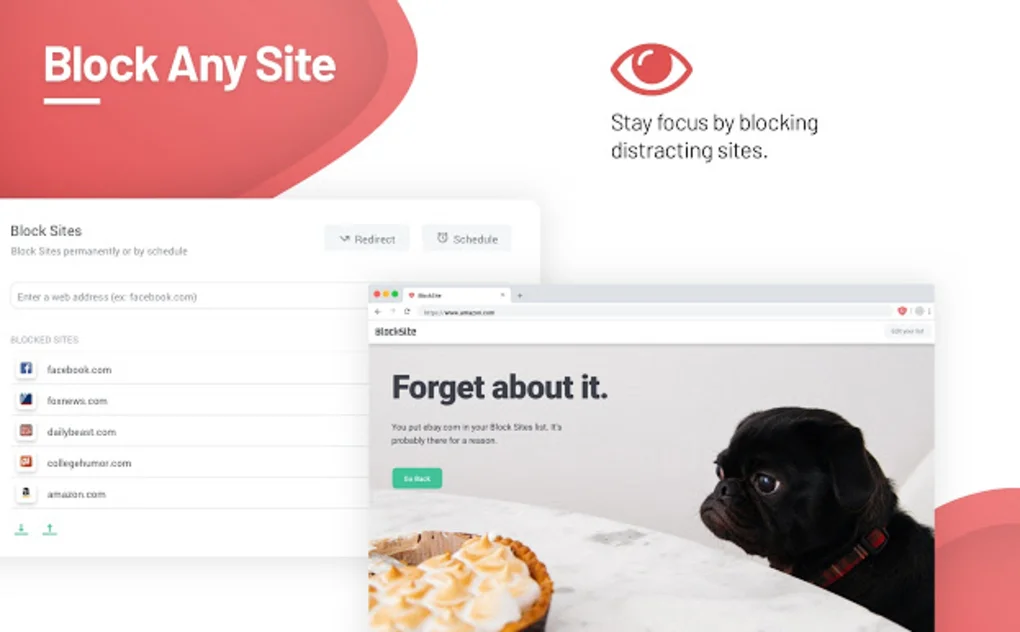
BlockSite is a productivity and website-blocking application designed to help users block distracting websites, restrict harmful content, improve focus, manage screen time, and create healthier internet usage habits across desktop and mobile platforms.
📌 What is BlockSite?
BlockSite is a productivity-focused application and browser extension that helps users control internet usage by blocking distracting websites, limiting app access, and managing browsing habits.
The software is commonly used for:
- Productivity improvement
- Website blocking
- Focus enhancement
- Screen time management
- Social media restriction
- Adult content filtering
- Study sessions
- Work environment control
- Digital wellbeing
One of the biggest strengths of BlockSite is simplified distraction management across multiple devices and browsers.
The software is commonly used by:
- Students
- Office workers
- Remote workers
- Parents
- Teachers
- Productivity-focused users
- Users managing internet addiction
- Users reducing social media distractions
Depending on the platform and subscription plan, BlockSite may support:
- Website blocking
- App blocking
- Focus mode
- Scheduling tools
- Password protection
- Adult content filtering
- Keyword blocking
- Redirect functionality
- Work mode timers
- Productivity analytics
- Screen time controls
- Browser extension integration
- Cross-device synchronization
- Whitelist systems
- Pomodoro productivity timers
The software may allow users to block:
- Social media platforms
- Video streaming websites
- Gaming websites
- Adult content
- Distracting apps
- Specific keywords or URLs
One major feature often highlighted is Focus Mode.
Focus Mode may help users:
- Avoid distractions during work
- Stay focused during study sessions
- Improve time management
- Reduce procrastination
Some versions support scheduling systems that automatically block websites during selected hours.
For example:
- Work hours
- Study sessions
- Sleep schedules
- Family time
Parental control functionality may include:
- Adult content filtering
- Restricted browsing access
- App usage limitation
- Child-safe internet environments
The software may be available as:
- Browser extensions
- Mobile applications
- Desktop tools
Supported browsers may include:
- Google Chrome
- Mozilla Firefox
- Microsoft Edge
Mobile support may include:
- Android
- iOS
Some premium plans may provide:
- Cross-device synchronization
- Advanced scheduling
- Password protection
- Analytics dashboards
- Productivity reports
Another advantage is simplicity. Users can quickly block distracting websites without advanced technical knowledge.
However, users should understand that browser-based blocking systems can sometimes be bypassed by advanced users or through alternative browsers unless stronger device-level restrictions are enabled.
Users should also carefully review privacy permissions because productivity and monitoring tools may access browsing activity or device usage statistics.
Overall, BlockSite acts as a productivity and internet management tool designed to reduce distractions, improve focus, and create healthier browsing habits.
💻 System Requirements (Detailed)
To run BlockSite smoothly, the following system requirements are recommended:
Minimum Requirements
- Operating System:
Windows
macOS
Android
iOS - Browser Support:
Chrome
Firefox
Edge
Chromium-compatible browsers - RAM:
Minimum 2GB RAM recommended - Storage Space:
Around 100MB–300MB free storage space - Internet:
Required for synchronization and cloud-based features
Recommended Requirements
- RAM:
4GB RAM or more - Browser:
Updated modern browser recommended - Additional Tools:
Frequently compared with:- Freedom
- Cold Turkey
- RescueTime
🔄 Alternatives
If you want similar productivity or website-blocking tools, you can try:
- Freedom
- Cold Turkey
- RescueTime
- StayFocusd
- LeechBlock NG
❓ FAQ
Q1. What is BlockSite mainly used for?
It is mainly used for blocking distracting websites and improving productivity.
Q2. Can BlockSite block social media websites?
Yes, users can block social media and other distracting platforms.
Q3. Does BlockSite support focus mode?
Yes, focus mode and productivity timers may be included.
Q4. Is BlockSite available on mobile devices?
Yes, Android and iOS versions are available.
Q5. Can parents use BlockSite for child safety?
Yes, it can help restrict harmful or inappropriate websites.
Q6. Does BlockSite support scheduling?
Yes, website blocking schedules can be configured.
Q7. Is BlockSite free?
A free version may be available, while advanced features often require premium plans.
🔄 Best Alternatives
Features
- ✔️ Website blocking functionality
- ✔️ App blocking support
- ✔️ Focus mode tools
- ✔️ Productivity timers
- ✔️ Screen time management
- ✔️ Adult content filtering
- ✔️ Password protection options
- ✔️ Scheduling systems
- ✔️ Keyword blocking
- ✔️ URL restriction tools
- ✔️ Cross-device synchronization
- ✔️ Browser extension integration
- ✔️ Productivity analytics
- ✔️ Work and study mode support
- ✔️ Mobile and desktop compatibility
👍 Pros & 👎 Cons
Pros
- Helps improve focus and productivity
- Easy-to-use interface
- Useful for students and remote workers
- Effective distraction management
- Supports website and app blocking
- Focus mode and scheduling features included
- Helpful parental control functionality
- Cross-platform support available
Cons
- Advanced users may bypass some restrictions
- Some features require premium plans
- Browser-level blocking may not fully secure all devices
- Productivity tracking may raise privacy concerns for some users
- Notifications and permissions may feel intrusive
Expert Review
In my opinion, BlockSite is one of the most practical productivity-focused tools for users struggling with online distractions and excessive screen time. The software is
How to Install
⚙️ Installation Guide (Step-by-Step)
Follow these steps to install and use BlockSite:
Step 1: Download BlockSite
Install the application or browser extension from the official source or app store.
Step 2: Install the Extension or App
Complete the installation process for your browser or device.
Step 3: Grant Required Permissions
Allow permissions for:
- Website monitoring
- Browser access
- Notification access
- App control (mobile devices)
Step 4: Launch BlockSite
Open the extension dashboard or application.
Step 5: Add Websites to the Block List
Enter websites or keywords you want to block.
Step 6: Configure Focus Mode
Set work or study sessions to minimize distractions.
Step 7: Create Schedules
Configure automatic blocking periods for selected times.
Step 8: Enable Password Protection (Optional)
Prevent changes to restrictions.
Step 9: Use Productivity Analytics
Monitor browsing habits and focus statistics if available.
Step 10: Keep the Software Updated
Install updates and security improvements regularly.
Apps Specs
Licence
Free
Latest Update
June 24, 2026
Platform
Windows
Downloads
1
Devlopers
Releted Searches
Top Downloads





Disclaimer
This content is provided for educational and informational purposes only. We do not host, store, or distribute any software files on our servers. All trademarks, product names, and logos belong to their respective owners.
We strongly recommend downloading software only from official websites or trusted sources. We are not responsible for any damage, data loss, or issues that may occur from the use of third-party software.
Users should ensure they comply with all applicable laws and software licensing agreements in their country before downloading or using any software mentioned on this website.
You may also like






Alternatives to


Expore Apps