- Development & IT
- Remote Control
- Universal Termsrv.dll Patch
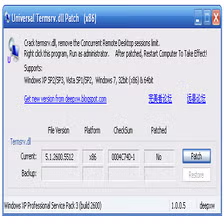
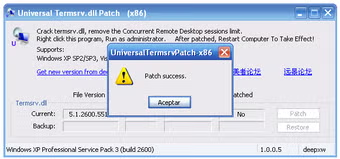
Universal Termsrv.dll Patch is a Windows system modification utility designed to enable multiple Remote Desktop sessions and remove certain Remote Desktop Services limitations in supported Windows operating systems.
What is Universal Termsrv.dll Patch?
Universal Termsrv.dll Patch is a specialized Windows modification tool that patches the termsrv.dll system file associated with Microsoft Remote Desktop Services (RDS). The purpose of the patch is generally to alter built-in Windows Remote Desktop limitations, particularly restrictions related to simultaneous Remote Desktop Protocol (RDP) sessions.
In standard consumer versions of Windows, Microsoft typically limits Remote Desktop functionality in several ways, such as:
- Allowing only one active remote session at a time
- Preventing multiple concurrent users from connecting simultaneously
- Restricting some server-like RDP capabilities
Universal Termsrv.dll Patch modifies the behavior of the Windows Terminal Services component by patching the termsrv.dll file responsible for Remote Desktop session management.
The software is commonly used by:
- Advanced Windows users
- System administrators
- Remote access enthusiasts
- Testing environments
- Multi-user lab setups
- Home office environments
- Educational and experimental systems
One of the main reasons users apply the patch is to enable multiple simultaneous RDP sessions on systems that normally restrict this behavior.
Depending on the version and Windows compatibility, the patch may allow:
- Multiple concurrent Remote Desktop sessions
- Multi-user remote access
- Local and remote sessions simultaneously
- Remote Desktop configuration customization
- Bypass of certain RDP restrictions
- Enhanced terminal service flexibility
The patch works by modifying system-level behavior, which means it interacts directly with sensitive Windows components.
Because it changes core operating system files, users must understand that improper use can potentially lead to:
- System instability
- Windows update conflicts
- Security risks
- Remote Desktop malfunctions
- Compatibility problems
- System file corruption
Another important factor is Windows updates. Major Windows updates may replace or restore the original termsrv.dll file, requiring the patch to be reapplied or updated for compatibility.
Security is also important. Since Remote Desktop access exposes systems to network connections, proper safeguards should always be used, including:
- Strong passwords
- Firewall configuration
- VPN access when possible
- Updated antivirus protection
- Limited remote access permissions
Universal Termsrv.dll Patch is generally intended for advanced users who understand Windows internals and Remote Desktop Services configuration.
Overall, Universal Termsrv.dll Patch acts as a Windows Remote Desktop modification utility for enabling expanded RDP session functionality and multi-user remote access behavior.
💻 System Requirements (Detailed)
To use Universal Termsrv.dll Patch smoothly, the following system requirements are recommended:
Minimum Requirements
- Operating System:
Supported versions of Windows 7 / Windows 8 / Windows 10 / Windows 11 - Processor:
Intel or AMD compatible processor - RAM:
Minimum 2GB RAM - Storage Space:
Less than 100MB free disk space - Permissions:
Administrator privileges required - Remote Desktop:
Windows Remote Desktop Services enabled
Recommended Requirements
- Processor:
Intel Core i3 or higher - RAM:
4GB RAM or more - Storage:
SSD recommended for better system performance - Security:
Firewall and antivirus protection recommended - Backup:
System restore point strongly recommended before patching - Additional Tools:
Often used with:- Microsoft Remote Desktop
- AnyDesk
Best Suitable For
Universal Termsrv.dll Patch is ideal for:
- Advanced Windows users
- Remote desktop testing labs
- Multi-user local environments
- Educational RDP experimentation
- Home office remote access setups
- Technical administrators
- Non-production experimental systems
- RDP configuration customization
🔄 Alternatives
If you want similar remote desktop and multi-user access solutions, you can try:
- Microsoft Remote Desktop Services
- AnyDesk
- TeamViewer
- Chrome Remote Desktop
- RustDesk
❓ FAQ
Q1. What is Universal Termsrv.dll Patch mainly used for?
It is used to modify Windows Remote Desktop limitations and enable multiple RDP sessions.
Q2. Does it allow simultaneous Remote Desktop users?
Yes, that is one of its primary purposes on supported systems.
Q3. Is the patch officially supported by Microsoft?
No, it is not officially supported.
Q4. Can Windows updates affect the patch?
Yes, updates may overwrite patched system files.
Q5. Is technical knowledge required?
Yes, advanced Windows and Remote Desktop knowledge is recommended.
Q6. Can patching create security risks?
Yes, improper remote access configuration can increase security risks.
Q7. Should backups be created before patching?
Yes, creating backups and restore points is strongly recommended.
🔄 Best Alternatives
Features
- ✔️ Enables multiple Remote Desktop sessions
- ✔️ Modifies Windows Remote Desktop limitations
- ✔️ Supports concurrent RDP connections
- ✔️ Allows simultaneous local and remote sessions
- ✔️ Lightweight patch utility
- ✔️ Useful for testing and lab environments
- ✔️ Can improve RDP flexibility on supported systems
- ✔️ Works with Windows Remote Desktop Services
- ✔️ Advanced terminal service customization
- ✔️ Quick patching process
- ✔️ Supports some multi-user remote access scenarios
- ✔️ Compatible with selected Windows versions
- ✔️ Useful for remote administration experiments
- ✔️ Portable patching functionality
- ✔️ Minimal resource usage
👍 Pros & 👎 Cons
Pros
- Enables multiple simultaneous RDP sessions
- Useful for advanced remote access setups
- Lightweight and simple utility
- Helpful for testing and educational environments
- Allows greater flexibility in Remote Desktop usage
- Useful for home labs and remote administration
- Portable and easy to apply in many cases
- Can improve productivity for multi-user access needs
Cons
- Modifies critical Windows system files
- May conflict with Windows updates
- Can introduce security risks if misconfigured
- Not officially supported by Microsoft
- Compatibility varies between Windows versions
- Incorrect usage may cause system instability
- Antivirus software may flag patches as suspicious
- Requires administrative privileges and technical knowledge
Expert Review
One of the biggest advantages is improved Remote Desktop flexibility on systems that normally restrict simultaneous sessions. For technical users, this can make remote management and experimentation significantly easier.
However, because the software modifies core Windows system files, it should be used carefully. Compatibility problems, Windows update conflicts, and security risks are important considerations. Beginners should avoid using such tools on critical production systems without proper backups and technical understanding.
For advanced administrators and lab environments, the patch can provide useful Remote Desktop functionality, but proper security configuration and system backup practices are essential.
If you fully understand the risks and need expanded RDP functionality for testing or administrative purposes, Universal Termsrv.dll Patch can be a practical solution.
How to Install
⚙️ Installation Guide (Step-by-Step)
Follow these steps carefully before applying Universal Termsrv.dll Patch:
Step 1: Create System Backup
Create:
- System restore point
- Backup image
- Original
termsrv.dllbackup
before modifying Windows files.
Step 2: Disable Conflicting Remote Sessions
Close active Remote Desktop sessions if necessary.
Step 3: Download Compatible Patch Version
Use a version compatible with your Windows build.
Step 4: Run as Administrator
Launch the patch utility with administrator privileges.
Step 5: Apply Patch
Allow the software to modify the termsrv.dll system file.
Step 6: Restart Remote Desktop Services
Restart the related Windows services or reboot the computer.
Step 7: Test Multiple RDP Sessions
Verify whether concurrent remote sessions are functioning properly.
Step 8: Configure Security Settings
Enable:
- Strong passwords
- Firewall rules
- User permissions
- Remote access limitations
for better security.
Step 9: Monitor Windows Updates
Check future Windows updates because updates may overwrite patched files.
Step 10: Restore Original File if Needed
Use backups if compatibility or stability issues occur.
Top Downloads



Related Topics
Disclaimer
This content is provided for educational and informational purposes only. We do not host, store, or distribute any software files on our servers. All trademarks, product names, and logos belong to their respective owners.
We strongly recommend downloading software only from official websites or trusted sources. We are not responsible for any damage, data loss, or issues that may occur from the use of third-party software.
Users should ensure they comply with all applicable laws and software licensing agreements in their country before downloading or using any software mentioned on this website.
You may also like






Alternatives to


Expore Apps