
- Windows Apps
- Utilities & Tools
- File Compression
- Top Downloads
Windows
( 10000 Programs )

Ashampoo Zip pro 2
3.6
Trial
Learn about Ashampoo ZIP Pro 2 for advanced file compression, archive extraction, AES encryption, cloud integration, backup creation, and professional…
Pros :
- Very powerful all-in-one tool
- Supports many formats
- Strong encryption
- Modern interface
- Cloud + virtual drive features
- Good for professional use
Cons :
- Paid software
- Heavy compared to simple tools
- Overkill for basic users
- Takes more system resources
- Learning curve for beginners

TUGZip
3.9
Free
Learn about TUGZip for file compression, archive extraction, multi-format support, backup creation, and lightweight file management on Windows systems.
Pros :
- Supports many archive formats
- Lightweight and simple
- Easy to use
- Useful for basic compression tasks
- Good for older systems
- Free to use
Cons :
- No longer actively developed
- Outdated interface
- Limited modern features
- Not as efficient as modern tools
- Reduced compatibility with newer Windows versions

7Zip Opener
3.1
Free
Learn about 7Zip Opener for extracting 7Z, ZIP, and RAR files, opening compressed archives, lightweight file decompression, and simple Windows…
Pros :
- Very easy to use
- Lightweight software
- Fast extraction speed
- Beginner-friendly
- Good for quick tasks
- Supports multiple formats
Cons :
- Limited compression features
- Not a full 7-Zip replacement
- Basic functionality only
- No advanced archive tools
- Less powerful than WinRAR/7-Zip

Unzip Wizard
2.9
Trial
Learn about Unzip Wizard for easy ZIP file extraction, step-by-step guided archive handling, beginner-friendly file decompression, and simple Windows file…
Pros :
- Very easy to use
- Perfect for beginners
- Guided extraction process
- Lightweight and fast
- No technical knowledge needed
- Simple interface
Cons :
- Limited to ZIP files
- No compression features
- No advanced tools
- Outdated compared to modern archivers
- Not suitable for power users
DMG Extractor
2.7
Free
Learn about DMG Extractor for opening macOS DMG files on Windows, extracting disk images, accessing Mac software files, and cross-platform…
Pros :
- Easy access to Mac files on Windows
- Simple and lightweight tool
- Good for developers and testers
- Fast extraction process
- No Mac required
- Beginner-friendly
Cons :
- Cannot run macOS apps
- Limited support for encrypted DMG files
- Extraction-only tool
- Not suitable for advanced disk management
- Some compatibility limitations

RAR Opener & RAR To ZIP Converter
4.6
Free
Learn about RAR Opener & RAR to ZIP Converter for opening RAR files, converting RAR to ZIP format, extracting archives,…
Pros :
- Very easy to use
- Combines extraction + conversion
- Improves file compatibility
- Lightweight tool
- Good for beginners
- Fast basic operations
Cons :
- Limited advanced features
- Not a full compression tool
- Basic format support only
- No professional archive management tools
- Less powerful than 7-Zip or WinRAR

Jango
4
Free
Learn about Jango for free internet radio streaming, personalized music stations, artist-based playlists, music discovery, and online background music listening…
Pros :
- Free music streaming
- Easy to use
- Good music discovery
- No playlist creation needed
- Works on multiple platforms
- Great for background music
Cons :
- Requires internet
- Ads in free version
- Limited advanced controls
- Less popular than major streaming apps
- Audio quality depends on connection

JustZIPit
2.8
Free
Learn about JustZIPit for simple ZIP compression and extraction, file packaging, basic archiving, lightweight file sharing, and beginner-friendly Windows file…
Pros :
- Extremely simple to use
- Very lightweight
- Fast basic ZIP operations
- Beginner-friendly interface
- Good for quick tasks
- No complex setup required
Cons :
-
⚙️ Installation Guide (General Overview)
Step 1: Download Software
Obtain JustZIPit from a trusted source.
Step 2: Install Application
Run installer and complete setup.
Step 3: Launch Program
Open the ZIP utility.
Step 4: Select Files
Choose files or folders to compress.
Step 5: Create ZIP Archive
Click compress option to generate ZIP file.
Step 6: Extract ZIP Files
Open ZIP and extract contents when needed.
KFK
3.9
Free
KFK is a free application for the cutting and splitting of large files. It is designed for use on Windows….
Pros :
- Very lightweight and fast
- Extremely easy to use
- Useful for large file transfer
- No compression required
- Works with many file types
- Good for basic file management
Cons :
- No file compression features
- Basic interface compared to modern tools
- Limited advanced options
- No encryption features
- Mostly single-purpose utility
WinRAR For U3
4
Trial
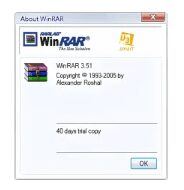
Learn about WinRAR for U3 for portable USB file compression, archive extraction, RAR and ZIP management, encrypted archives, and on-the-go…
Pros :
- Fully portable on U3 drives
- Full WinRAR functionality
- Supports encryption
- Good compression performance
- Easy file management on the go
Cons :
- U3 technology is outdated
- Limited modern compatibility
- Not actively developed for new systems
- Requires specific USB setup
- Less relevant in modern Windows environments