
- Education & Reference
- Languages & Translation
- Type3arabi Download for Windows 11 – Free Arabic Keyboard

Type3arabi Overview
Type3arabi is a free, open-source Arabic typing tool designed for Windows users who prefer writing Arabic words with English letters and numbers. It converts Arabizi, also known as Franco-Arabic, into Arabic script while users type in compatible Windows applications.
For example, users can enter “mar7aba” to produce an Arabic greeting without manually selecting individual Arabic letters from a traditional keyboard layout.
The software integrates with the Windows language input system, allowing users to switch between installed keyboards using the familiar Windows keyboard shortcut.
Type3arabi includes a word suggestion system that displays possible Arabic interpretations of typed words. Users can accept the suggested word or select another option.
The application supports Modern Standard Arabic along with several regional writing styles, including Gulf, Egyptian, Iraqi, Levantine, and Maghrebi Arabic.
Another useful feature is its diacritics editor, which allows users to add Arabic vowel marks and other text details.
Type3arabi operates offline and does not require an account for everyday typing.
For UAE residents, students, office employees, and Arabic-speaking Windows users, Type3arabi provides an alternative to typing with a conventional Arabic keyboard layout.
Unlike a language translation application, Type3arabi focuses on converting Arabic words written with Latin characters into Arabic script.
Type3arabi download – Free Arabic Typing Software for Windows 11 and 10
Type3arabi is a free, open-source Arabic typing application for Windows 11 and Windows 10 that allows users to write Arabic using familiar English letters and numbers. Instead of learning a traditional Arabic keyboard layout, users can type words in Arabizi, also known as Franco-Arabic, and convert them into Arabic script directly within Windows applications.
The software is designed for people who can speak or understand Arabic but find typing with a standard Arabic keyboard difficult or inconvenient. By entering familiar combinations such as “mar7aba,” “7abibi,” or “3ala,” users can produce corresponding Arabic words without manually locating every character on a keyboard.
Type3arabi integrates with the Windows Text Services Framework, functioning as a system-wide input method rather than a separate text editor. This allows Arabic typing in compatible applications such as Microsoft Word, Outlook, WhatsApp, Microsoft Teams, Notepad, Chrome, and Microsoft Edge.
The application also supports multiple Arabic dialects, intelligent word suggestions, Arabic diacritics, and mixed English-Arabic writing. Its offline functionality makes it a practical option for students, office professionals, writers, and multilingual Windows users.
What Is Type3arabi?
Type3arabi is an Arabizi-to-Arabic keyboard designed to simplify Arabic text input on Windows computers.
Arabizi is a writing system commonly used in informal Arabic communication. It represents Arabic sounds with Latin letters and numbers, especially for sounds that do not have direct English-letter equivalents.
For example:
| Arabizi Input | Arabic Output |
|---|---|
| mar7aba | مرحباً |
| 7abibi | حبيبي |
| 3ala | على |
| 5amsa | خمسة |
| assalamu 3alaykum | السلام عليكم |
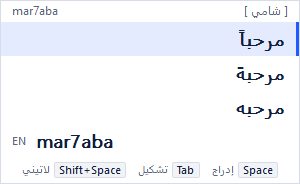
Type3arabi interprets these combinations and presents possible Arabic spellings through a small candidate list.
Users can accept the suggested word by pressing Space or choose another interpretation using the arrow keys.
Unlike an English-to-Arabic translation application, Type3arabi does not translate sentences from one language into another. It converts Arabic words written with Latin characters into Arabic script.
Key Features of Type3arabi
1. Arabizi-to-Arabic Typing
The primary feature of Type3arabi is converting Arabizi into Arabic characters.
Users can enter familiar Latin-letter spellings rather than learning an entirely new keyboard arrangement. Numbers such as 3, 7, and 5 represent Arabic sounds that are difficult to express using ordinary English letters.
This approach is useful for Arabic speakers who regularly communicate using a combination of English and Arabic.
2. Windows Keyboard Integration
Type3arabi operates as a Windows input method.
After installation, users can switch to the Type3arabi keyboard using Windows + Space or the configured Ctrl + Alt + A shortcut.
Because it integrates with the Windows input system, the application can be used in compatible text fields without transferring text from another website or application.
3. Intelligent Arabic Word Suggestions
When users enter Arabizi text, Type3arabi displays possible Arabic interpretations.
The application places a suggested word at the top of the candidate list. Users can select a different spelling when necessary.
This is particularly useful when the same Latin-letter combination can represent different Arabic words.
4. Multiple Arabic Dialects
Type3arabi includes language support for several Arabic writing styles:
- Modern Standard Arabic
- Gulf Arabic
- Egyptian Arabic
- Levantine Arabic
- Iraqi Arabic
- Maghrebi Arabic
The application adapts its suggestions according to the user’s writing patterns.
For people living in the UAE, Gulf Arabic support may be useful for informal communication, while Modern Standard Arabic can be relevant to general written content.
5. Offline Arabic Typing
Type3arabi performs its core input processing locally on the computer.
An active internet connection is not required for regular typing after installation.
The developer also states that typing data is not transmitted to an external server.
This allows users to work with Arabic text in offline documents and supported desktop applications.
6. Arabic Diacritics Editor
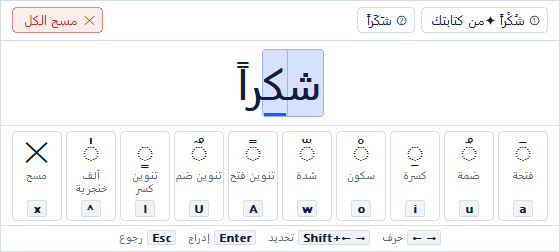
The application provides a dedicated editor for Arabic diacritics, also called Tashkeel or Harakat.
Users can open the editor by pressing Tab while working with a word.
Available controls support vowel marks such as Fatha, Kasra, Damma, Sukun, and Shadda.
This feature may be useful for Arabic language students, educational writing, and text requiring more precise pronunciation guidance.
7. Mixed Arabic and English Typing
Many people use Arabic and English together in everyday communication.
Type3arabi provides shortcuts that allow users to preserve English words without repeatedly switching keyboard layouts.
For example, pressing Shift + Space or Escape can retain a word in Latin characters.
Users can also temporarily pause Arabic conversion using Ctrl + Space.
8. Personalized Word Preferences
Type3arabi can remember which Arabic candidate a user selects for a particular Arabizi spelling.
When the same spelling is entered again, the previously selected interpretation can appear first.
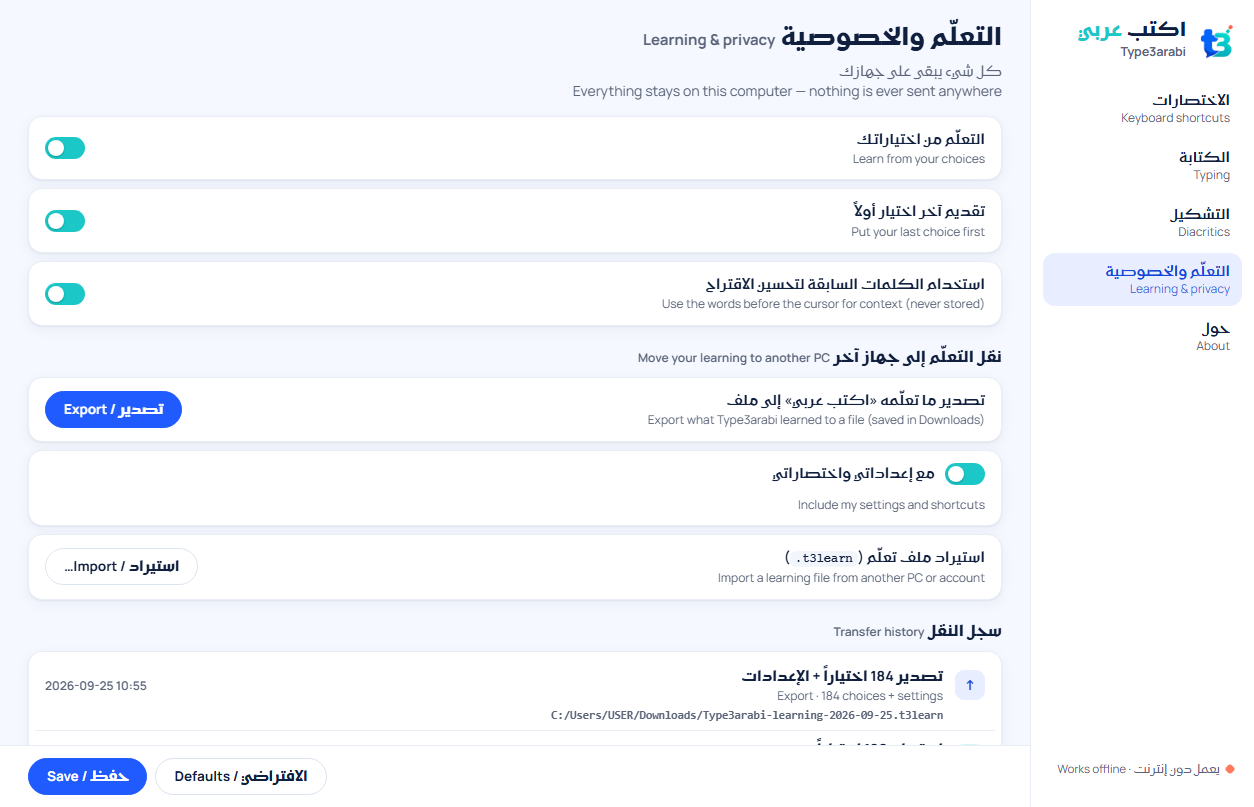
These learned preferences are stored locally and can be exported, imported, cleared, or disabled through the application’s settings.
9. Automatic Handling of Selected Arabic Characters
The software includes additional conveniences for common Arabic writing patterns.
Certain words can receive predefined diacritics, and supported punctuation can be converted into corresponding Arabic punctuation marks.
These details can make longer Arabic text entry more convenient.
10. Free and Open-Source Software
Type3arabi is distributed as free software without advertisements, mandatory registration, or a paid feature tier.
The project’s source code is publicly available, with its software components distributed under the developer’s stated licensing terms.
How Does Type3arabi Work?
Type3arabi uses a language model and candidate-selection system to interpret Arabic words written in Latin letters and numbers.
For example, a user types “mar7aba” into a supported text field. The input method presents Arabic suggestions, including “مرحباً.”
Pressing Space inserts the selected Arabic word.
If multiple interpretations are available, the user can choose another suggestion before continuing.
Because the tool operates through the Windows input system, users can apply this workflow across different compatible applications.
This is different from online Arabic keyboards that require typing in a webpage and then copying the converted text into another application.
Type3arabi for Windows 11 and Windows 10
Type3arabi supports Windows 11 and Windows 10 on 64-bit x64 computers.
The installer also includes keyboard components for compatibility with supported 32-bit Windows applications running on an x64 system.
ARM-based Windows computers are not currently supported.
The application is distributed through an MSI installation package and becomes available through Windows language input controls after installation.
How to Install Type3arabi on Windows
- Open the official Type3arabi website.
- Select the Windows download option.
- Download the available Type3arabi-x64.msi installer from the official release source.
- Open the downloaded installation package.
- Follow the installation instructions.
- Restart Windows when prompted.
- Press Windows + Space and select Arabic – Type3arabi.
- Open Notepad, Microsoft Word, or another compatible application.
- Type an Arabizi word such as “mar7aba.”
- Press Space to insert the selected Arabic word.
Installation note: The developer currently distributes an installer without a digital code-signing certificate, so Windows may display an Unknown Publisher warning. The official release information provides SHA-256 checksums for users who want to compare the downloaded package with the published release.
Advantages of Type3arabi
- Free Arabic typing for Windows.
- Converts Arabizi into Arabic script.
- Supports several Arabic dialects.
- Works offline after installation.
- Integrates with the Windows keyboard system.
- Provides contextual Arabic word suggestions.
- Supports Arabic diacritics.
- Allows mixed Arabic-English writing.
- Remembers selected word preferences locally.
- No mandatory user account or subscription.
Limitations of Type3arabi
- Available for Windows rather than macOS or Linux.
- Requires Windows 10 or 11 on an x64 computer.
- Does not currently support Windows on ARM.
- Not designed for translating complete English sentences.
- Some words may require manual candidate selection.
- Users unfamiliar with Arabizi may need time to learn common spellings.
- The installer does not currently include a publisher code-signing certificate.
Who Should Use Type3arabi?
Type3arabi may be useful for different types of Windows users.
Arabic-speaking students: Students who are familiar with Arabic pronunciation but prefer using Latin keyboard characters can enter Arabic text without memorizing a traditional keyboard layout.
Office professionals: Employees working with multilingual messages, correspondence, and documents can switch between Arabic and English input.
Users in the UAE: Residents communicating in Arabic and English may find the combination of Gulf Arabic suggestions and mixed-language typing useful.
Content writers: Writers producing Arabic text can use the word candidate system and diacritics editor for text entry.
Everyday Windows users: People who type Arabic messages in supported communication applications can use Type3arabi without relying on a separate online conversion page.
Type3arabi vs Traditional Arabic Keyboard
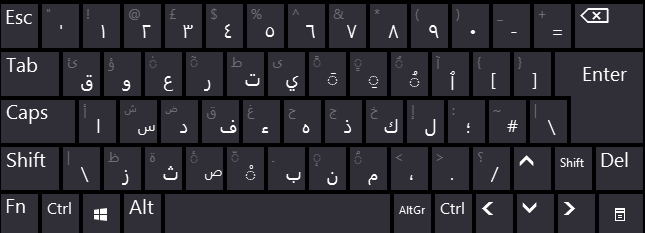
A conventional Arabic keyboard uses fixed key positions for Arabic letters.
Type3arabi takes a different approach by interpreting Arabic pronunciation represented through Latin characters.
Users who already know the traditional Arabic keyboard may prefer direct character input.
However, those familiar with Arabizi may find Type3arabi easier to approach because they can use spellings they already know.
The application does not eliminate the need to understand Arabic spelling. Users still need to select the intended words, particularly when an Arabizi combination has multiple possible interpretations.
Our Analysis
Type3arabi offers a distinctive approach to Arabic typing by combining familiar Arabizi input with native Windows keyboard functionality.
Its principal advantage is the ability to enter Arabic script directly within compatible applications rather than depending on a browser-based text converter.
The inclusion of Gulf Arabic, Egyptian, Levantine, Iraqi, Maghrebi, and Modern Standard Arabic expands its relevance to users with different regional writing habits.
Additional features, including local word preferences, customizable shortcuts, and the diacritics editor, give users more control over their typing workflow.
The application’s offline design also makes it suitable for users who prefer local language input without depending on an online conversion service.
Its limitations are mainly related to platform availability and the nature of transliteration. It is intended for x64 Windows computers and cannot replace a complete translation application.
For users in Dubai, Abu Dhabi, Sharjah, and other parts of the UAE who frequently type Arabic alongside English, Type3arabi is an option worth considering.
Final Verdict
Type3arabi is a free Arabic typing utility for Windows 11 and Windows 10 that combines Arabizi transliteration, intelligent word suggestions, multiple dialects, and Windows keyboard integration.
Its ability to work in compatible desktop applications makes it different from browser-only Arabic typing services.
For users familiar with writing Arabic through English letters and numbers, Type3arabi provides a practical method of producing Arabic text directly on a Windows computer.
Official Website: https://type3arabi.com/
Official Downloads: https://github.com/ArabSeven/Type3arabi/releases
| Requirement | Details |
|---|---|
| Operating System | Windows 10, Windows 11 |
| Architecture | 64-bit (x64) |
| Processor | Compatible x64 processor |
| RAM | Not specified by developer |
| Storage Space | Not specified by developer |
| Installer | MSI installation package |
| Internet Connection | Not required for normal typing |
| ARM Support | Not supported |
| Installation Restart | Restart when prompted |
| License | Free and open-source |
Features
Key Features of Type3arabi
1. Arabizi-to-Arabic Conversion
Type Arabic words using Latin letters and numbers. Type3arabi suggests corresponding Arabic script while you type.
2. Windows Keyboard Integration
Switch to Type3arabi using Win + Space or a configured keyboard shortcut, just like other Windows input methods.
3. Offline Arabic Typing
The input system runs locally without requiring an active internet connection.
4. Multiple Arabic Dialects
Supports language patterns associated with Gulf, Egyptian, Levantine, Iraqi, Maghrebi, and Modern Standard Arabic.
5. Smart Word Suggestions
Displays candidate Arabic words and allows users to choose the intended spelling.
6. Arabic Diacritics Editor
Provides controls for adding tashkeel, including vowel marks and shadda.
7. Mixed English and Arabic Input
Users can retain English words using Shift + Space or Escape without repeatedly changing keyboards.
8. Personalized Word Preferences
Remembers selected word choices locally and allows users to manage learned preferences.
9. Application-Wide Typing
Works as a Windows input method in compatible editors, browsers, communication applications, and other text fields.
10. Open-Source Availability
Distributed as a free project with publicly available source code and no mandatory subscription.
👍 Pros & 👎 Cons
Pros
Free Arabic typing tool
Works offline
Windows keyboard integration
Supports multiple dialects
Arabic word suggestions
Diacritics editing
Cons
Windows only
No ARM support
Not an English-to-Arabic translator
Candidate selection may be needed
Installer currently unsigned
Our Analysis
Our Analysis
Type3arabi addresses a practical challenge for users who understand spoken Arabic but prefer entering words through the Latin alphabet.
Its approach differs from traditional Arabic keyboard layouts because users can type familiar Arabizi spellings rather than memorizing the placement of individual Arabic characters.
The combination of Windows input integration, dialect-aware suggestions, offline operation, and diacritics editing makes it particularly relevant for multilingual communication.
Users in the UAE may find the tool useful when writing Arabic messages, informal communications, notes, or everyday text alongside English content.
However, Type3arabi should not be confused with a professional translation application. It converts transliterated Arabic into Arabic script rather than translating the meaning of English sentences.
For users who need a fixed phonetic key mapping instead of word suggestions, a dedicated Arabic phonetic keyboard layout may be another option.
Overall, Type3arabi is a relevant choice for Windows users seeking an accessible Arabizi-based Arabic typing workflow.
How to Install Type3arabi on Windows
- Visit the official Type3arabi website.
- Open the Windows download section and download the available MSI installer.
- Locate the downloaded installer on your computer.
- Follow the Windows installation instructions.
- Restart Windows if prompted.
- Press Windows + Space to display the available input languages.
- Select Arabic – Type3arabi.
- Open a text editor and enter an Arabizi word such as “mar7aba”.
- Select the preferred Arabic suggestion and press Space.
Once configured, Type3arabi can be used for Arabic input in supported Windows applications.
Note: The developer currently distributes an installer without a digital code-signing certificate. Windows may display an Unknown Publisher or SmartScreen warning. Refer to the project’s official release information and published file checksum before deciding whether to proceed.
About SoftwareDownloading Editorial Team
The SoftwareDownloading Editorial Team researches Windows software, compatibility information, features, alternatives, and software-related guides for SoftwareDownloading.in.
Our pages are prepared using available product information and relevant documentation. When an application has not been personally tested, we distinguish research-based analysis from hands-on testing. Learn more about our review process
Apps Specs
Developer
Licence
Free
Version
1.1.4
Platform
Windows
Download Clicks
0
Page Reviewed
October 25, 2026
Top Downloads
Related Topics
Disclaimer
Disclaimer
This page is provided for informational purposes. Software availability, licensing, compatibility and download sources may change over time. Download links on SoftwareDownloading.in may direct users to an official developer website, another external source, or a file made available through our download system where appropriate.
SoftwareDownloading.in does not claim ownership of third-party software, trademarks, product names or logos. Users should review the applicable licence terms, system compatibility and download source before installing or using any software. See our Disclaimer for more information.





This Post Has One Comment
Pingback: Best Arabic Typing Software for Windows 11 in UAE