
- Education & Reference
- Languages & Translation
- Arabic Phonetic Keyboard Layout
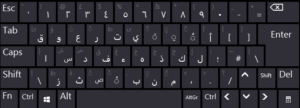
Arabic Phonetic Keyboard Layout Overview
Arabic Phonetic Keyboard Layout is a free keyboard configuration developed by Omar Al Zabir to make Arabic typing more accessible to users familiar with the English keyboard.
The layout uses phonetic key mappings, allowing users to enter Arabic characters using keyboard positions associated with similar Latin letters.
For example, pressing A produces ا, B produces ب, and Shift + D produces ض.
The layout is designed to support common Arabic characters while providing convenient access to vowel marks, different forms of hamza, and other Arabic writing symbols.
It also includes functionality intended for Quranic Arabic writing, including Uthmani script characters and Tajweed-related symbols.
Instead of operating as a separate typing application, the layout becomes part of the operating system’s available keyboard configurations.
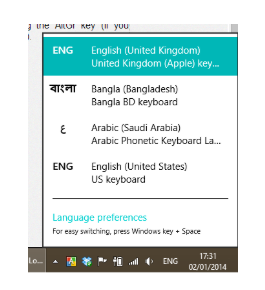
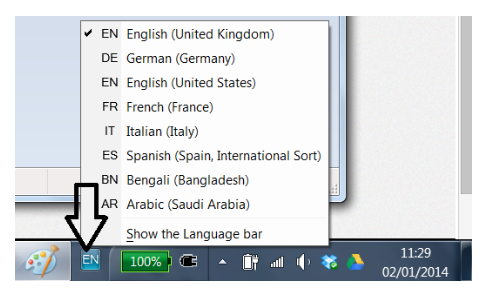
After installation, users can select the Arabic keyboard through Windows language controls.
This approach can be useful for students, teachers, Arabic-language writers, researchers, and users who prefer a predictable character-based typing method.
For Windows users in the UAE, Arabic Phonetic Keyboard Layout offers an alternative to the default Arabic keyboard arrangement without requiring a completely different physical keyboard.
The developer also provides a separate macOS layout, although the Windows installer is the relevant download for this listing.
Arabic Phonetic Keyboard Layout – Free Arabic Typing Keyboard for Windows
Arabic Phonetic Keyboard Layout is a free keyboard configuration developed by Omar Al Zabir to simplify Arabic typing on Windows computers. It allows users to enter Arabic letters using familiar phonetic key positions instead of relying entirely on the traditional Arabic keyboard arrangement.
The keyboard is designed for students, teachers, Arabic-language writers, office professionals, and users who frequently work with Arabic text. It provides access to Arabic characters, vowel marks, different forms of Hamza, and specialized symbols used in Quranic Arabic writing.
Unlike conventional Arabic typing applications, Arabic Phonetic Keyboard Layout does not operate as a separate text editor. Instead, it integrates with the operating system’s built-in language and keyboard functionality, allowing users to select it as an input method.
For people who regularly switch between English and Arabic, this approach offers an alternative to memorizing a completely different keyboard arrangement.
What Is Arabic Phonetic Keyboard Layout?
Arabic Phonetic Keyboard Layout is a character-based keyboard configuration that maps Arabic letters to keys associated with similar Latin sounds.
For example, pressing the A key produces the Arabic letter ا, while pressing B produces ب. Other Arabic characters can be entered using designated Shift and alternative key combinations.
The layout aims to make commonly used Arabic characters accessible through convenient keyboard positions.
It also provides dedicated mappings for vowel marks, different forms of Alif and Hamza, and characters used in specialized Arabic writing.
After installation, the layout becomes available through Windows language settings. Users can switch between keyboard configurations while working in applications that support standard Windows text input.
The developer also provides a separate version for macOS, although the Windows installation package is the primary focus of this software listing.
Key Features of Arabic Phonetic Keyboard Layout
1. Natural Phonetic Arabic Typing
The main feature of Arabic Phonetic Keyboard Layout is its phonetic character mapping.
Instead of requiring users to remember the position of every Arabic letter on a conventional keyboard, the layout associates many Arabic characters with familiar English keys.
Examples include:
- A = ا
- B = ب
- S = س
- Shift + S = ش
- D = د
- Shift + D = ض
- J = ذ
- Shift + J = ج
These mappings provide a practical starting point for users learning to type Arabic.
2. Arabic Vowel Marks and Harakat
Arabic Phonetic Keyboard Layout includes mappings for Arabic vowel marks, commonly called Harakat or Tashkeel.
These marks are important in Arabic grammar, pronunciation guidance, language education, and certain forms of formal writing.
The keyboard is designed to make vowel marks accessible without requiring users to search for characters in a separate symbol selection window.
This functionality may be useful for students, Arabic teachers, and writers preparing educational material.
3. Multiple Forms of Alif and Hamza
Arabic includes several characters involving Alif and Hamza.
The keyboard provides specific shortcuts for commonly used variations.
Examples include:
- A = ا
- Shift + A = أ
- P = ٱ
- Shift + P = آ
- G = ء
Having these characters available through dedicated mappings can simplify Arabic text entry.
4. Quranic Arabic and Uthmani Script Support
One distinguishing feature is the inclusion of keyboard mappings intended for Quranic Arabic.
The developer designed the layout to support Uthmani script and specialized Tajweed symbols.
These characters can be relevant when preparing Quranic educational material or working with detailed Arabic text.
The availability of individual symbols does not eliminate the need for appropriate fonts and text rendering support in the application being used.
5. Windows Keyboard Integration
Arabic Phonetic Keyboard Layout uses Windows’ built-in language and keyboard system.
After installing the Windows package and restarting the computer, the additional keyboard layout becomes available through language selection controls.
Users can then select Arabic input and begin typing in compatible applications.
This approach allows the keyboard to function as part of the operating system rather than requiring a separate typing window.
6. Frequently Used Characters Without Complex Shortcuts
The layout is designed to make commonly entered Arabic characters accessible through regular keys.
According to the developer, its arrangement incorporates research intended to reduce reliance on Shift and AltGr for frequently used characters.
Less common characters and specialized symbols remain accessible using defined key combinations.
7. Free Keyboard Layout
Arabic Phonetic Keyboard Layout is distributed free of charge.
The developer provides downloadable keyboard packages and installation instructions through the official website.
Users do not need a recurring software subscription to obtain the keyboard layout.
8. Customizable Keyboard Layout
The developer explains that the Windows layout was created using Microsoft Keyboard Layout Creator.
A layout source file is available for users interested in modifying the original configuration.
This may appeal to advanced users who prefer particular keyboard mappings or want to adapt the layout for specialized typing requirements.
Customization requires an understanding of keyboard layouts and the relevant development tools.
9. Arabic and English Language Switching
Users who work with both Arabic and English can switch between installed keyboard configurations using Windows language controls.
This can be useful when preparing bilingual documents, communicating with colleagues, or writing Arabic text alongside English material.
The keyboard itself does not translate between languages; it changes how physical key presses produce Arabic characters.
10. Separate macOS Keyboard Availability
In addition to the Windows keyboard package, the developer offers a separate layout for macOS.
The macOS installation process differs from Windows and involves installing the keyboard bundle in the appropriate system directory.
Users should select the package designed for their operating system.
How Does Arabic Phonetic Keyboard Layout Work?
Arabic Phonetic Keyboard Layout changes the relationship between physical keyboard keys and the characters they produce.
A traditional keyboard layout assigns Arabic characters to predetermined key positions.
A phonetic layout instead places many letters on keys that resemble their pronunciation or familiar Latin representations.
For example, pressing B produces ب, while pressing D produces د.
The layout also uses Shift and alternative key combinations to provide additional Arabic letters and symbols.
Because characters are entered directly, users can control the exact spelling of Arabic words.
This is different from transliteration software such as Type3arabi, which interprets sequences of Latin letters and offers suggested Arabic words.
Arabic Phonetic Keyboard Layout is therefore better understood as a direct keyboard input configuration, rather than an automatic word conversion application.
Arabic Phonetic Keyboard Layout for Windows
The developer provides a Windows installation package identified as Arabic Keyboard 1.2.
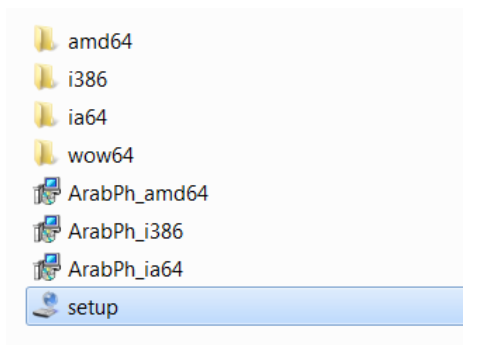
The package is distributed as a ZIP archive containing the installation files.
According to the installation guide, the keyboard adds a layout to the Arabic language options available in Windows.
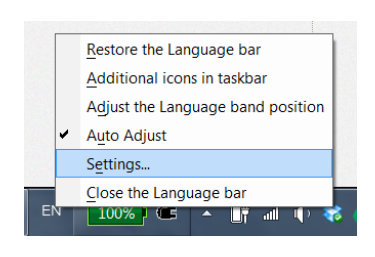
After installation and a restart, users can select the Arabic input configuration through the language bar or system keyboard settings.
The published instructions reference older Windows interfaces. Current compatibility with Windows 10 and Windows 11 is not explicitly documented by the developer.
Users should review the operating system requirements and package documentation before installing the keyboard on newer Windows computers.
How to Install Arabic Phonetic Keyboard Layout on Windows
Follow these steps to install Arabic Phonetic Keyboard Layout:
- Visit the official Arabic Phonetic Keyboard Layout website.
- Locate the Windows download section.
- Download the available Arabic Keyboard 1.2 ZIP archive.
- Save the ZIP file to your computer.
- Extract the archive into a separate folder.
- Open the extracted installation folder.
- Locate the setup.exe file.
- Run the installer and follow the displayed instructions.
- Restart Windows after installation.
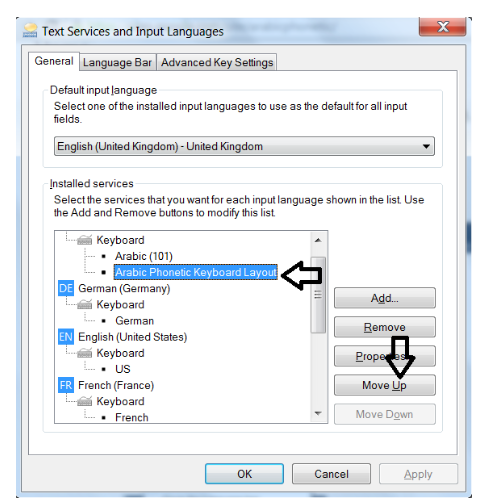
- Open the Windows language selection menu.
- Select the installed Arabic Phonetic Keyboard Layout.
- Open a compatible text application and begin typing Arabic.
Important: The developer specifically recommends extracting the ZIP archive before launching setup.exe. Running the installer directly from inside the compressed archive may interfere with installation.
If Arabic is already installed, users may need to select the new keyboard layout under the existing Arabic language configuration.
The exact settings screens may differ between Windows versions.
Advantages of Arabic Phonetic Keyboard Layout
- Available as a free keyboard configuration.
- Phonetic Arabic letter mappings.
- Convenient access to commonly used characters.
- Support for Arabic vowel marks.
- Multiple forms of Alif and Hamza.
- Mappings for Quranic Arabic symbols.
- Integration with Windows language input.
- Direct character-based typing.
- No separate online text conversion page required.
- Layout source available for customization.
- Separate macOS version available.
Limitations of Arabic Phonetic Keyboard Layout
- The published Windows installation guide references older Windows versions.
- Current Windows 10 and 11 compatibility is not explicitly documented.
- Users may need time to learn the phonetic key combinations.
- The keyboard does not translate English sentences into Arabic.
- It does not provide automatic word prediction.
- Advanced symbols may require additional key combinations.
- The layout does not replace dedicated Arabic language editing software.
Arabic Phonetic Keyboard vs Traditional Arabic Keyboard
A traditional Arabic keyboard uses a fixed layout that many experienced Arabic typists already know.
Arabic Phonetic Keyboard Layout offers a different approach.
Its mappings are based on phonetic associations with familiar English keyboard positions.
For example, users can enter ب with B rather than finding the character on a conventional Arabic keyboard.
This can be useful for people who are accustomed to an English keyboard but need to write Arabic regularly.
However, experienced Arabic typists may prefer standard keyboard layouts because of their familiarity and established typing habits.
The choice depends on typing experience, language requirements, and personal preference.
Arabic Phonetic Keyboard Layout vs Type3arabi
Although both tools assist with Arabic typing, they use different methods.
Arabic Phonetic Keyboard Layout maps individual keys to Arabic characters.
Type3arabi interprets Arabizi words and presents suggested Arabic spellings.
For example, a user of Type3arabi may type an entire Latin-letter word and select the resulting Arabic suggestion.
With a phonetic keyboard layout, users construct the Arabic word by pressing individual mapped keys.
A phonetic keyboard may be preferable for people seeking precise letter-by-letter control.
A transliteration tool may be more convenient for users who already communicate using Arabizi spellings.
Neither approach is universally better. Each addresses a different style of Arabic text input.
Who Should Use Arabic Phonetic Keyboard Layout?
Arabic Language Students
Students learning Arabic may benefit from keyboard mappings that connect familiar Latin letters with Arabic characters.
The layout can also support work involving vowel marks and character variations.
Teachers and Educational Writers
Teachers preparing Arabic learning material may find direct access to diacritics and specialized characters useful.
Arabic Content Writers
Writers who need to enter specific Arabic letters and punctuation can use the character-based keyboard configuration.
Quranic Arabic Learners
The inclusion of Uthmani Arabic characters and Tajweed-related symbols may be relevant for specialized educational material.
Bilingual Office Users
Employees who regularly alternate between English and Arabic documents may prefer having an additional keyboard layout available through the operating system.
UAE Residents
Arabic-speaking users in Dubai, Abu Dhabi, Sharjah, and other UAE locations may consider the layout for Arabic text entry, particularly if they are more familiar with English keyboard positions.
Our Analysis
Arabic Phonetic Keyboard Layout provides an alternative method for entering Arabic text by connecting familiar Latin keyboard positions with Arabic characters.
Its main strength is its emphasis on direct character entry rather than automatic word conversion.
The layout also includes features that extend beyond ordinary Arabic letter entry, such as dedicated vowel mappings, multiple Hamza forms, and specialized Quranic Arabic symbols.
These capabilities make it relevant to language education, formal text preparation, and users who require precise control over Arabic spelling.
Its integration with the operating system’s language system avoids the need to type text in a separate website before copying it into another application.
However, compatibility deserves particular attention.
The developer’s Windows documentation contains instructions for older operating system interfaces, and current Windows 10/11 support is not explicitly stated.
Users seeking a newer Arabic transliteration application may instead consider software such as Type3arabi, provided its word-conversion approach matches their needs.
Arabic Phonetic Keyboard Layout remains a relevant option for users interested in traditional keyboard input with a phonetic arrangement.
Final Verdict
Arabic Phonetic Keyboard Layout is a free keyboard configuration for Arabic typing that combines phonetic key mappings, vowel support, Hamza variations, and specialized Arabic symbols.
Its character-based input approach distinguishes it from transliteration applications that convert entire words.
The keyboard is particularly relevant to Arabic-language students, teachers, writers, and users who want to enter Arabic characters through familiar Latin keyboard positions.
Before installing it on a recent Windows version, users should review the developer’s available compatibility information, as the published installation guide refers to older Windows environments.
Developer: Omar Al Zabir
Official Website: https://arabic.omaralzabir.com/
System Requirements
| Requirement | Details |
|---|---|
| Operating System | Windows (see compatibility note) |
| Windows 10 / 11 | Compatibility not specified by developer |
| Processor | Not specified |
| RAM | Not specified |
| Storage Space | Not specified |
| Installation Package | ZIP archive containing setup.exe |
| Internet Connection | Not required for normal keyboard input |
| Restart | Required after installation |
| License | Free |
Features
Key Features of Arabic Phonetic Keyboard Layout
1. Phonetic Arabic Typing
Uses familiar Latin keyboard positions to produce corresponding Arabic characters.
2. Direct Character Input
Allows users to enter Arabic letters individually instead of relying on automatic word conversion.
3. Arabic Vowel Marks
Provides access to Arabic diacritics, including commonly used vowel marks.
4. Multiple Hamza Forms
Supports different forms of Arabic hamza and alif characters through designated key combinations.
5. Quranic Arabic Symbols
Includes keyboard mappings designed for Arabic religious and educational writing.
6. Windows Language Integration
Adds an Arabic input layout to the Windows keyboard selection system.
7. Traditional Keyboard Operation
Uses a standard physical keyboard without requiring a separate on-screen character picker.
8. No Subscription Requirement
The keyboard layout is distributed free of charge by its developer.
9. Customizable Layout Source
The developer makes a keyboard layout file available for users interested in modifying the configuration.
10. Separate macOS Availability
A macOS keyboard layout is also published by the developer for users working across different platforms.
👍 Pros & 👎 Cons
Pros
Free keyboard layout
Natural phonetic mapping
Direct Arabic character entry
Diacritics support
Quranic Arabic symbols
Windows keyboard integration
Cons
Older installation documentation
Current Windows compatibility unspecified
Requires learning keyboard mappings
No word prediction system
No automatic transliteration engine
Our Analysis
Arabic Phonetic Keyboard Layout offers a character-based approach to Arabic typing that may appeal to users who want greater control over individual letters and diacritics.
Its primary advantage is the relationship between familiar Latin keyboard positions and corresponding Arabic characters.
Unlike tools that interpret complete words and suggest Arabic spellings, this layout lets users construct their text character by character.
This distinction can be useful for educational writing, language learning, detailed Arabic text editing, and situations where specific vowel marks are important.
The inclusion of Quranic Arabic symbols provides additional functionality for users working with specialized Arabic text.
However, users should distinguish the phonetic keyboard layout from a transliteration application. It does not automatically convert entire Arabizi words into Arabic suggestions.
The developer’s Windows installation documentation also references older operating system interfaces, so users of newer Windows versions should review the current compatibility information before installing.
Overall, Arabic Phonetic Keyboard Layout is an option for users who prefer direct Arabic input through a free keyboard configuration.
How to Install Arabic Phonetic Keyboard Layout
- Visit the developer’s official Arabic Phonetic Keyboard website.
- Locate the Windows download section.
- Download the available Arabic Keyboard ZIP package.
- Extract the ZIP archive to a folder on your computer.
- Open the extracted folder and locate setup.exe.
- Run the installation package and follow the available instructions.
- Restart Windows after installation.
- Open the Windows language and keyboard selection menu.
- Select the installed Arabic Phonetic Keyboard Layout.
- Open a text editor and use the phonetic key mappings to enter Arabic characters.
The developer recommends extracting the ZIP archive before running setup.exe rather than executing the installer directly from inside the compressed archive.
Compatibility note: The published installation guide refers to older Windows interfaces. Steps may differ on newer Windows releases, and current Windows 10/11 compatibility is not explicitly documented.
About SoftwareDownloading Editorial Team
The SoftwareDownloading Editorial Team researches Windows software, compatibility information, features, alternatives, and software-related guides for SoftwareDownloading.in.
Our pages are prepared using available product information and relevant documentation. When an application has not been personally tested, we distinguish research-based analysis from hands-on testing. Learn more about our review process
Apps Specs
Developer
Licence
Free
Version
1.2
Platform
Windows
Download Clicks
0
Page Reviewed
October 25, 2026
Top Downloads
Related Topics
Disclaimer
Disclaimer
This page is provided for informational purposes. Software availability, licensing, compatibility and download sources may change over time. Download links on SoftwareDownloading.in may direct users to an official developer website, another external source, or a file made available through our download system where appropriate.
SoftwareDownloading.in does not claim ownership of third-party software, trademarks, product names or logos. Users should review the applicable licence terms, system compatibility and download source before installing or using any software. See our Disclaimer for more information.






This Post Has One Comment
Pingback: Arabic Typing Tools for Windows 11 in UAE: 5 Free Options