- Utilities & Tools
- File Managers
- Softperfect RAM Disk

SoftPerfect RAM Disk is a high-performance system utility that allows users to create a virtual disk drive using computer RAM (memory) instead of physical storage like SSD or HDD.
This virtual disk behaves like a normal drive (C:, D:, E: etc.), but works at extremely high speed because it is based on RAM, which is much faster than any traditional storage device.
The software is widely used for:
- System performance optimization
- Temporary file storage
- Cache acceleration
- Gaming performance tweaks
- Development and testing environments
- Reducing SSD write load
One of its biggest advantages is that it can significantly improve responsiveness for tasks that rely heavily on temporary data processing.
📌 What is SoftPerfect RAM Disk?
SoftPerfect RAM Disk is a Windows-based utility that creates a virtual hard disk inside system memory (RAM).
Instead of storing data on a physical drive, the system stores it temporarily in RAM, which results in:
- Extremely fast read/write speeds
- Low latency operations
- Better system performance in specific tasks
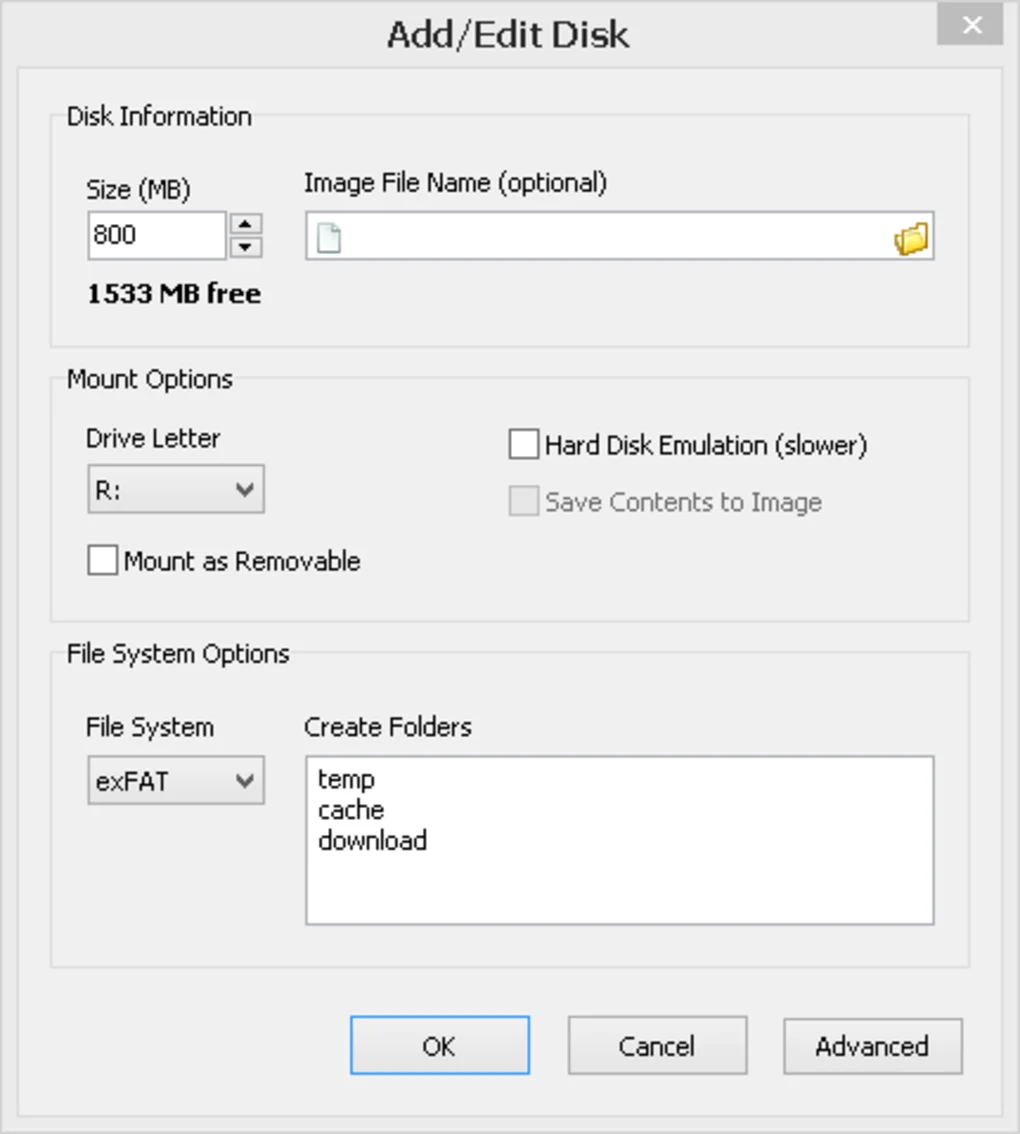
Users typically assign a portion of RAM (for example 1GB, 2GB, 4GB) and the tool converts it into a usable drive.
💡 Common Uses
Users commonly use RAM Disk for:
- Browser cache storage (Chrome, Firefox cache)
- Temporary Windows files (Temp folders)
- Game cache and shader storage
- Software compilation and build files
- Video editing cache files
- Database caching
- High-speed file processing
⚙️ How It Works
- User selects RAM size
- Software creates virtual disk
- Windows detects it as a normal drive
- Applications read/write data to RAM
- Data is processed at memory speed
Since RAM is much faster than SSD/HDD, operations become significantly faster.
💻 System Optimization
Improves performance by moving temporary system files to RAM.
🎮 Gaming Performance
Helps reduce loading time by caching:
- Game assets
- Shader files
- Temporary textures
🧑💻 Software Development
Used for:
- Build compilation cache
- Temporary project files
- Testing environments
🎬 Media Editing
Speeds up:
- Video rendering cache
- Audio processing
- 3D rendering temporary files
🌐 Browser Acceleration
Stores:
- Cache
- Temporary internet files
- Session data
💻 System Requirements (General)
Minimum Requirements
- Operating System: Windows 7 / 8 / 10 / 11
- RAM: 2GB minimum
- Processor: Any modern CPU
- Permissions: Administrator access
Recommended Requirements
- RAM: 8GB or more
- Storage: SSD recommended
- CPU: Multi-core processor
- Free RAM: At least 1–4GB for RAM disk usage
🔄 Alternatives
- ImDisk Toolkit
- Dataram RAMDisk
- StarWind RAM Disk
- OSFMount
- Radeon RAMDisk (legacy)
❓ FAQ
Q1. What is SoftPerfect RAM Disk used for?
It is used to create a virtual high-speed disk using system RAM.
Q2. Is RAM Disk safe?
Yes, it is safe but data is temporary unless persistence is enabled.
Q3. Does it improve performance?
Yes, for cache-heavy and temporary operations.
Q4. What happens after restart?
Data is erased unless saved as an image.
Q5. Can it damage PC?
No, but improper RAM allocation can reduce system performance.
Q6. How much RAM should I allocate?
Depends on system RAM; usually 1–4GB is safe.
Features
✔️ Create high-speed RAM-based virtual drives
✔️ Multiple RAM disk support
✔️ NTFS / FAT / exFAT file system support
✔️ Auto-mount on startup
✔️ Persistent disk image option
✔️ SSD wear reduction
✔️ Temporary file redirection
✔️ Custom disk size allocation
✔️ High-speed caching support
✔️ Lightweight system tool
✔️ Advanced configuration settings
✔️ GUI-based management
✔️ Stable Windows integration
✔️ Multi-drive support
👍 Pros & 👎 Cons
Pros
- Extremely fast performance (RAM speed)
- Improves system responsiveness
- Reduces SSD/HDD wear
- Useful for developers and power users
- Supports multiple RAM disks
- Flexible configuration options
- Better cache performance
Cons
- Data is lost on restart (if not saved)
- Consumes system RAM
- Not suitable for low-RAM systems
- Requires careful configuration
- Not ideal for permanent storage
- Misconfiguration may slow system
Our Analysis
SoftPerfect RAM Disk is a powerful optimization tool for users who want to extract maximum performance from their system memory.
Its biggest advantage is speed improvement, since RAM is significantly faster than SSD or HDD storage. This makes it especially useful for tasks involving temporary files, caching, and high-speed processing.
For developers, gamers, and advanced users, it can provide noticeable improvements in:
- Build times
- Loading performance
- Cache-heavy operations
However, it is not a general-purpose performance booster for all users. Since it consumes system memory, users with low RAM may not benefit much.
Also, incorrect configuration may reduce overall system performance instead of improving it.
Overall, it is a specialized but very powerful utility for optimizing temporary storage performance in Windows systems.
⚙️ Installation Guide (General Overview)
Step 1: Install Software
Download and install SoftPerfect RAM Disk from a trusted source.
Step 2: Launch Application
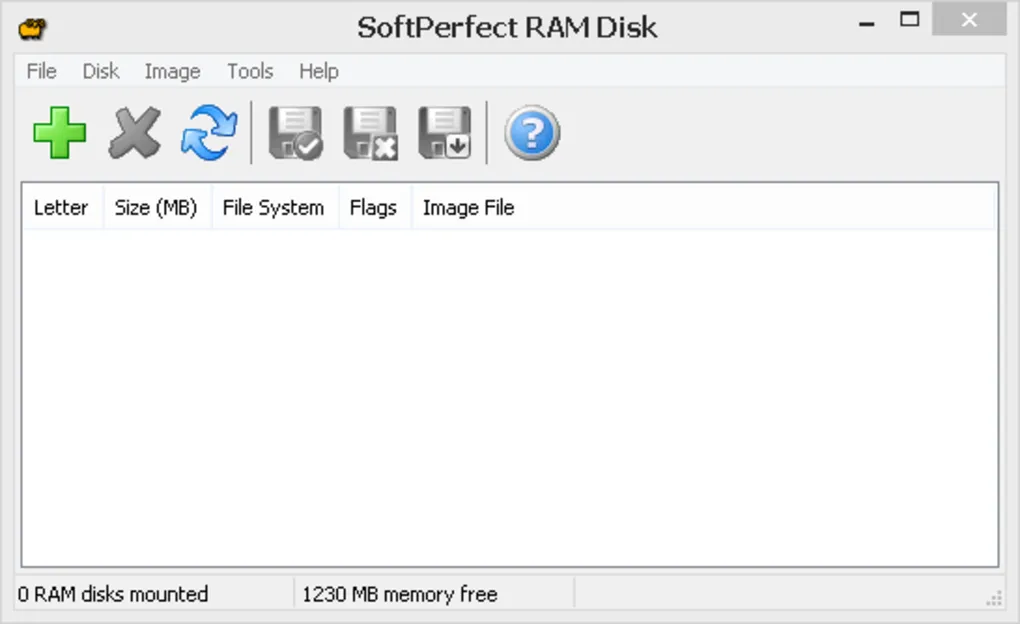
Open RAM Disk manager interface.
Step 3: Create Disk
Select:
- RAM size
- Drive letter
- File system
Step 4: Apply Settings
Click create/mount option.
Step 5: Configure Options
Enable:
- Auto startup
- Persistence (optional)
- Folder mapping
Step 6: Start Using Disk
Access it like a normal drive.
About SoftwareDownloading Editorial Team
The SoftwareDownloading Editorial Team researches Windows software, compatibility information, features, alternatives, and software-related guides for SoftwareDownloading.in.
Our pages are prepared using available product information and relevant documentation. When an application has not been personally tested, we distinguish research-based analysis from hands-on testing. Learn more about our review process
Apps Specs
Developer
Licence
Trial
Version
4.0.6
Platform
Windows
Download Clicks
1
Page Reviewed
September 26, 2026
Top Downloads



Related Topics
Disclaimer
This content is provided for educational and informational purposes only. We do not host, store, or distribute any software files on our servers. All trademarks, product names, and logos belong to their respective owners.
We strongly recommend downloading software only from official websites or trusted sources. We are not responsible for any damage, data loss, or issues that may occur from the use of third-party software.
Users should ensure they comply with all applicable laws and software licensing agreements in their country before downloading or using any software mentioned on this website.