- Business & Productivity
- Finance
- HDPOSsmart
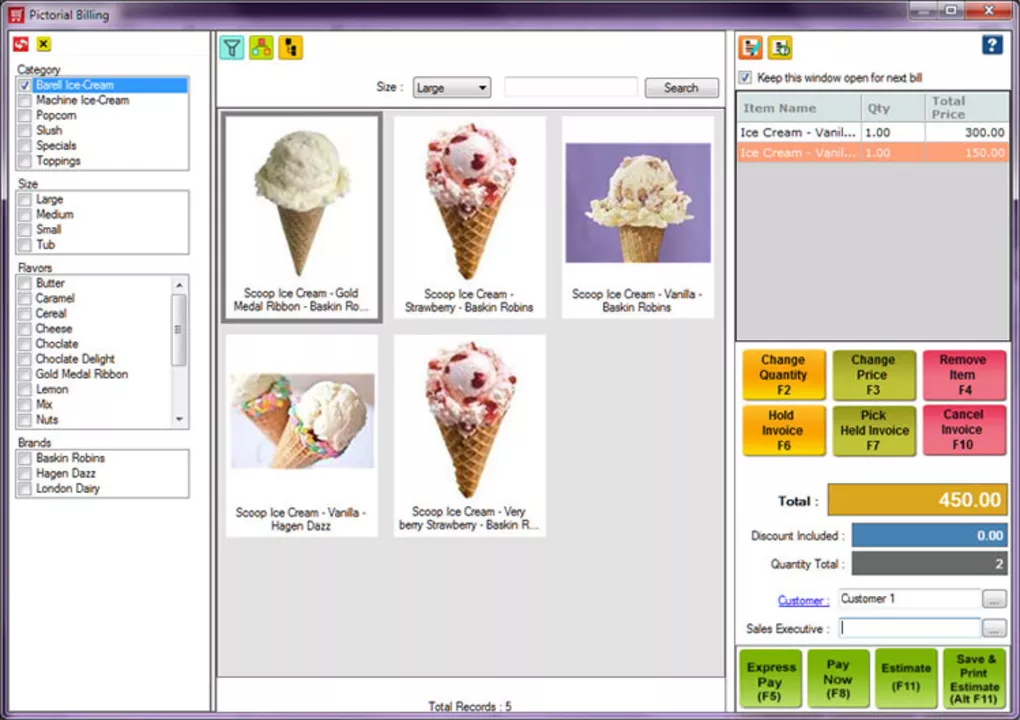
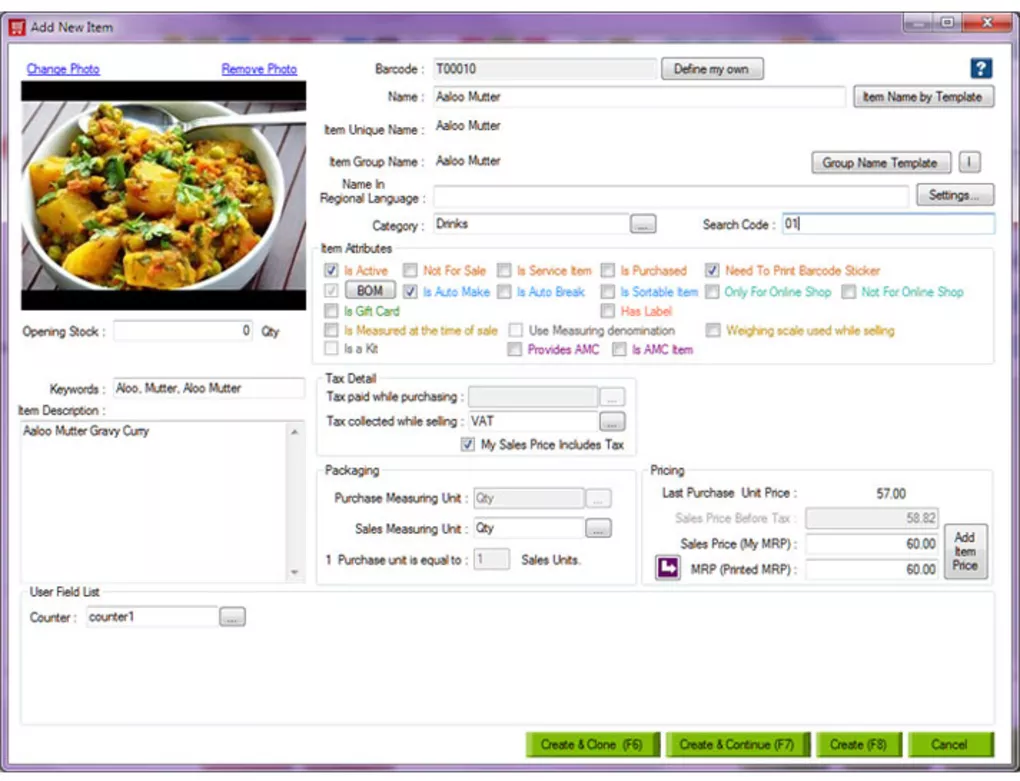
HDPOSsmart is designed to provide an all-in-one retail and business management solution that integrates billing, inventory, and customer management into a single system.
The software helps businesses:
- Manage sales billing efficiently
- Track stock in real time
- Organize customer and supplier data
- Improve retail operations
- Generate financial and GST reports
- Automate POS workflows
It is commonly used in:
- Retail shops
- Supermarkets
- Pharmacies
- Restaurants
- Wholesale businesses
- Distribution centers
Depending on the edition, users may gain access to:
- Barcode-based billing systems
- Multi-store management
- GST-ready invoicing
- Loyalty programs
- Purchase and supplier tracking
- Sales analytics dashboards
- Accounting integration
One major advantage of HDPOSsmart is integrated POS control because it combines billing, inventory, and customer management into one streamlined system.
The software is especially useful for:
- Shop owners
- Cashiers
- Retail managers
- Restaurant operators
- Inventory managers
- Small business owners
who need efficient billing and retail management tools.
📌 What is HDPOSsmart?
HDPOSsmart is a complete Point of Sale (POS) and business management software designed to help retail shops, restaurants, and small to medium businesses manage billing, inventory, sales, customers, and financial operations.
It is widely used for:
- Billing and invoicing
- Retail POS operations
- Inventory management
- Customer management
- Sales tracking
- Business reporting
It is especially popular in retail stores, supermarkets, pharmacies, restaurants, and distribution businesses.
🚀 Key Uses
- Creating sales bills and invoices
- Managing retail billing counters (POS)
- Tracking inventory and stock levels
- Managing customer records and loyalty
- Handling purchases and suppliers
- Generating GST and tax reports
- Monitoring daily sales performance
- Managing barcode-based billing
- Restaurant and retail order management
- Business accounting support
💻 System Requirements (General)
Minimum Requirements
- Microsoft Windows 7 / 8 / 10 / 11
- 4GB RAM minimum
- Dual-core processor
- 1GB+ free storage space
- Printer and barcode scanner support (recommended)
Recommended Requirements
- 8GB–16GB RAM
- SSD storage
- Multi-user LAN setup (for shops)
- Barcode scanner + thermal printer
- Stable backup system for business data
🔄 Alternatives
- TallyPrime
- Vyapar
- Zoho Inventory
- Marg ERP
- GoFrugal POS
- Square POS
- Shopify POS
❓ FAQ
Q1. What is HDPOSsmart used for?
It is used for billing, POS operations, inventory management, and retail business management.
Q2. Is it suitable for small shops?
Yes, it is widely used by small and medium retail businesses.
Q3. Does it support barcode billing?
Yes, barcode-based billing is a key feature.
Q4. Can it manage inventory?
Yes, stock and inventory management is fully supported.
Q5. Is it useful for restaurants?
Yes, restaurant billing and order management features are commonly included.
🔄 Best Alternatives
Features
✔ POS billing system
✔ Barcode scanning support
✔ Inventory and stock tracking
✔ Customer management system
✔ GST and tax reporting
✔ Purchase and supplier management
✔ Sales analytics and reporting
✔ Multi-store support
✔ Loyalty program management
✔ Invoice and receipt printing
✔ Restaurant order management
✔ Beginner-friendly POS interface
✔ Business workflow automation
✔ Accounting integration support
👍 Pros & 👎 Cons
Pros
- Complete POS + inventory system
- Strong billing and retail features
- Useful for many business types
- Barcode and printer support
- Good reporting and analytics tools
- Helps streamline store operations
Cons
- Setup can be complex for beginners
- Requires proper hardware for best performance
- Advanced features may need paid versions
- Multi-store setup requires technical configuration
- Data backup and maintenance are important
Expert Review
HDPOSsmart is a strong and practical POS solution for retail and small business environments.
Its strongest advantages are:
- Powerful billing and POS system
- Strong inventory management
- Barcode and retail automation support
- Useful reporting and business insights
The software is especially useful for shops, supermarkets, pharmacies, and restaurants that need structured billing and inventory control systems.
While setup and hardware requirements may be slightly technical, HDPOSsmart performs very well once configured properly.
Overall, it is a complete point-of-sale and business management software for billing, inventory control, customer management, and retail workflow automation.
How to Install
⚙️ Installation Guide (General Overview)
Step 1: Download HDPOSsmart
Download HDPOSsmart from official provider.
Step 2: Run Installer
Launch setup file and begin installation.
Step 3: Choose Installation Type
Select:
- Single store setup
- Multi-store setup (if needed)
Step 4: Complete Installation
Wait for installation to finish.
Step 5: Configure Business Settings
Add:
- Store details
- Tax configuration
- Billing preferences
- Inventory setup
Step 6: Set Up Inventory
Add:
- Products
- Categories
- Prices
- Stock quantities
Step 7: Configure Billing System
Enable:
- Barcode scanning
- Printer setup
- Invoice templates
Step 8: Start Billing Operations
Begin:
- Sales billing
- Customer transactions
- Inventory updates
Step 9: Generate Reports
View:
- Sales reports
- Stock reports
- GST summaries
Step 10: Maintain Backup System
Regularly backup business data for safety.
Apps Specs
Licence
Free
Latest Update
June 24, 2026
Platform
Windows
Downloads
Devlopers
Top Downloads
Disclaimer
This content is provided for educational and informational purposes only. We do not host, store, or distribute any software files on our servers. All trademarks, product names, and logos belong to their respective owners.
We strongly recommend downloading software only from official websites or trusted sources. We are not responsible for any damage, data loss, or issues that may occur from the use of third-party software.
Users should ensure they comply with all applicable laws and software licensing agreements in their country before downloading or using any software mentioned on this website.
You may also like
Alternatives to
Expore Apps