- Business & Productivity
- E-mail Clients
- Winmail Opener

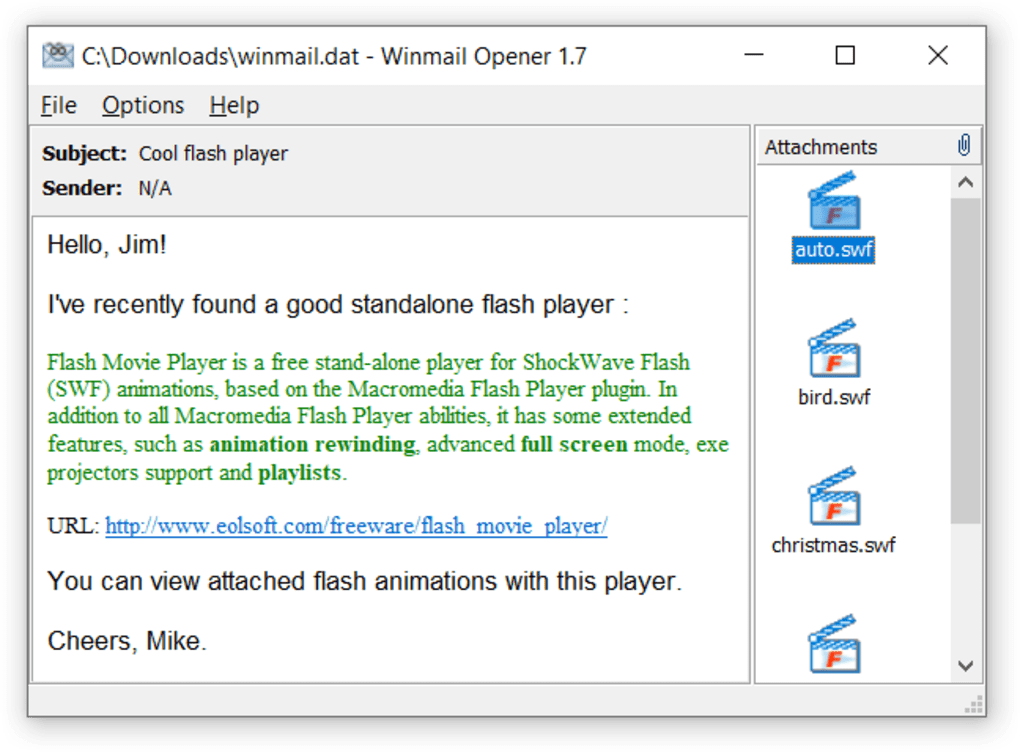
Winmail Opener is designed to solve compatibility issues caused by Microsoft Outlook’s TNEF (Transport Neutral Encapsulation Format) encoded email attachments.
It helps users:
- Open inaccessible attachments
- Extract hidden email files
- Improve email compatibility
- Recover important documents
- Access Outlook message contents
- Simplify email troubleshooting
The software is commonly useful for:
- Office communication
- Business email handling
- Technical support
- Outlook compatibility issues
- Corporate environments
- Daily email management
Depending on the version, users may get:
- Attachment extraction
- Message preview support
- TNEF decoding
- Simple drag-and-drop interface
- Lightweight utility tools
- Fast processing
- Multi-file support
📌 What is Winmail Opener?
Winmail Opener is a lightweight utility software designed to open and extract contents from Winmail.dat files that are commonly generated by Microsoft Outlook email formatting systems.
The software helps users:
- Open Winmail.dat attachments
- Extract email contents
- Access hidden attachments
- Read encoded Outlook messages
- Recover attached files
- View message formatting data
It is commonly used by:
- Email users
- Office professionals
- Business users
- IT support teams
- Outlook recipients
- Windows users
The application mainly focuses on:
- Winmail.dat decoding
- Attachment extraction
- Email compatibility
- Outlook message handling
- Simple file recovery
🚀 Key Uses
- Opening Winmail.dat files
- Extracting email attachments
- Recovering hidden documents
- Reading Outlook encoded messages
- Accessing inaccessible email content
- Fixing Outlook attachment issues
- Viewing TNEF email data
- Business email compatibility
- File extraction from emails
- Simplifying email communication
💻 System Requirements (General)
Supported Platforms
- Microsoft Windows
Basic Requirements
- 1GB RAM minimum
- Small storage space
- Basic processor
- Winmail.dat file access
- Windows-compatible system
Recommended Requirements
- 2GB+ RAM
- Updated Windows version
- SSD storage
- Modern processor
🔄 Alternatives
- TNEF’s Enough
- Letter Opener
- WMDecode
- Thunderbird
- Microsoft Outlook
- Online Winmail.dat viewers
- MSG Viewer tools
❓ FAQ
Q1. What is Winmail Opener used for?
It is used for opening and extracting files from Winmail.dat email attachments.
Q2. What is a Winmail.dat file?
It is an Outlook-generated email formatting file that may contain hidden attachments and message formatting information.
Q3. Can users recover attachments from Winmail.dat?
Yes, the software can extract embedded attachments and files.
Q4. Is Winmail Opener free?
Many versions of the software are available as free utilities.
Q5. Is it useful for business emails?
Yes, it helps users access Outlook email attachments correctly.
🔄 Best Alternatives
Features
✔ Winmail.dat file opening support
✔ Attachment extraction tools
✔ TNEF email decoding
✔ Outlook compatibility support
✔ Lightweight performance
✔ Simple user interface
✔ Drag-and-drop file handling
✔ Hidden attachment recovery
✔ Fast email processing
✔ Easy document extraction
✔ Business email support
✔ Windows compatibility
👍 Pros & 👎 Cons
Pros
- Simple and lightweight
- Easy Winmail.dat handling
- Fast attachment extraction
- Useful for Outlook compatibility
- Beginner-friendly interface
- Helps recover inaccessible files
Cons
- Limited functionality outside Winmail.dat files
- Windows-focused software
- Basic interface design
- Some advanced email features missing
- Depends on source email integrity
Expert Review
Winmail Opener is a very practical utility for users who frequently receive problematic Outlook email attachments in Winmail.dat format.
Its strongest advantages are:
- Extremely easy to use
- Lightweight utility design
- Fast file extraction
- Helpful Outlook compatibility support
It is especially useful for office workers, businesses, and users dealing with Outlook-generated email attachment issues.
However, the software is highly specialized and mainly useful only for Winmail.dat-related problems.
How to Install
⚙️ Usage Guide (General Overview)
Step 1: Install Software
Install Winmail Opener on your computer.
Step 2: Locate Winmail.dat File
Download attachment from email.
Step 3: Open File
Load Winmail.dat into the application.
Step 4: Decode Contents
Allow software to process email data.
Step 5: View Attachments
Access:
- Documents
- Images
- Embedded files
- Message contents
Step 6: Extract Files
Save attachments to local storage.
Step 7: Continue Email Access
Use recovered files normally.
Top Downloads




Related Topics
Disclaimer
This content is provided for educational and informational purposes only. We do not host, store, or distribute any software files on our servers. All trademarks, product names, and logos belong to their respective owners.
We strongly recommend downloading software only from official websites or trusted sources. We are not responsible for any damage, data loss, or issues that may occur from the use of third-party software.
Users should ensure they comply with all applicable laws and software licensing agreements in their country before downloading or using any software mentioned on this website.
You may also like






Alternatives to
Expore Apps