- Development & IT
- Web devlopment
- MiTeC System Information X
MiTeC System Information X is a powerful system diagnostic and hardware analysis tool that provides detailed information about computer hardware, software, network components, and operating system configuration.
📌 What is MiTeC System Information X?
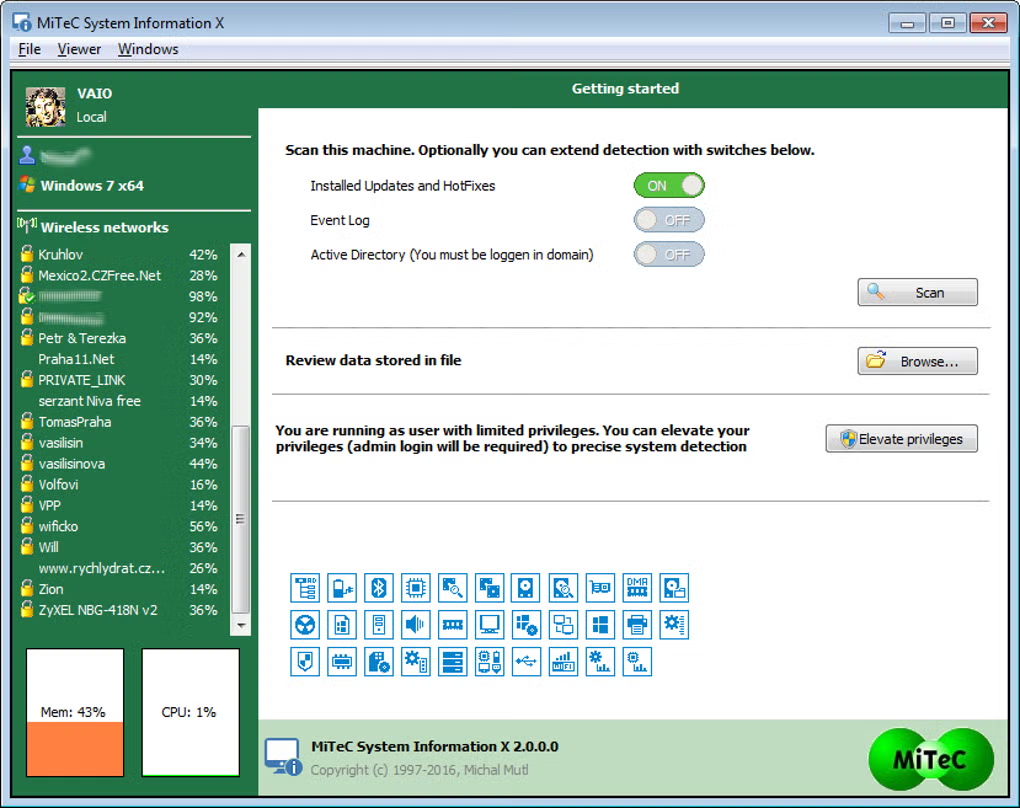
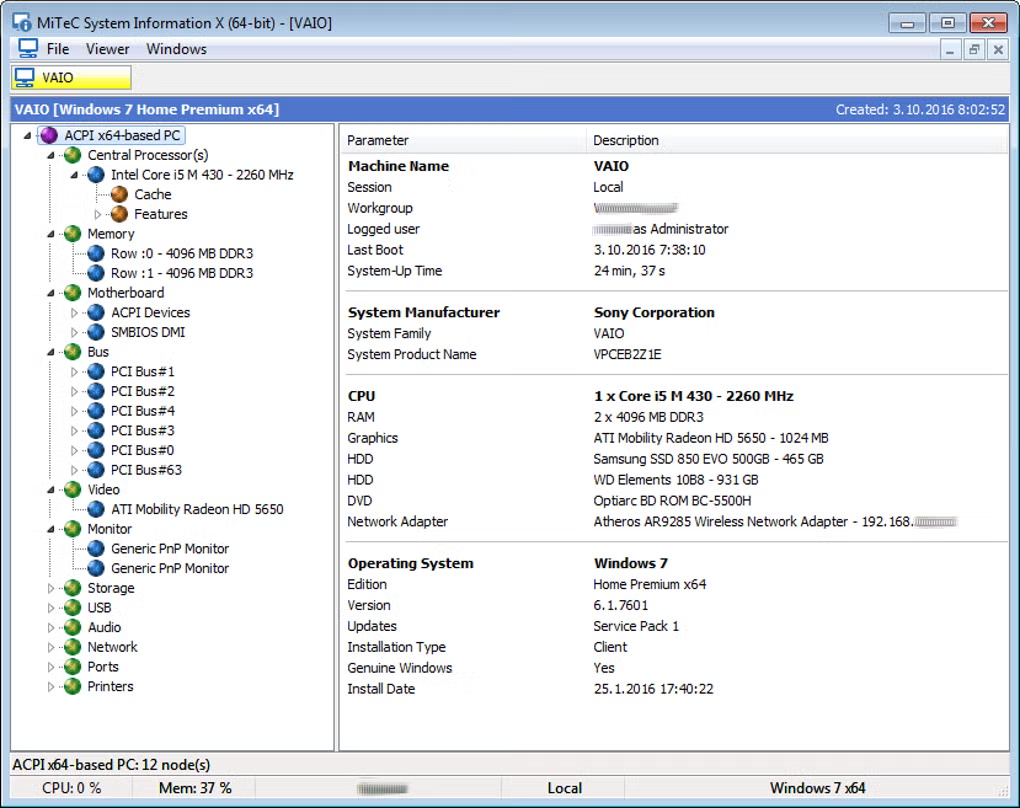
MiTeC System Information X is an advanced diagnostic and reporting utility designed to display detailed technical information about a computer system. It helps users inspect hardware components, operating system details, installed software, network configuration, drivers, and performance-related information from one interface.
The software is especially useful for IT professionals, technicians, developers, and advanced users who need deep insight into a system’s configuration. Instead of checking multiple Windows settings manually, MiTeC System Information X collects everything into an organized dashboard.
One of its biggest strengths is the amount of information it can display. Users can view CPU details, RAM usage, motherboard information, graphics hardware, storage devices, running processes, installed updates, and network data in real time.
The application is lightweight and portable, meaning it can often run without full installation. This makes it very convenient for technicians who need to diagnose multiple computers quickly using a USB drive.
MiTeC System Information X can also generate reports in various formats, which is useful for troubleshooting, auditing, or documenting system configurations.
Overall, it is a highly useful diagnostic utility for monitoring and understanding computer systems in detail.
💻 System Requirements (Detailed)
To run MiTeC System Information X smoothly, the following system requirements are recommended:
Minimum Requirements
- Operating System: Windows 7 / Windows 8 / Windows 10 / Windows 11
- Processor: Intel or AMD processor
- RAM: Minimum 1GB RAM
- Storage Space: 50MB free space
- Display: Standard monitor resolution
Recommended Requirements
- Processor: Dual-Core or higher
- RAM: 2GB–4GB or more
- Storage: Additional space for report exports
- Privileges: Administrator rights for complete system scanning
The software is lightweight and works efficiently even on older systems.
🔄 Alternatives
If you want similar system diagnostic tools, you can try:
- CPU-Z
- Speccy
- HWiNFO
- AIDA64
❓ FAQ
Q1. What is MiTeC System Information X mainly used for?
It is used for viewing detailed hardware and system information.
Q2. Is it suitable for beginners?
Basic information is easy to access, but advanced sections may require technical knowledge.
Q3. Does it support portable usage?
Yes, portable versions are available.
Q4. Can it export reports?
Yes, users can generate and export detailed system reports.
Q5. Is the software free?
Some MiTeC tools are freeware for personal use.
Features
- ✔️ Detailed hardware information
- ✔️ Real-time system monitoring
- ✔️ CPU, RAM, and motherboard analysis
- ✔️ Storage and disk information
- ✔️ Network configuration details
- ✔️ Installed software and drivers list
- ✔️ Running process monitoring
- ✔️ Portable and lightweight design
- ✔️ Export system reports
- ✔️ User-friendly technical dashboard
👍 Pros & 👎 Cons
Pros
- Provides extremely detailed system information
- Lightweight and fast performance
- Portable version available
- Useful for troubleshooting and diagnostics
- Good for IT professionals and advanced users
Cons
- Interface may feel technical for beginners
- Too much information for casual users
- Limited visual customization
- Some advanced data may require technical knowledge
Our Analysis
In my opinion, MiTeC System Information X is an excellent utility for users who need complete insight into their computer system. It combines detailed hardware diagnostics, software analysis, and monitoring features into a lightweight package.
The portable nature of the tool makes it especially useful for IT technicians and repair professionals who frequently troubleshoot multiple systems. It provides a huge amount of information without consuming many system resources.
Although the interface may feel advanced for casual users, power users and technicians will appreciate the depth of information available. If you need a reliable system information and diagnostics tool, MiTeC System Information X is definitely worth trying.
⚙️ Installation Guide (Step-by-Step)
Follow these steps to install MiTeC System Information X:
Step 1: Download the Software
Download MiTeC System Information X from a trusted source.
Step 2: Extract ZIP File
If downloaded as an archive, extract files using WinRAR or 7-Zip.
Step 3: Run Installer or Portable File
Launch the installer or open the portable executable.
Step 4: Accept License Agreement
Read and accept the software terms.
Step 5: Complete Installation
Click Install and wait for setup completion.
Step 6: Open the Software
Launch MiTeC System Information X.
Step 7: Scan System
Allow the software to collect system details.
Step 8: View or Export Reports
Analyze information or export reports for future use.
About SoftwareDownloading Editorial Team
The SoftwareDownloading Editorial Team researches Windows software, compatibility information, features, alternatives, and software-related guides for SoftwareDownloading.in.
Our pages are prepared using available product information and relevant documentation. When an application has not been personally tested, we distinguish research-based analysis from hands-on testing. Learn more about our review process
Apps Specs
Developer
MiTeC
Licence
Free
Version
V 3.9.0
Platform
Windows
Download Clicks
5
Page Reviewed
September 26, 2026
Top Downloads




Related Topics
Disclaimer
This content is provided for educational and informational purposes only. We do not host, store, or distribute any software files on our servers. All trademarks, product names, and logos belong to their respective owners.
We strongly recommend downloading software only from official websites or trusted sources. We are not responsible for any damage, data loss, or issues that may occur from the use of third-party software.
Users should ensure they comply with all applicable laws and software licensing agreements in their country before downloading or using any software mentioned on this website.