- Development & IT
- Web devlopment
- Cariboost Free Edition
Cariboost Free Edition is a lightweight website builder and content management software that allows users to create, edit, and manage websites without requiring advanced coding knowledge.
📌 What is Cariboost Free Edition?
Cariboost Free Edition is a website creation and management tool designed for users who want to build websites without learning complex programming languages. It combines a visual website editor with basic content management features, making it suitable for beginners, small businesses, and personal website creators.
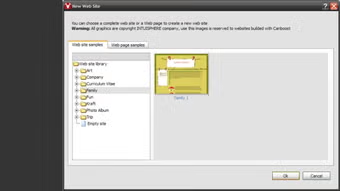
The software allows users to design webpages using a simple interface where elements such as text, images, menus, and layouts can be arranged visually. Instead of writing HTML or CSS manually, users can customize pages through built-in editing tools.
One of the major advantages of Cariboost Free Edition is its simplicity. The software focuses on providing an easy website creation experience for users who may not have technical knowledge. This makes it especially useful for small organizations, hobby websites, and basic business pages.
Cariboost also includes features for managing website content, updating pages, and organizing navigation structures. Users can create multi-page websites and update information without needing to redesign the entire site.
The Free Edition is intended as an entry-level version of the software, providing core functionality for personal and educational use. While advanced professional features may be limited, it still offers enough tools for building simple and functional websites.
Overall, Cariboost Free Edition acts as an accessible web design solution for beginners looking to create websites quickly and easily.
💻 System Requirements (Detailed)
To run Cariboost Free Edition smoothly, the following system requirements are recommended:
Minimum Requirements
- Operating System: Windows XP / Windows 7 / Windows 8 / Windows 10
- Processor: Intel or AMD processor
- RAM: Minimum 1GB RAM
- Storage Space: 200MB free disk space
- Display: Standard monitor resolution
Recommended Requirements
- Processor: Dual-Core CPU or higher
- RAM: 2GB–4GB RAM
- Storage: Additional space for website projects and media files
- Internet: Required for publishing and updating websites
The software is lightweight and can run on older computers as well.
🔄 Alternatives
If you want similar website building tools, you can try:
- Wix
- WordPress
- Webflow
- Squarespace
❓ FAQ
Q1. What is Cariboost Free Edition mainly used for?
It is used for creating and managing websites without coding knowledge.
Q2. Is Cariboost Free Edition free?
Yes, the Free Edition provides basic website building features at no cost.
Q3. Do I need programming skills to use it?
No, it is designed for beginners and non-technical users.
Q4. Can I create business websites with it?
Yes, small business and personal websites can be created.
Q5. Is Cariboost suitable for modern professional websites?
It is more suitable for simple websites rather than advanced modern web applications.
Features
- ✔️ Visual drag-and-drop style website editing
- ✔️ Beginner-friendly interface
- ✔️ Create and manage multiple web pages
- ✔️ Website templates and layouts
- ✔️ Built-in content management tools
- ✔️ Text and image editing support
- ✔️ Navigation menu creation
- ✔️ No advanced coding required
- ✔️ Lightweight website management solution
- ✔️ Suitable for personal and small business websites
👍 Pros & 👎 Cons
Pros
- Easy to use for beginners
- No coding skills required
- Lightweight and simple interface
- Good for small websites
- Quick website setup process
Cons
- Limited advanced customization features
- Outdated compared to modern web builders
- Free edition has restricted functionality
- Less suitable for large professional websites
Our Analysis
In my opinion, Cariboost Free Edition is a good beginner-friendly solution for users who want to create simple websites quickly without learning coding. Its visual editing system makes website creation easy even for non-technical users.
The lightweight nature of the software is also a benefit, especially for older computers or users who want a straightforward web design experience without complicated tools.
However, compared to modern cloud-based website builders, Cariboost feels somewhat outdated and limited in advanced functionality. Still, for personal projects, educational use, or small websites, it can be a practical and easy-to-use option.
⚙️ Installation Guide (Step-by-Step)
Follow these steps to install Cariboost Free Edition:
Step 1: Download the Software
Download Cariboost Free Edition from a trusted source.
Step 2: Run the Installer
Open the setup file to begin installation.
Step 3: Accept License Agreement
Read and accept the software terms.
Step 4: Choose Installation Folder
Select where the software should be installed.
Step 5: Complete Installation
Click Install and wait for setup completion.
Step 6: Launch the Software
Open Cariboost Free Edition after installation.
Step 7: Create a New Website
Start a new project using templates or blank layouts.
Step 8: Edit and Publish
Customize pages and publish your website online.
About SoftwareDownloading Editorial Team
The SoftwareDownloading Editorial Team researches Windows software, compatibility information, features, alternatives, and software-related guides for SoftwareDownloading.in.
Our pages are prepared using available product information and relevant documentation. When an application has not been personally tested, we distinguish research-based analysis from hands-on testing. Learn more about our review process
Apps Specs
Developer
Licence
Paid
Version
V 2.0
Platform
Windows
Download Clicks
6
Page Reviewed
September 27, 2026
Top Downloads




Related Topics
Disclaimer
This content is provided for educational and informational purposes only. We do not host, store, or distribute any software files on our servers. All trademarks, product names, and logos belong to their respective owners.
We strongly recommend downloading software only from official websites or trusted sources. We are not responsible for any damage, data loss, or issues that may occur from the use of third-party software.
Users should ensure they comply with all applicable laws and software licensing agreements in their country before downloading or using any software mentioned on this website.