- Development & IT
- Remote Control
- WakeMeOnLan

WakeMeOnLan is a lightweight network utility designed to remotely wake up, monitor, and manage computers using Wake-on-LAN (WoL) technology across local networks.
📌 What is WakeMeOnLan?
WakeMeOnLan is a network administration and remote management utility that allows users to remotely wake up computers connected to a local network using Wake-on-LAN (WoL) technology. The software is especially useful for IT administrators, businesses, and advanced home users who need to remotely power on systems without physical access.
Wake-on-LAN is a networking feature that enables computers to be turned on remotely by sending a special network packet called a “Magic Packet” to the target machine.
Normally, when a computer is shut down or in sleep mode, it cannot be accessed remotely. WakeMeOnLan solves this problem by allowing administrators or users to power on compatible systems through network commands.
The software is commonly used for:
- Remote computer startup
- Network device management
- IT administration
- Energy-saving environments
- Remote maintenance
- Server management
- Office computer control
- Automated network operations
One of the biggest strengths of WakeMeOnLan is simplicity. The software can scan the local network, detect connected devices, and allow users to remotely wake supported computers quickly.
The software is commonly used by:
- IT administrators
- Businesses
- Network technicians
- Remote workers
- Home lab users
- Educational institutions
- Server management teams
Depending on the version and network configuration, WakeMeOnLan may support:
- Wake-on-LAN packet transmission
- Network scanning functionality
- Device discovery
- MAC address identification
- IP address management
- Batch wake-up operations
- Remote monitoring tools
- Export and reporting options
- Command-line functionality
- Portable operation without installation
- Multi-device management
- Remote shutdown integration with other tools
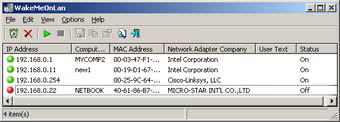
The software typically scans a network and displays information such as:
- Computer names
- IP addresses
- MAC addresses
- Network adapter details
- Device status information
WakeMeOnLan is particularly useful in environments where computers need to remain powered off to save energy but occasionally require remote access or scheduled maintenance.
For Wake-on-LAN to function properly, several requirements must usually be met:
- Compatible motherboard and network adapter
- Wake-on-LAN enabled in BIOS/UEFI
- WoL enabled in network adapter settings
- Proper network configuration
- Ethernet connection support in many cases
Another major advantage is automation. IT administrators can remotely power on multiple systems for updates, backups, maintenance, or remote work sessions without manually visiting each computer.
The software is lightweight and typically consumes very few system resources, making it suitable for portable network administration tasks.
Overall, WakeMeOnLan acts as a convenient remote power management and Wake-on-LAN utility for network administration and remote computer startup operations.
💻 System Requirements (Detailed)
To run WakeMeOnLan smoothly, the following system requirements are recommended:
Minimum Requirements
- Operating System:
Windows 7 / Windows 8 / Windows 10 / Windows 11 - Processor:
Intel or AMD compatible processor - RAM:
Minimum 1GB RAM - Storage Space:
Less than 50MB free disk space - Network:
Ethernet or LAN connection recommended - Hardware Requirement:
Wake-on-LAN compatible network adapter and motherboard
Recommended Requirements
- Processor:
Intel Core i3 or higher - RAM:
2GB–4GB RAM or more - Storage:
SSD recommended for overall system responsiveness - Network:
Gigabit LAN infrastructure recommended for enterprise environments - Additional Tools:
Frequently used with:- Advanced IP Scanner
- AnyDesk
- TeamViewer
Best Suitable For
WakeMeOnLan is ideal for:
- IT administration
- Office network management
- Remote maintenance environments
- Home lab setups
- Server management
- Energy-efficient office operations
- Remote work systems
- Educational computer labs
🔄 Alternatives
If you want similar Wake-on-LAN and network management utilities, you can try:
- Advanced IP Scanner
- ManageEngine OpUtils
- SolarWinds Wake-On-LAN
- Depicus Wake on LAN
- Aqua Connect Wake-On-LAN
❓ FAQ
Q1. What is WakeMeOnLan mainly used for?
It is used for remotely powering on computers using Wake-on-LAN technology.
Q2. Does WakeMeOnLan work over the internet?
It can work remotely if network and router configuration support Wake-on-LAN forwarding.
Q3. Is Wake-on-LAN supported on all computers?
No, compatible hardware and BIOS support are required.
Q4. Can multiple computers be powered on at once?
Yes, batch wake-up operations are supported.
Q5. Is technical setup required?
Yes, BIOS and network adapter configuration may be necessary.
Q6. Does WakeMeOnLan consume many resources?
No, it is a lightweight utility.
Q7. Is WakeMeOnLan useful for businesses?
Yes, it is useful for remote maintenance and centralized IT management.
Features
- ✔️ Remote Wake-on-LAN functionality
- ✔️ Network device scanning
- ✔️ Remote computer startup
- ✔️ MAC address detection
- ✔️ IP address identification
- ✔️ Multi-device wake-up support
- ✔️ Lightweight and portable utility
- ✔️ Batch Wake-on-LAN operations
- ✔️ Network monitoring support
- ✔️ Simple and user-friendly interface
- ✔️ Command-line functionality
- ✔️ Export device list options
- ✔️ Suitable for IT administration
- ✔️ Energy-saving remote management support
- ✔️ Fast network discovery tools
👍 Pros & 👎 Cons
Pros
- Very lightweight and fast utility
- Useful for remote computer power management
- Easy to use for network administrators
- Supports multiple device wake-up operations
- Good for office and enterprise environments
- Portable functionality may not require installation
- Helps save energy by powering systems remotely only when needed
- Useful for remote maintenance and backups
Cons
- Wake-on-LAN must be supported by hardware
- BIOS and network configuration may require technical setup
- Some systems may not support WoL properly
- Internet-based wake-up may require router configuration
- Mostly useful within local network environments
Our Analysis
⭐ My Review
In my opinion, WakeMeOnLan is an extremely useful utility for IT administrators and advanced users who regularly manage multiple computers across local networks. The software provides a simple yet powerful way to remotely power on systems without needing physical access to the machines.
One of the biggest advantages is convenience. Administrators can remotely wake computers for maintenance, software updates, backups, or remote support tasks without keeping systems powered on all the time. This can help reduce energy consumption in office and enterprise environments.
The lightweight and portable design is also excellent because the software runs efficiently without consuming significant system resources. Network scanning and device discovery features further simplify management of large environments.
Although proper Wake-on-LAN setup can require some technical configuration in BIOS and network settings, the functionality becomes very valuable once configured correctly.
If you need an efficient solution for remote computer startup and Wake-on-LAN management, WakeMeOnLan is definitely worth considering.
⚙️ Installation Guide (Step-by-Step)
Follow these steps to use WakeMeOnLan:
Step 1: Download WakeMeOnLan
Download the latest version from the official or trusted source.
Step 2: Launch the Software
Some versions are portable and may not require installation.
Step 3: Scan Local Network
Allow the software to discover available network devices.
Step 4: Identify Target Computer
Locate the computer using:
- IP address
- Computer name
- MAC address
Step 5: Enable Wake-on-LAN on Target System
Configure BIOS/UEFI and network adapter settings to enable WoL.
Step 6: Save Device Information
Store discovered systems for future remote wake-up operations.
Step 7: Send Wake-on-LAN Packet
Select the target device and send the Magic Packet.
Step 8: Verify System Startup
Wait for the remote computer to power on.
Step 9: Access the Remote System
Use remote desktop tools if needed.
Step 10: Automate Wake-Up Tasks (Optional)
Configure scripts or scheduled operations for automated remote startup.
About SoftwareDownloading Editorial Team
The SoftwareDownloading Editorial Team researches Windows software, compatibility information, features, alternatives, and software-related guides for SoftwareDownloading.in.
Our pages are prepared using available product information and relevant documentation. When an application has not been personally tested, we distinguish research-based analysis from hands-on testing. Learn more about our review process
Apps Specs
Developer
Licence
Free
Version
V 1.87
Platform
Windows
Download Clicks
3
Page Reviewed
September 26, 2026
Top Downloads




Disclaimer
This content is provided for educational and informational purposes only. We do not host, store, or distribute any software files on our servers. All trademarks, product names, and logos belong to their respective owners.
We strongly recommend downloading software only from official websites or trusted sources. We are not responsible for any damage, data loss, or issues that may occur from the use of third-party software.
Users should ensure they comply with all applicable laws and software licensing agreements in their country before downloading or using any software mentioned on this website.