
- Business & Productivity
- Document & Management
- SwifDoo PDF for Windows – PDF Editor & Converter

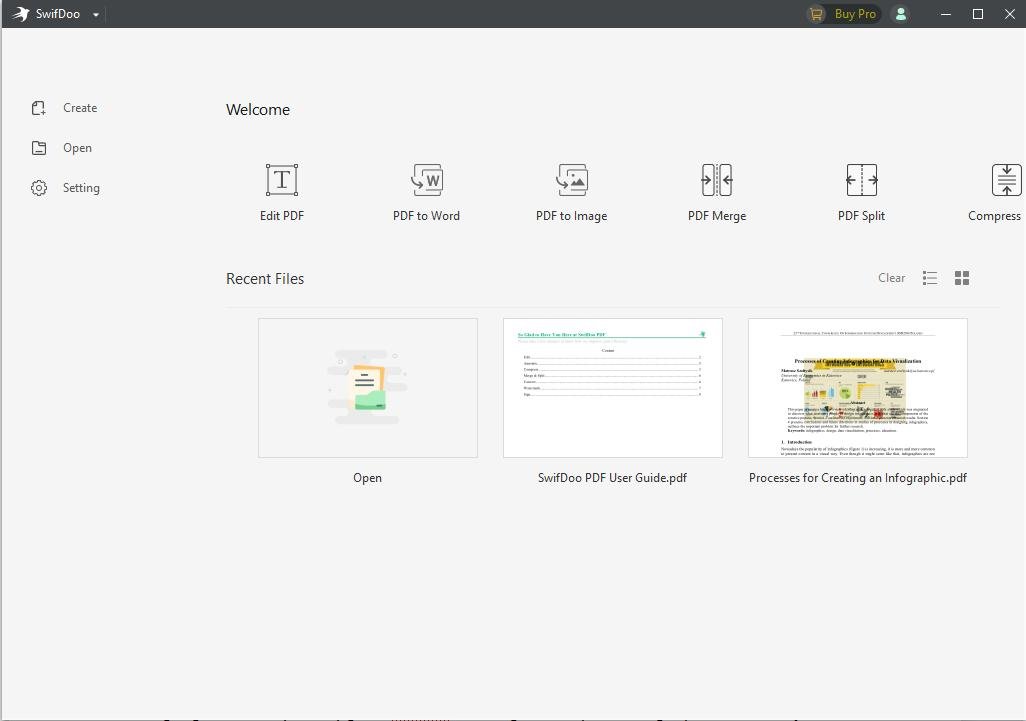
SwifDoo PDF is an all-in-one PDF editor and document management software for Windows that allows users to view, create, edit, convert, merge, split, compress, and organize PDF files. It includes OCR technology for extracting text from scanned documents, annotation tools for reviewing PDFs, and password protection for securing sensitive files. SwifDoo PDF also supports PDF-to-Word, Excel, PowerPoint, and image conversion, along with electronic signatures and AI-assisted document features. Designed for students, professionals, and businesses, it provides a convenient solution for everyday PDF management tasks through a user-friendly interface. A free trial is available, while advanced features require a paid license.
| Requirement | Specification |
|---|---|
| Operating System | Windows 7, 8, 10, 11 |
| Processor | 1 GHz or faster processor |
| RAM | 1 GB minimum |
| Storage Space | 150 MB available disk space |
| Architecture | 32-bit and 64-bit |
| Internet Connection | Required for activation, updates, and online features |
| License | Free Trial / Paid |
| Software Type | PDF Editor, Converter & Reader |
SwifDoo PDF – PDF Editor, Converter, OCR and Document Manager for Windows
SwifDoo PDF is a PDF editing and document management application for Windows that brings multiple document tools into a single interface. It allows users to create, read, edit, convert, compress, merge, split, annotate, and protect PDF files without switching between several applications.
Designed for students, office professionals, educators, and businesses, SwifDoo PDF supports everyday document workflows, including editing existing PDF text, organizing pages, preparing forms, and converting documents into other file formats.
PDF Editing and Document Creation
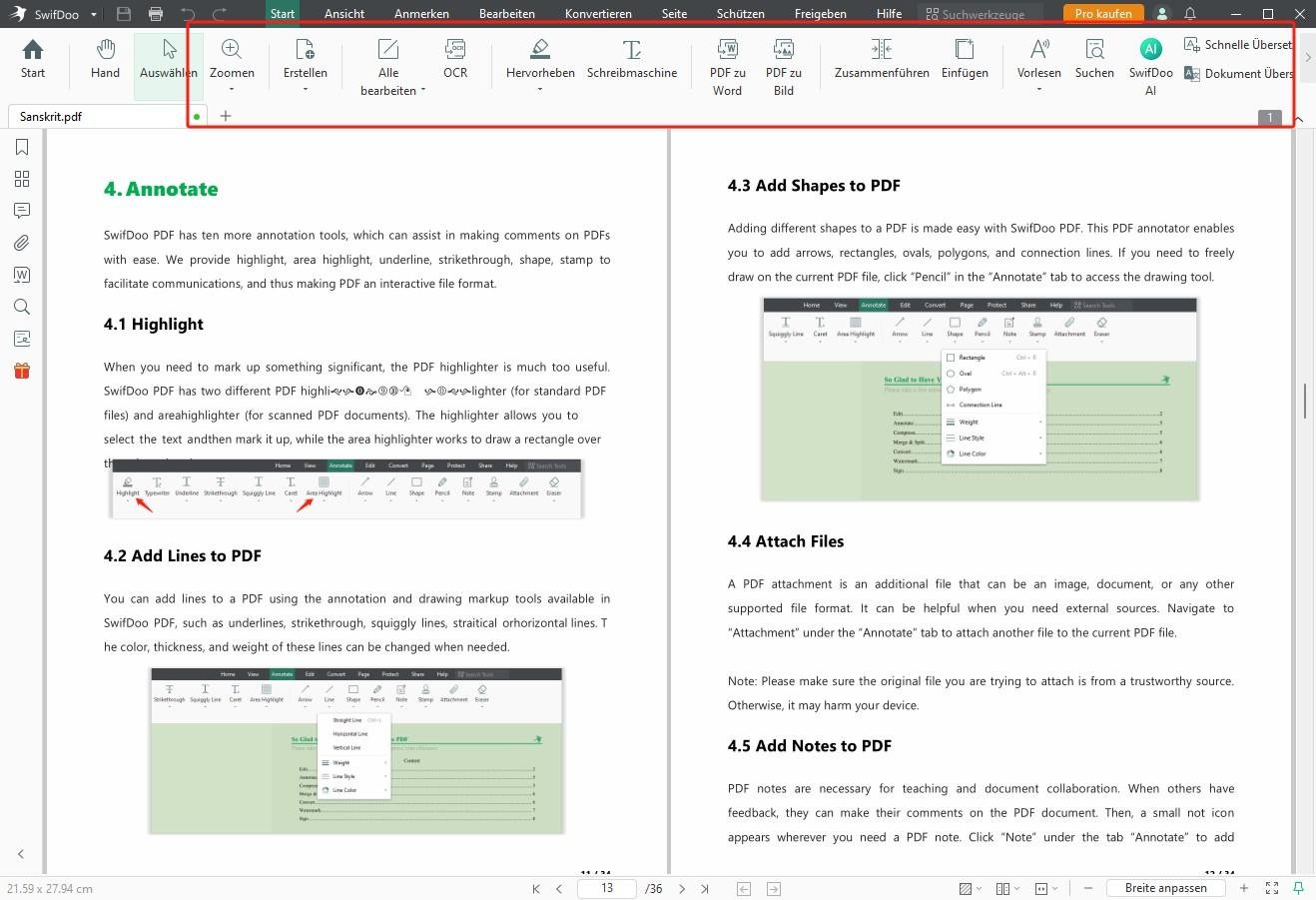
SwifDoo PDF provides tools for modifying text, images, links, and other elements within supported PDF documents. Users can create PDF files, insert new pages, rearrange content, and prepare documents for sharing or printing.
The software also supports annotations such as highlights, comments, shapes, and other markup tools, making it useful for reviewing reports, assignments, contracts, and professional documents.
PDF Conversion Tools
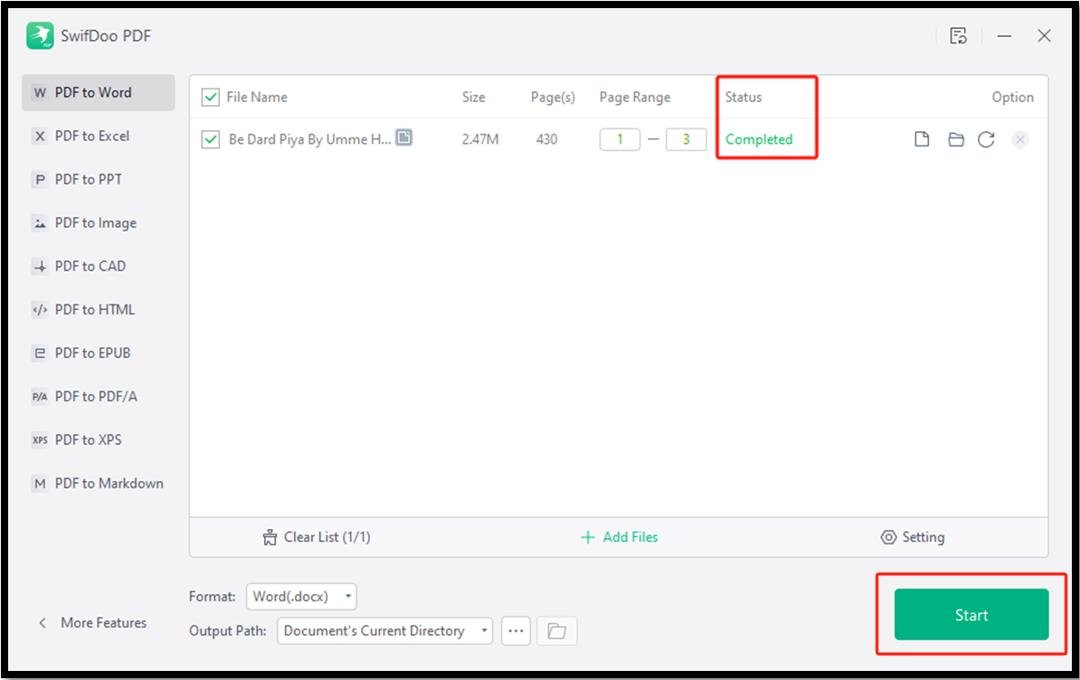
SwifDoo PDF supports converting PDFs into common formats, including Microsoft Word, Excel, PowerPoint, images, and text files. It also provides tools for creating PDFs from supported document formats.
These conversion features are useful when users need to reuse document content or prepare files for editing in other applications. The accuracy of converted layouts can vary depending on the complexity of the original document.
OCR for Scanned Documents
The built-in Optical Character Recognition (OCR) functionality can recognize text within supported scanned PDFs and image-based documents.
This feature is particularly useful for working with scanned paperwork, printed documents, and archived records that do not contain selectable text.
OCR accuracy depends on image quality, document layout, and the language used.
Organize, Merge, and Split PDFs
SwifDoo PDF includes document organization tools that allow users to:
- Merge multiple PDF files into a single document.
- Split larger PDF documents into smaller files.
- Rearrange, rotate, insert, and delete pages.
- Compress PDF files for easier sharing.
- Extract selected pages from existing documents.
These features help simplify document preparation and file management.
Document Security and Electronic Signatures
The software includes tools for applying password protection, managing PDF permissions, and adding signatures to supported documents.
Users can prepare files for controlled sharing and apply electronic or digital signatures where supported. The suitability of a particular signature method for legal or regulatory requirements depends on the applicable rules.
AI-Powered PDF Features
SwifDoo PDF also offers AI-assisted document features designed to help users interact with PDF content.
Depending on the available AI plan, users can ask questions about documents, summarize information, translate text, and obtain explanations of selected content.
AI functionality may require an internet connection and a separate subscription or usage allowance.
Free Trial and Premium Features
SwifDoo PDF for Windows provides a seven-day trial with access to premium features. After the trial ends, users can continue using certain basic functions, while advanced editing and document-processing tools require a paid license.
The developer offers subscription and perpetual licensing options. AI features may have separate pricing and usage limitations.
Who Should Use SwifDoo PDF?
SwifDoo PDF may be useful for students preparing assignments, professionals handling business documents, educators managing learning materials, and users who regularly need to edit or convert PDF files.
Its combination of editing, conversion, OCR, document organization, and security tools makes it an option for users seeking a multipurpose Windows PDF application.
Download SwifDoo PDF for Windows
SwifDoo PDF is available through its official website. Users can download the Windows installer, install the application, and explore its features during the available trial period.
Official Website: https://www.swifdoo.com/
Editorial Disclosure: SoftwareDownloading.in received a complimentary Windows lifetime license from the developer. This does not guarantee favorable coverage or affect the information presented in this listing.
Features
- PDF Editing: Edit text, images, links, and other content within PDF documents.
- PDF Conversion: Convert PDFs to Word, Excel, PowerPoint, images, and other supported formats.
- OCR Technology: Recognize and extract text from scanned PDFs and image-based documents.
- PDF Creation: Create PDF documents from supported file formats.
- Merge and Split PDFs: Combine multiple PDF files or split large documents into smaller files.
- PDF Compression: Reduce PDF file sizes for easier storage and sharing.
- PDF Annotation: Highlight text, add comments, insert shapes, and mark up documents.
- Electronic Signatures: Add signatures to PDF documents.
- Password Protection: Secure PDF files with passwords and document permissions.
- PDF Page Management: Insert, delete, rotate, extract, and rearrange PDF pages.
- AI-Powered PDF Tools: Summarize, translate, and ask questions about PDF content, subject to feature availability.
- Batch Processing: Process multiple supported PDF files for selected conversion and management tasks.
- User-Friendly Interface: Navigate PDF editing and document management tools through a Windows desktop interface.
👍 Pros & 👎 Cons
Pros
- Easy-to-use PDF editing interface
- Supports multiple PDF conversion formats
- Built-in OCR for scanned documents
- Merge, split, and compress PDF files
- PDF annotation and signature tools
- Password protection for PDF documents
- AI-assisted document features
- Lightweight Windows application
Cons
- Advanced features require a paid license
- Free trial has limited duration
- AI features may require additional payment
- OCR accuracy varies with scan quality
- Complex PDF layouts may not convert perfectly
- No native Linux version
Our Analysis
SwifDoo PDF offers a practical combination of PDF editing, conversion, OCR, annotation, and document management features for Windows users. Its interface brings commonly used PDF tools together, making it a convenient option for students, office professionals, educators, and small businesses that regularly work with digital documents.
One of its main advantages is the range of document conversion and organization tools available within a single application. Users can convert PDFs into editable formats, merge multiple documents, extract pages, compress files, and manage scanned documents using OCR. These capabilities may reduce the need to switch between separate PDF utilities.
SwifDoo PDF also includes document security, electronic signatures, and AI-assisted features. However, users should consider that advanced editing functions require a paid license, while certain AI capabilities may involve additional costs or usage restrictions. Conversion accuracy and OCR results can also vary depending on the original document’s quality and complexity.
Compared with basic PDF readers, SwifDoo PDF provides a broader set of editing and document-processing capabilities. However, users who only need to open, read, or print PDF files may not require its premium features.
Our Assessment: SwifDoo PDF is a worthwhile option to consider for Windows users who need an integrated PDF editor and converter. Its combination of everyday document tools and advanced features makes it suitable for a variety of personal and professional workflows. Users should review the available trial, licensing terms, and feature limitations before purchasing.
Editorial Disclosure: SoftwareDownloading.in received a complimentary Windows lifetime license from the SwifDoo PDF developer. This assessment is based on the software’s documented capabilities and publicly available product information, not independent performance benchmarking. The complimentary license does not guarantee a positive assessment.
- Download SwifDoo PDF: Visit the official SwifDoo PDF website or use the download button on SoftwareDownloading.in to get the Windows installer.
- Locate the Installer: Open your Downloads folder and find the downloaded SwifDoo PDF setup file.
- Run the Setup: Double-click the installer to start the installation process. If Windows displays a User Account Control prompt, confirm the publisher details before selecting Yes.
- Follow the Installation Instructions: Review the installation options, accept the license agreement if you agree with its terms, and proceed with the setup.
- Complete the Installation: Wait for the installer to copy the necessary files and finish installing SwifDoo PDF.
- Launch SwifDoo PDF: Open the application from the Windows Start menu or desktop shortcut.
- Sign In or Create an Account: Sign in to your SwifDoo account if you want to activate a license or access account-related features.
- Activate Your License (Optional): If you have a valid license key, open Help → Activate License, enter your key, and follow the activation instructions.
- Start Using SwifDoo PDF: Open a PDF document to explore editing, conversion, annotation, OCR, and other available features.
About SoftwareDownloading Editorial Team
The SoftwareDownloading Editorial Team researches Windows software, compatibility information, features, alternatives, and software-related guides for SoftwareDownloading.in.
Our pages are prepared using available product information and relevant documentation. When an application has not been personally tested, we distinguish research-based analysis from hands-on testing. Learn more about our review process
Apps Specs
Developer
Licence
Trial
Version
2.0.7.7
Platform
Windows
Download Clicks
0
Page Reviewed
October 21, 2026
Top Downloads



Related Topics
Disclaimer
Disclaimer
This page is provided for informational purposes. Software availability, licensing, compatibility and download sources may change over time. Download links on SoftwareDownloading.in may direct users to an official developer website, another external source, or a file made available through our download system where appropriate.
SoftwareDownloading.in does not claim ownership of third-party software, trademarks, product names or logos. Users should review the applicable licence terms, system compatibility and download source before installing or using any software. See our Disclaimer for more information.


This Post Has One Comment
Pingback: SwifDoo PDF Review 2026: Features, Pricing & Pros