
SwifDoo PDF Review 2026: A Practical Guide to Editing, OCR and PDF Conversion
PDF files are widely used for business contracts, academic materials, invoices, application forms, manuals, and digital records. They are convenient for sharing because the format is designed to preserve document presentation across different devices. However, making changes to an existing PDF is not always straightforward.
A basic PDF reader can open and display documents, but tasks such as replacing text, converting scanned pages, reorganizing files, or exporting PDF content into Microsoft Word often require additional software.
This is where SwifDoo PDF enters the picture.
In this SwifDoo PDF Review 2026, we examine the application’s editing tools, document conversion options, optical character recognition (OCR), AI capabilities, licensing model, and practical limitations.
The goal is to help Windows users determine whether SwifDoo PDF offers the features they actually need, rather than simply choosing a PDF editor based on its feature count.
Editorial Disclosure: SoftwareDownloading.in received a complimentary Windows lifetime license from the SwifDoo PDF developer. This article provides an editorial assessment based on the developer’s documented features, licensing information, and common PDF workflows. It does not claim independent performance benchmarking or extensive product testing. The complimentary license does not guarantee favorable coverage.
What Is SwifDoo PDF?
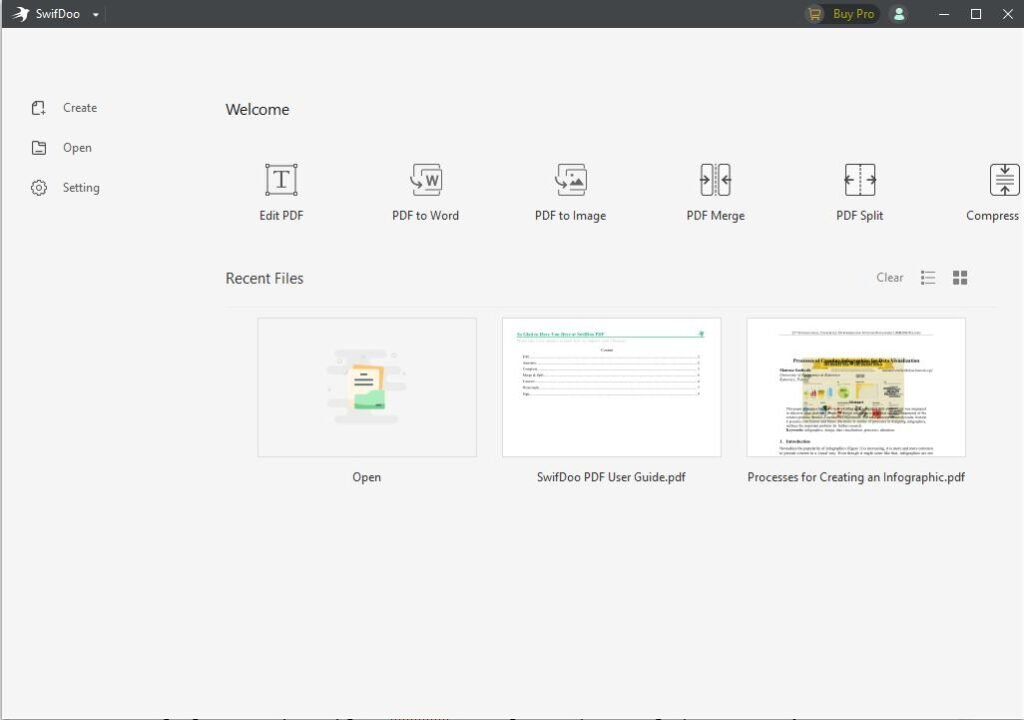
SwifDoo PDF is a document editing and management application that combines several PDF-related tasks within one interface.
Its Windows software supports reading, creating, editing, converting, annotating, compressing, merging, splitting, and organizing PDF files. Additional capabilities include OCR for scanned documents, electronic signatures, password protection, and AI-assisted document interaction.
For someone who works with PDF documents regularly, the main appeal is convenience. Instead of maintaining separate applications for PDF conversion, page organization, and document annotation, many common operations can be performed from a single program.
SwifDoo PDF is not limited to professional users. Students, teachers, freelancers, administrative staff, and small business owners may find its tools relevant to everyday work.
However, its premium features are not permanently free, and some AI functions have separate usage limits or licensing requirements.
For software details, installation information, and the Windows download option, visit our SwifDoo PDF software listing.
Why Choosing the Right PDF Editor Matters
PDF editing requirements vary significantly from one user to another.
Someone who only needs to open a document and print it may be satisfied with a free PDF reader. Another person may need to replace text in a contract, extract tables from financial reports, or convert scanned paperwork into searchable documents.
Choosing software with unnecessary features can increase costs without improving productivity.
Before selecting a PDF editor, consider these questions:
Do you need to modify existing PDF text or simply read documents?
Do you regularly convert PDFs into Word, Excel, or PowerPoint?
Are your files primarily digital documents or scanned images?
Do you need electronic signatures, document permissions, or annotations?
Will you process multiple files regularly?
Do you need AI-based summaries or document translation?
The answers determine whether a full-featured application such as SwifDoo PDF is a sensible purchase.
SwifDoo PDF Editing: What Can You Actually Change?
PDF editing is one of the application’s central capabilities.
SwifDoo PDF provides tools for modifying existing text, inserting new text, changing formatting, adding images, and working with hyperlinks.
According to the developer’s documentation, its text editing tools include multiple modes designed to handle different document structures.
Editing Existing Text
Consider a business proposal that has already been exported as a PDF. The original Word document is unavailable, but the proposal contains an outdated phone number.
With a PDF editor, it may be possible to modify that information directly without reconstructing the entire document.
SwifDoo PDF provides text-editing options that can adjust content, font characteristics, alignment, and spacing.
The effectiveness of these tools depends on how the PDF was created. Documents containing embedded fonts, complex graphics, or unusual layouts may require additional adjustments.
Adding Images and Other Content
SwifDoo PDF also supports inserting images, text boxes, and links.
This can be useful for adding a company logo to a document, inserting explanatory notes, or updating visual elements in a PDF.
Users should remember that editing a PDF is different from editing its original design file. A PDF editor may not preserve every relationship between elements in a complex layout.
When Is Direct PDF Editing Useful?
Direct editing is particularly convenient for minor corrections, administrative changes, and document preparation.
For extensive redesigns, modifying the original Word, PowerPoint, or desktop publishing file may still produce more predictable results.
This distinction matters because even capable PDF editors cannot eliminate every limitation of the PDF format.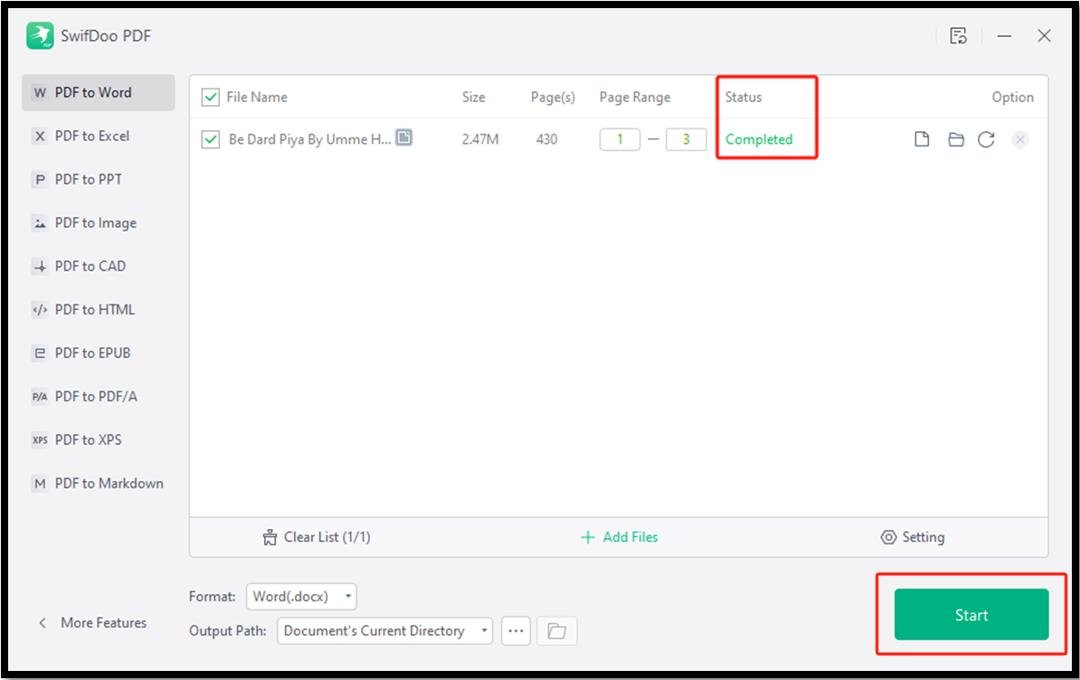
PDF Conversion: Word, Excel, PowerPoint and Images
Document conversion is another important part of the SwifDoo PDF feature set.
The application supports converting PDF files into several commonly used formats, including Microsoft Word, Excel, PowerPoint, and image formats.
This functionality can help users reuse information from documents that were originally intended only for reading or distribution.
PDF to Word
A PDF-to-Word converter can be useful when someone receives a document that needs substantial rewriting.
Instead of manually copying text into a new file, users can convert the PDF into an editable Word document.
However, conversion is not guaranteed to reproduce the original layout perfectly.
Documents containing multiple columns, unusual fonts, embedded graphics, or complicated tables may need manual formatting corrections.
PDF to Excel
Financial statements, reports, and tabular documents sometimes arrive as PDFs even when the recipient needs to analyze their data.
Converting a PDF into Excel may help recover tables for calculations and further processing.
The result depends heavily on how the original table was constructed. Merged cells, irregular spacing, and scanned content can complicate extraction.
For financial or business-critical information, converted numbers and table structures should be checked against the original document.
PDF to PowerPoint
Converting PDFs into PowerPoint can be helpful when preparing presentation materials from an existing report.
Users should not assume that every converted element will become independently editable.
Text, diagrams, and visual components may require adjustments after conversion.
Batch Conversion
SwifDoo PDF also documents batch conversion capabilities for supported operations.
This may be useful for office environments where multiple documents need the same conversion process.
Batch support is a convenience feature, but users should confirm that their intended file formats and operations are included in their license.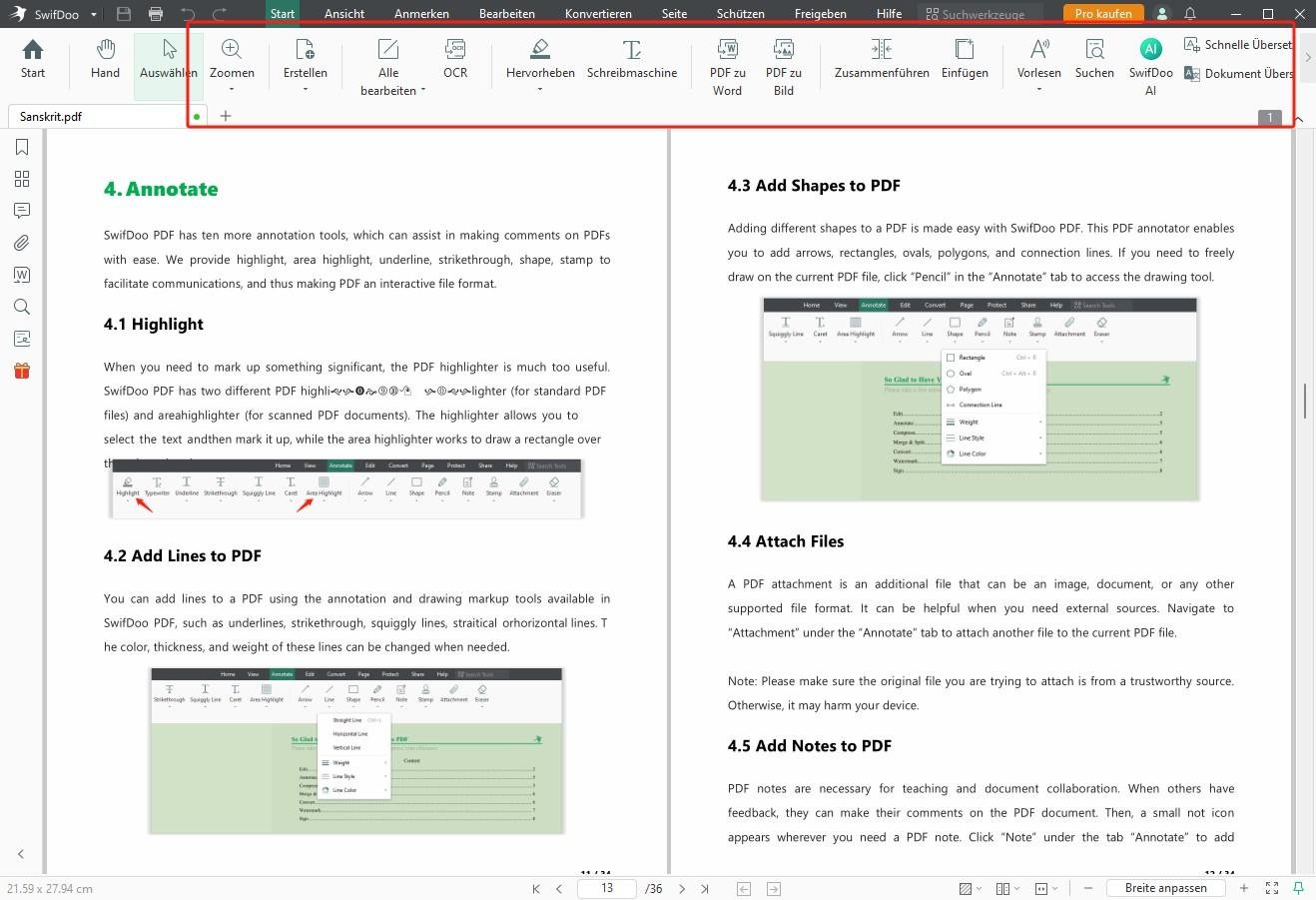
OCR: Working with Scanned PDF Documents
One of the most useful capabilities of a full-featured PDF editor is optical character recognition.
A scanned PDF may look like a normal document, but its pages often contain images rather than selectable text.
For example, scanning a printed invoice typically creates an image of the invoice. Without OCR, searching for a particular invoice number may not work.
OCR software attempts to recognize the characters inside those images.
How SwifDoo PDF OCR Works
SwifDoo PDF includes OCR tools designed to turn supported scanned documents into searchable or editable text.
The general workflow involves opening a scanned PDF, selecting the OCR function, choosing the appropriate document language, and processing the selected pages.
The resulting document may allow text selection, searching, or editing depending on the selected OCR output.
Practical OCR Use Cases
OCR can be useful for:
Converting scanned invoices into searchable records.
Extracting information from printed reports.
Organizing older administrative documents.
Preparing scanned academic materials for text-based workflows.
Recovering text from image-based PDF pages.
OCR Limitations
OCR results depend on several factors.
Low-resolution scans, handwritten text, unusual fonts, skewed pages, and poor contrast can reduce recognition accuracy.
Documents with multiple languages or complex tables may also need manual corrections.
For sensitive records, OCR output should be reviewed before it is used for accounting, legal documentation, or other consequential tasks.
The presence of an OCR feature is valuable, but it should not be interpreted as a guarantee of perfect text recognition.
Organizing PDF Pages Without Rebuilding Documents
PDF page management is a common requirement that does not necessarily involve editing text.
Imagine receiving a 40-page document when only six pages are relevant to your work.
Rather than sending the entire file, you may want to extract the necessary pages into a separate PDF.
SwifDoo PDF provides page-management functions that support this type of workflow.
Merge Multiple PDFs
The merge function can combine separate documents into one file.
For example, a freelancer could combine a proposal, invoice, project summary, and supporting documents into a single PDF package.
Split Large PDFs
Splitting allows users to divide larger documents into smaller files.
This can be helpful when distributing different chapters of a manual or separating individual records from a combined document.
Rearrange and Rotate Pages
Users can reorder, rotate, insert, and remove pages.
These functions are especially useful for documents assembled from different sources or scanners.
Compress PDF Files
PDF compression can reduce file size for easier sharing and storage.
The amount of reduction depends on the document’s contents and compression settings.
Image-heavy documents may offer more opportunities for size reduction than files already containing efficiently compressed text and graphics.
Aggressive compression may also affect image quality, so important documents should be reviewed after processing.
PDF Annotation and Document Review
PDF annotation is useful when people need to communicate feedback without modifying the underlying document.
SwifDoo PDF includes tools for highlighting text, inserting comments, drawing shapes, and adding other markup.
Students can use annotations while reviewing study materials. Teachers may use them to provide feedback, while office teams can highlight proposed changes in reports.
Annotations are also useful during document approval processes.
For example, a reviewer might highlight an unclear paragraph and add a comment explaining what needs to change.
This preserves the context of the feedback without requiring the reviewer to rewrite the entire document.
Users working with collaborative documents should confirm that annotations display correctly in the PDF readers used by their colleagues.
Document Security, Passwords and Signatures
PDF files often contain information that should not be modified or distributed without permission.
SwifDoo PDF includes document protection and signature-related tools.
Password protection can help restrict access to documents, while permission settings may control certain operations in compatible PDF applications.
These features can support routine document management, but password-protected PDFs are not a substitute for a comprehensive organizational security policy.
Electronic and Digital Signatures
SwifDoo PDF supports adding signatures to documents, including digital-signature-related functions.
This may be useful for internal approvals, forms, and business paperwork.
However, adding a visual signature image is not necessarily equivalent to applying a certificate-based digital signature.
Users handling legally significant documents should verify which signature method is required under the applicable laws, contractual obligations, or organizational policies.
SwifDoo AI: What Does It Add?
AI-powered document interaction is increasingly common in PDF software.
SwifDoo offers AI-assisted features for interacting with document content, including asking questions, generating summaries, explaining passages, and translating information.
These capabilities can be helpful when reading long or unfamiliar documents.
Summarizing Long PDFs
A lengthy report may contain more information than a reader needs immediately.
An AI summary can provide an initial overview of the main topics and help identify sections that deserve closer attention.
However, summaries may omit qualifications or misunderstand complex passages.
Important conclusions should always be checked against the original document.
Asking Questions About a Document
AI-assisted question answering can help users locate relevant information in lengthy PDFs.
For example, someone reading a technical manual might ask about a particular procedure rather than manually reviewing every chapter.
The quality of the answer depends on the source document and the AI system’s interpretation.
Translation and Explanation
AI tools may also assist with translating or explaining document passages.
This can be useful for multilingual reading and technical comprehension.
AI-generated translations should not replace qualified human review when precise legal, medical, or contractual language matters.
AI Licensing and Privacy Considerations
SwifDoo AI has usage allowances and paid plans that are distinct from some standard PDF editing licenses.
Users should review current plan terms before assuming that a perpetual PDF license includes unlimited AI access.
For confidential documents, it is also important to examine the provider’s privacy practices and determine whether uploading content to an AI service is appropriate.
Is SwifDoo PDF Free?
SwifDoo PDF provides a free Windows offering with a trial period for premium functionality.
According to the developer’s support information, new users can access full functionality for seven days, after which restrictions apply to certain features.
The developer also documents limitations involving saved output, editing functions, and AI usage.
This means that the free version should not be treated as an unrestricted replacement for a paid PDF editor.
Users who only need basic document viewing may find the free capabilities sufficient.
Those who frequently edit PDFs, convert documents, or use advanced tools should compare the available paid plans.
SwifDoo PDF Pricing and Licensing
SwifDoo PDF offers several licensing options, including subscriptions and perpetual licenses.
Subscription plans may be suitable for users who only need advanced PDF features temporarily or prefer recurring payments.
A perpetual license may appeal to users who expect to use the application regularly over a longer period.
The developer’s pricing page also distinguishes between licensing options for different numbers of devices.
Important: A perpetual PDF license does not automatically imply unlimited access to every separately billed AI service or future add-on.
Pricing, discounts, included devices, and licensing terms can change.
For current offers, consult the official SwifDoo PDF website and its pricing page before making a purchase.
SwifDoo PDF Pros and Cons
Advantages
Broad document functionality: Editing, conversion, OCR, annotation, compression, and page organization are available within the same software ecosystem.
Direct text editing: Users can modify supported PDF content without always converting the file into another format.
Scanned document support: OCR expands the range of documents that can be searched and processed.
Multiple conversion formats: Support for Office documents and images can simplify content reuse.
Document organization tools: Merging, splitting, and page rearrangement address common administrative requirements.
Flexible licensing: Subscription and perpetual options accommodate different purchasing preferences.
Limitations
Premium restrictions: Advanced functions require a paid license after the applicable trial period.
Separate AI considerations: AI features may have additional costs, allowances, and service requirements.
Conversion limitations: Complex PDF layouts may not retain their formatting perfectly.
OCR variability: Scanned document quality can affect recognition results.
Potentially unnecessary for basic reading: Users who only open and print PDFs may not benefit from the premium toolset.
SwifDoo PDF vs Other PDF Applications
The best PDF application depends on what you need to accomplish.
| Software | Primary Strength | Suitable For |
|---|---|---|
| SwifDoo PDF | Integrated editing, conversion, OCR and page tools | Regular document editing |
| Soda PDF | Broad PDF creation and management capabilities | Office and business documents |
| PDF Reader Pro | Reading, annotation and document tools | Document-heavy workflows |
| PDF WIZ | PDF conversion and processing | Format conversion |
| SumatraPDF | Lightweight document viewing | Basic PDF and eBook reading |
These applications serve overlapping but not identical purposes.
For instance, SumatraPDF is primarily a document reader and should not be considered a direct replacement for the full editing capabilities of SwifDoo PDF.
Soda PDF and other full-featured editors are more relevant comparisons for users who need conversion, annotation, and document modification.
Before purchasing any PDF editor, compare the particular features you need, supported operating systems, license restrictions, and total cost.
Who Should Consider SwifDoo PDF?
Students and Educators
Students often work with lecture notes, academic papers, assignments, and scanned reading materials.
PDF annotation, OCR, and document organization can help manage these files.
However, students who only read PDF textbooks may not need a premium editor.
Office Professionals
Administrative teams regularly handle invoices, contracts, forms, proposals, and reports.
SwifDoo PDF’s editing, conversion, and page-management capabilities may help consolidate routine document tasks.
Freelancers and Small Businesses
Freelancers frequently prepare client proposals, invoices, portfolios, and project documentation.
A multipurpose PDF editor can reduce the need to switch between separate utilities for common document operations.
Researchers and Document-Heavy Users
People who read large numbers of reports may find OCR, annotations, text searching, and AI-assisted summaries useful.
They should nevertheless review source documents directly before relying on extracted or AI-generated information.
When SwifDoo PDF May Not Be the Best Choice
A full-featured PDF editor is not always necessary.
If your main requirement is reading PDFs, a lightweight reader may provide a simpler experience.
If you work almost entirely with Microsoft Word documents, maintaining the original editable files may be more efficient than repeatedly converting between Word and PDF.
Organizations that require advanced document collaboration, centralized administration, specialized compliance features, or extensive automation should evaluate those requirements individually before choosing a product.
Similarly, users who depend on AI document processing should assess AI pricing and privacy separately from the standard PDF editing license.
How to Get Started with SwifDoo PDF
Getting started with the Windows application involves a straightforward installation process.
Visit the SwifDoo PDF listing on SoftwareDownloading.in or the developer’s official download page.
Download the appropriate Windows installer.
Open the downloaded setup file and confirm the publisher information when prompted.
Follow the installation instructions.
Launch SwifDoo PDF.
Open an existing PDF or create a new document.
Explore the available tools and trial features.
If you purchase a license, follow the developer’s account and activation instructions.
Before using the software for important work, consider opening a copy of a noncritical document to become familiar with the editing and export options.
Keeping original documents separately is a sensible precaution when performing conversions or extensive modifications.
Frequently Asked Questions
Is SwifDoo PDF completely free?
SwifDoo PDF offers a free Windows version and a seven-day trial of premium functionality. Certain features and saving operations are restricted after the trial. A paid license is required for continued access to the relevant premium functions.
Can SwifDoo PDF edit existing text?
Yes. The application provides tools for modifying supported PDF text, including formatting and content changes. Editing results depend on the structure of the original document.
Does SwifDoo PDF support OCR?
Yes. Its OCR feature is designed to recognize text in scanned or image-based PDF documents, making supported content searchable or editable.
Can SwifDoo PDF convert PDF files to Word?
Yes. SwifDoo PDF supports PDF-to-Word conversion, along with other supported output formats such as Excel, PowerPoint, and images. Complex layouts may need manual corrections.
Does SwifDoo PDF work on Windows 11?
Yes. SwifDoo PDF provides a Windows application that supports Windows 11. Users should check the developer’s current requirements before installation.
Is a lifetime license the same as unlimited AI access?
Not necessarily. The developer offers separate AI plans and usage allowances. Users should check the exact terms of their PDF and AI licenses.
Can SwifDoo PDF merge and split documents?
Yes. The software includes tools for combining PDF files, splitting documents, extracting pages, and organizing page order.
Is SwifDoo PDF suitable for business use?
It may be suitable for routine business document editing, conversion, annotation, and management. Organizations with specialized security, compliance, or collaboration requirements should evaluate those needs separately.
Final Assessment: Is SwifDoo PDF Worth Considering in 2026?
SwifDoo PDF offers a broad collection of tools for Windows users who regularly work with PDF documents.
Its principal advantage is the combination of direct editing, document conversion, OCR, page management, annotations, and related features in one application.
For users who repeatedly encounter tasks such as modifying PDFs, extracting information from scanned documents, or preparing document packages, this functionality may be valuable.
However, purchasing a PDF editor should depend on actual usage rather than the number of features advertised.
People who only read or print PDFs may be better served by a free reader. Users who require advanced document processing should examine the premium licensing terms, conversion limitations, and AI allowances before deciding.
Our conclusion: SwifDoo PDF is a reasonable option to shortlist for everyday PDF editing and document management on Windows. Its range of supported functions is appealing, but users should take advantage of the available trial to determine whether it fits their own document workflows.
For installation information and software details, visit our SwifDoo PDF download and information page.
For official product information, licensing, and support, visit SwifDoo PDF.