- Development & IT
- Development Kits
- LibreSprite

LibreSprite is designed to provide a lightweight and accessible environment for creating pixel art and sprite animations, making it especially useful for indie game development and retro-style digital art creation.
It helps users:
- Design pixel-based artwork
- Create animated sprites
- Build game-ready assets
- Learn 2D animation fundamentals
- Export assets for game engines
- Work with frame-based workflows
The software is commonly popular among:
- Indie game developers
- Pixel artists
- Animation beginners
- Hobby designers
- Students
- Digital artists
Depending on usage, users may get:
- Layer-based drawing tools
- Timeline animation editor
- Onion skinning support
- Sprite sheet export
- Frame management tools
- Lightweight editing interface
📌 What is LibreSprite?
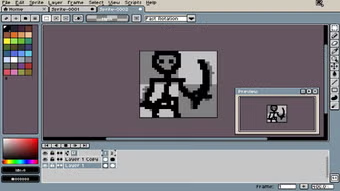
LibreSprite is a free, open-source pixel art and sprite animation software designed for creating 2D graphics, game assets, and frame-by-frame animations.
It is a community-driven fork of the older Aseprite version and focuses on pixel-based artwork creation for games and digital art projects.
The software helps users:
- Create pixel art sprites
- Design 2D game assets
- Build frame-by-frame animations
- Edit tilesets for games
- Work with layers and frames
- Export animations and sprite sheets
It is commonly used by:
- Game developers
- Pixel artists
- Indie developers
- Animators
- Hobby designers
- Students learning game art
The application mainly focuses on:
- Pixel art creation
- Sprite animation
- 2D game asset design
- Frame-based animation workflow
- Lightweight graphic editing
🚀 Key Uses
- Designing character sprites for games
- Creating 2D game animations
- Making tilesets for game maps
- Frame-by-frame animation creation
- Exporting sprite sheets for engines (Unity, Godot, etc.)
- Designing retro-style graphics
- UI elements for games
- Pixel-based illustrations
- Indie game development assets
- Animation prototyping
💻 System Requirements (General)
Supported Platforms
- Windows
- Linux
- macOS
Basic Requirements
- 1GB–2GB RAM minimum
- Basic CPU
- Minimal GPU requirements
- Storage for art projects
- Stable desktop environment
Recommended Requirements
- 4GB RAM or more
- SSD storage
- Modern CPU for smoother animation workflow
- Graphics tablet (optional but helpful)
- Updated OS
🔄 Alternatives
- Aseprite
- Piskel
- GraphicsGale
- Pyxel Edit
- Krita (with animation tools)
- GIMP (with plugins)
- Photoshop (for advanced pixel work)
- Pixelorama
❓ FAQ
Q1. What is LibreSprite used for?
It is used for creating pixel art, sprites, and 2D animations for games and digital artwork.
Q2. Is LibreSprite free?
Yes, it is completely free and open-source.
Q3. Can it be used for game development?
Yes, it is widely used for creating game assets like characters and tiles.
Q4. Does it support animation?
Yes, it supports frame-by-frame sprite animation and export options.
Q5. Is it beginner-friendly?
Yes, it is simple enough for beginners in pixel art and game design.
🔄 Best Alternatives
Features
✔ Pixel art creation tools
✔ Frame-by-frame animation support
✔ Sprite sheet export
✔ Onion skinning for animation
✔ Layer support
✔ Lightweight and fast performance
✔ Tileset creation tools
✔ Open-source development
✔ Multiple file format support
✔ Keyboard shortcuts for workflow
✔ Simple UI for beginners
✔ Game asset creation tools
👍 Pros & 👎 Cons
Pros
- Completely free and open-source
- Lightweight and fast
- Great for pixel art beginners
- Ideal for indie game development
- Supports animation workflows
- Simple and focused interface
Cons
- Fewer advanced features than commercial tools
- Limited professional-grade painting tools
- Smaller community than competitors like Aseprite
- No advanced digital painting features
- Basic UI compared to modern design software
Expert Review
LibreSprite is a practical and lightweight pixel art tool designed for beginners and indie developers who need a free solution for sprite creation and animation.
Its strongest advantages are:
- Free and open-source
- Easy pixel art workflow
- Good animation tools
- Lightweight performance
It is especially useful for game developers and digital artists working on 2D retro-style projects.
However, professionals requiring advanced illustration tools may prefer more powerful commercial alternatives like Aseprite or Photoshop.
How to Install
⚙️ Usage Guide (General Overview)
Step 1: Install LibreSprite
Download and install the software.
Step 2: Create New File
Set canvas size for sprite design.
Step 3: Draw Pixel Art
Use brush tools to create sprites.
Step 4: Add Frames
Create animation frames in timeline.
Step 5: Apply Onion Skin
Preview animation flow.
Step 6: Export Project
Save as PNG or sprite sheet.
Step 7: Use in Game Engine
Import into Unity, Godot, etc.
Apps Specs
Licence
Free
Latest Update
June 24, 2026
Platform
Windows
Downloads
1
Devlopers
LibreSprite
Top Downloads




Related Topics
Disclaimer
This content is provided for educational and informational purposes only. We do not host, store, or distribute any software files on our servers. All trademarks, product names, and logos belong to their respective owners.
We strongly recommend downloading software only from official websites or trusted sources. We are not responsible for any damage, data loss, or issues that may occur from the use of third-party software.
Users should ensure they comply with all applicable laws and software licensing agreements in their country before downloading or using any software mentioned on this website.
You may also like





Alternatives to




Expore Apps