
- AI
- AI Productivity
- Descript

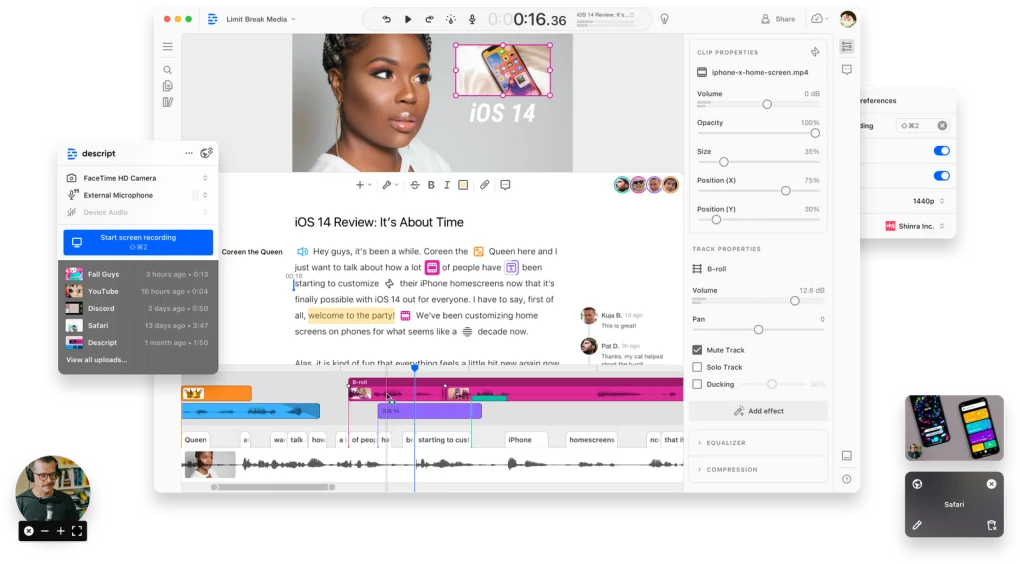
Descript is designed to simplify multimedia editing workflows using artificial intelligence and transcript-based editing systems.
Instead of relying only on traditional timeline editing, users can:
- Edit videos through text transcripts
- Remove filler words automatically
- Generate subtitles and captions
- Enhance voice quality
- Record screens and presentations
- Manage podcast production workflows
The software is commonly used in:
- Podcast production
- YouTube content creation
- Online education
- Remote interviews
- Marketing and advertising
- Social media publishing
- Business communication workflows
Depending on the version and subscription plan, users may gain access to:
- AI transcription tools
- Text-based editing workflows
- Voice cloning features
- Noise reduction tools
- Screen recording functionality
- Team collaboration support
- Cloud project synchronization
One major advantage of Descript is workflow simplicity because even beginners can edit complex multimedia projects through easier text-based controls.
The software is especially useful for:
- Podcasters
- YouTubers
- Teachers
- Streamers
- Marketers
- Remote teams
- Content creators
who need faster and more accessible multimedia editing solutions.
Its AI-powered automation helps reduce editing time while improving overall production efficiency.
📌 What is Descript?
Descript is an AI-powered multimedia editing platform designed for editing audio, video, podcasts, screen recordings, and voice content using text-based workflows. The software combines video editing, transcription, screen recording, voice enhancement, and AI tools into a single platform for creators, podcasters, educators, marketers, and remote teams.
It is commonly used for podcast production, YouTube content creation, online courses, interviews, social media editing, voiceovers, and professional multimedia workflows.
🚀 Key Uses
- Editing podcasts and audio recordings
- Video editing with text-based workflows
- Automatic speech transcription
- Creating YouTube and social media content
- Recording screens and presentations
- AI voice enhancement and cleanup
- Remote interview recording
- Generating subtitles and captions
- Producing educational and marketing videos
- Streamlining multimedia production workflows
💻 System Requirements (General)
Minimum Requirements
- Windows 10 / 11 or modern macOS version
- 4GB RAM
- Dual-core processor
- Stable internet connection
- Microphone and speaker support
Recommended Requirements
- 8GB–16GB RAM
- Multi-core processor
- SSD storage
- Dedicated graphics support for smoother editing
- HD or higher-resolution display
- High-speed broadband internet connection
🔄 Alternatives
- Adobe Premiere Pro
- Audacity
- DaVinci Resolve
- Camtasia
- Final Cut Pro
- Riverside
- OBS Studio
❓ FAQ
Q1. What is Descript used for?
It is used for AI-powered audio and video editing, podcast production, transcription, and multimedia content creation.
Q2. Can Descript edit videos using text?
Yes, users can edit audio and video by editing the automatically generated transcript.
Q3. Is it useful for podcasters?
Yes, it is especially popular among podcasters and content creators.
Q4. Does it support screen recording?
Yes, many versions include screen and presentation recording features.
Q5. Does it require internet access?
Many AI and cloud-based features require internet connectivity.
Features
✔ AI-powered audio and video editing
✔ Automatic speech transcription
✔ Text-based video editing workflows
✔ Podcast production support
✔ Screen recording functionality
✔ Voice enhancement and noise cleanup
✔ Subtitle and caption generation
✔ Remote interview recording support
✔ Cloud collaboration features
✔ Multimedia project management tools
✔ Beginner-friendly editing workflow
✔ Social media content creation support
✔ AI automation tools for editing tasks
✔ Multi-format export compatibility
👍 Pros & 👎 Cons
Pros
- Innovative text-based editing workflow
- Excellent for podcast and video creators
- AI tools save significant editing time
- Beginner-friendly interface
- Good transcription and subtitle generation
- Useful all-in-one multimedia platform
Cons
- Some advanced features require subscription plans
- Internet connection is needed for many AI tools
- Heavy projects may require strong hardware
- Professional editors may still prefer advanced timeline software for complex productions
Our Analysis
Descript is one of the most innovative multimedia editing platforms for creators who want faster and simpler production workflows.
Its strongest advantages are:
- Text-based editing simplicity
- Excellent AI automation features
- Strong podcast production tools
- Efficient transcription workflows
The software is especially valuable for podcasters, educators, YouTubers, marketers, and remote teams who want to create professional multimedia content without mastering complicated traditional editing software.
While advanced professional editors may still require specialized high-end editing suites for complex productions, Descript performs exceptionally well for fast and efficient modern content creation workflows.
Overall, it is a powerful AI-driven multimedia editing solution for podcasting, video production, transcription, and streamlined content creation workflows.
⚙️ Installation Guide (General Overview)
Step 1: Download Software
Download Descript from the official website or a trusted software provider.
Step 2: Run Installer
Open the downloaded setup file and follow the installation instructions.
Step 3: Create or Sign In to Account
Log in or register an account to access cloud and AI features.
Step 4: Configure Audio and Video Devices
Set up:
- Microphone
- Webcam
- Speakers
- Recording devices
Step 5: Create or Import Project
Start a new multimedia project or import:
- Audio recordings
- Video clips
- Podcasts
- Interviews
- Screen recordings
Step 6: Generate Transcript
Allow the software to automatically transcribe speech into editable text.
Step 7: Edit Content Using Text Workflow
Modify transcripts to:
- Remove unwanted sections
- Edit speech
- Rearrange content
- Generate captions
Step 8: Enhance Audio and Video
Use built-in tools for:
- Noise reduction
- Voice cleanup
- Subtitle generation
- Screen editing
- AI enhancements
Step 9: Preview Final Project
Review the edited multimedia content before exporting.
Step 10: Export and Share
Save or publish the project in supported formats for podcasts, videos, or social media platforms.
About SoftwareDownloading Editorial Team
The SoftwareDownloading Editorial Team researches Windows software, compatibility information, features, alternatives, and software-related guides for SoftwareDownloading.in.
Our pages are prepared using available product information and relevant documentation. When an application has not been personally tested, we distinguish research-based analysis from hands-on testing. Learn more about our review process
Apps Specs
Developer
Licence
Free
Version
30.1.0
Platform
Windows
Download Clicks
4
Page Reviewed
September 27, 2026
Releted Searches
Top Downloads

Related Topics
Disclaimer
This content is provided for educational and informational purposes only. We do not host, store, or distribute any software files on our servers. All trademarks, product names, and logos belong to their respective owners.
We strongly recommend downloading software only from official websites or trusted sources. We are not responsible for any damage, data loss, or issues that may occur from the use of third-party software.
Users should ensure they comply with all applicable laws and software licensing agreements in their country before downloading or using any software mentioned on this website.